<?xml version="1.0" encoding="utf-8"?><feed xmlns="http://www.w3.org/2005/Atom" ><generator uri="https://jekyllrb.com/" version="4.2.2">Jekyll</generator><link href="https://dubiouscreations.com/feed.xml" rel="self" type="application/atom+xml" /><link href="https://dubiouscreations.com/" rel="alternate" type="text/html" /><updated>2025-11-13T00:21:12+00:00</updated><id>https://dubiouscreations.com/feed.xml</id><title type="html">Dubious Creations</title><subtitle>Proudly serving as a warning to others</subtitle><author><name>Matthew Lai</name></author><entry><title type="html">Garden Workshop Part 1: The Bones</title><link href="https://dubiouscreations.com/woodworking/2024/07/10/building-a-garden-workshop.html" rel="alternate" type="text/html" title="Garden Workshop Part 1: The Bones" /><published>2024-07-10T00:00:00+00:00</published><updated>2024-07-10T00:00:00+00:00</updated><id>https://dubiouscreations.com/woodworking/2024/07/10/building-a-garden-workshop</id><content type="html" xml:base="https://dubiouscreations.com/woodworking/2024/07/10/building-a-garden-workshop.html"><![CDATA[<p>We built a workshop in the garden… from a kit! Bonus: evolution of my woodworking spaces.</p>
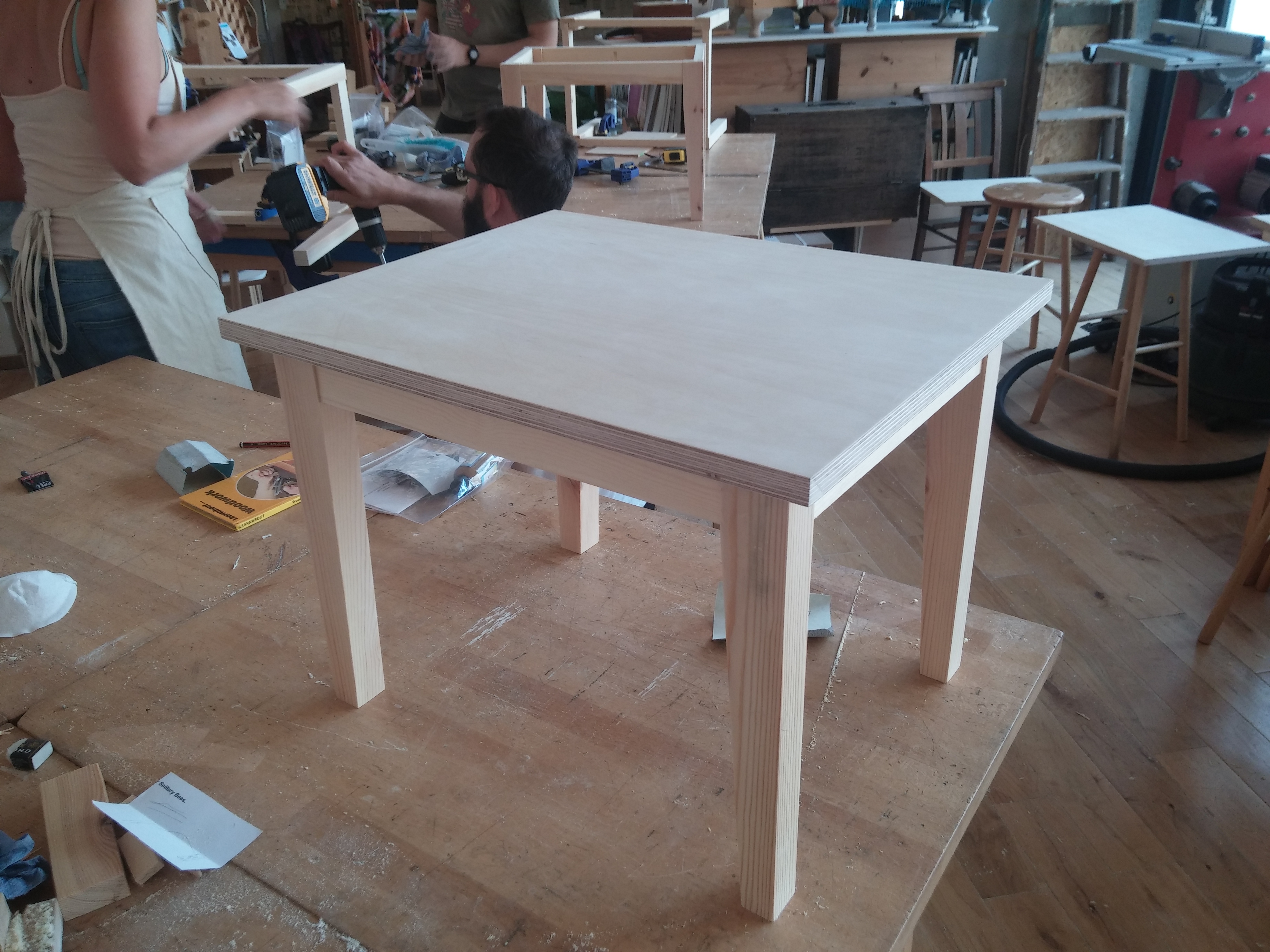
<p>It all started back in 2015. I was stuck in my tiny dorm room working on my master’s thesis for a weeks-long stretch, and it was driving me a bit insane. So I did what any reasonable person would have done, and signed up for a week-long full-time woodworking intensive.</p>

<!-- _includes/responsive_image.html -->

<div class="image-wrapper">
    <a href="/images/garden_workshop/class_project.jpg" title="" target="_blank">
        <img src="/images/garden_workshop/class_project.jpg" width="4160" height="3120" srcset="   /images/resized/garden_workshop/class_project-2048.jpg 2048w,   /images/resized/garden_workshop/class_project-1024.jpg 1024w,   /images/resized/garden_workshop/class_project-518.jpg 518w,   /images/resized/garden_workshop/class_project-250.jpg 250w, /images/garden_workshop/class_project.jpg 4160w" alt="The class project - a coffee table. Doesn't look like much, but it's all hand-cut mortise and tenon joints. Have not done a M&amp;T joint since..." loading="lazy" />
    </a>
    <p class="image-caption">The class project - a coffee table. Doesn’t look like much, but it’s all hand-cut mortise and tenon joints. Have not done a M&amp;T joint since…
</p>
</div>

<p>That planted the bug and I wanted my own space to work in. Not an easy task living in central London.</p>

<h2 id="history">History</h2>

<h3 id="workshop-iteration-1---kitchen">Workshop Iteration 1 - Kitchen</h3>

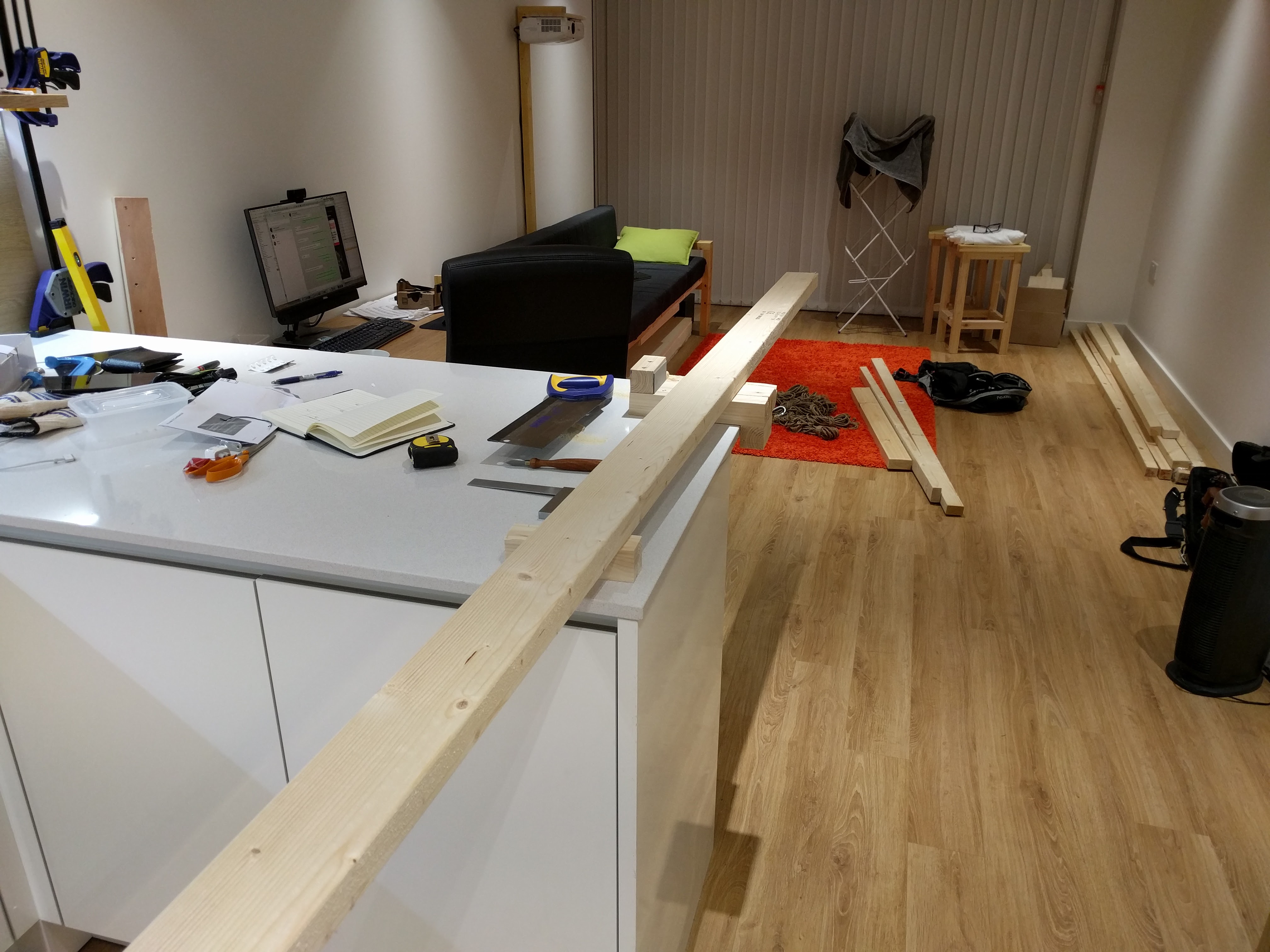
<p>In my first 1-bedroom flat, my open plan kitchen/living room doubled as my workshop, with the beautiful stone kitchen island as my workbench. Since I didn’t want to coat the inside of my whole flat with saw dust, I was limited to just hand tools, and spent almost as much time cleaning up as actually building things. Not ideal, but that’s the space I had, and I did what I could with it - simple stuff out of construction timber.</p>

<!-- _includes/responsive_image.html -->

<div class="image-wrapper">
    <a href="/images/garden_workshop/kitchen_workshop.jpg" title="" target="_blank">
        <img src="/images/garden_workshop/kitchen_workshop.jpg" width="4032" height="3024" srcset="   /images/resized/garden_workshop/kitchen_workshop-2048.jpg 2048w,   /images/resized/garden_workshop/kitchen_workshop-1024.jpg 1024w,   /images/resized/garden_workshop/kitchen_workshop-518.jpg 518w,   /images/resized/garden_workshop/kitchen_workshop-250.jpg 250w, /images/garden_workshop/kitchen_workshop.jpg 4032w" alt="Kitchen for ~~food~~ wood preparation." loading="lazy" />
    </a>
    <p class="image-caption">Kitchen for <del>food</del> wood preparation.
</p>
</div>

<p>Never got around to building a bed by the time I moved out.</p>

<h3 id="workshop-iteration-2---spare-bedroom">Workshop Iteration 2 - Spare Bedroom</h3>

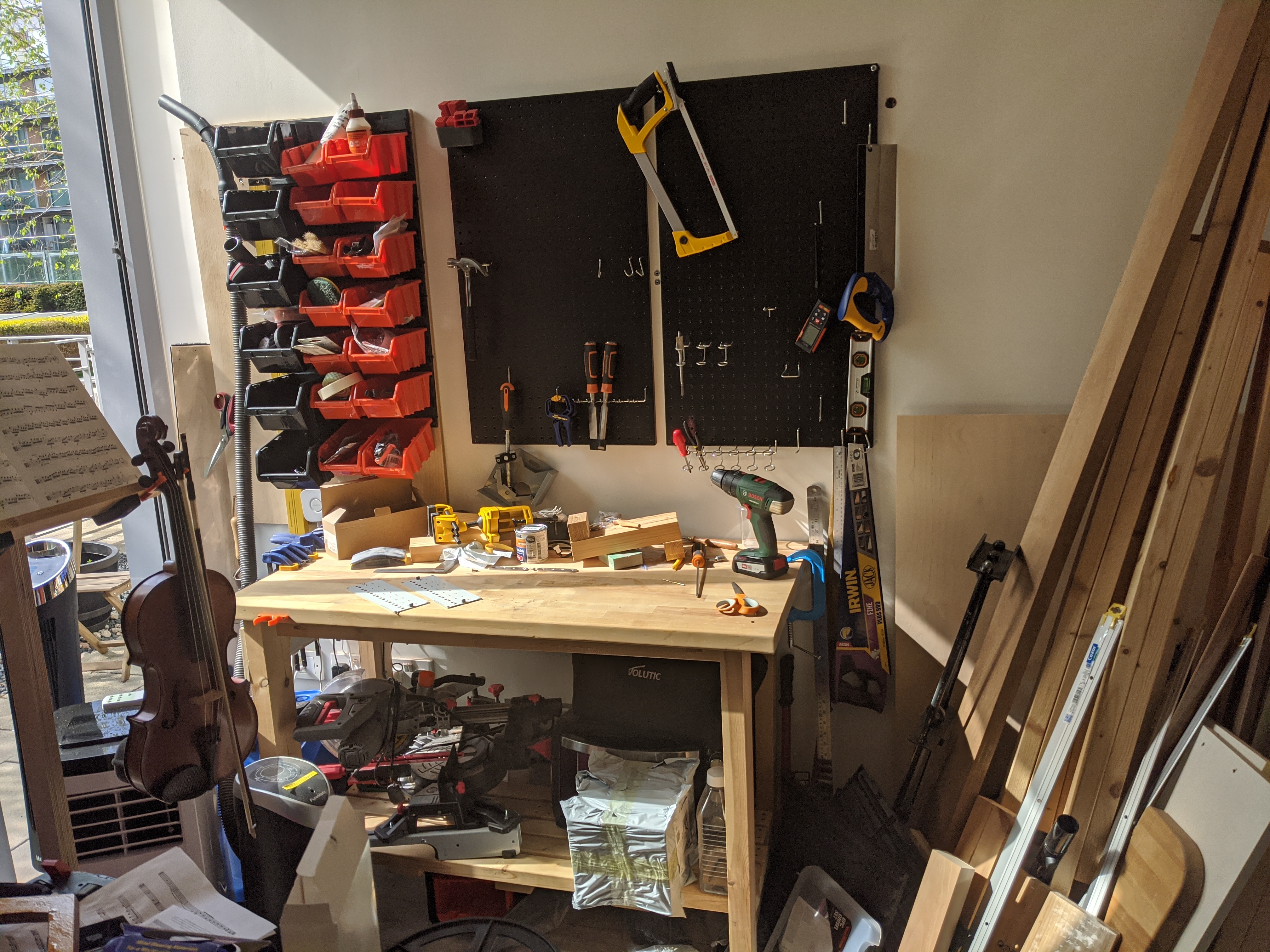
<p>In my second flat I had a spare bedroom that I converted into an office and a workshop. Not ideal to have computers in the same room as dusty wood workshop, but again, that’s the space I had. I also had a garden that I could do the very dusty stuff in, and it was at this point that I became the proud owner of a mitre saw, and stopped the character-building practice of sawing everything with a tenon saw. The obligatory first project was the workbench.</p>

<!-- _includes/responsive_image.html -->

<div class="image-wrapper">
    <a href="/images/garden_workshop/old_workbench.jpg" title="" target="_blank">
        <img src="/images/garden_workshop/old_workbench.jpg" width="4032" height="3024" srcset="   /images/resized/garden_workshop/old_workbench-2048.jpg 2048w,   /images/resized/garden_workshop/old_workbench-1024.jpg 1024w,   /images/resized/garden_workshop/old_workbench-518.jpg 518w,   /images/resized/garden_workshop/old_workbench-250.jpg 250w, /images/garden_workshop/old_workbench.jpg 4032w" alt="Workbench" loading="lazy" />
    </a>
    <p class="image-caption">Workbench
</p>
</div>

<p>Not a lot of space, but being able to use a mitre saw outside made cross cuts much less painful, and I was able to build a few more things.</p>

<h2 id="new-workshop">New Workshop!</h2>

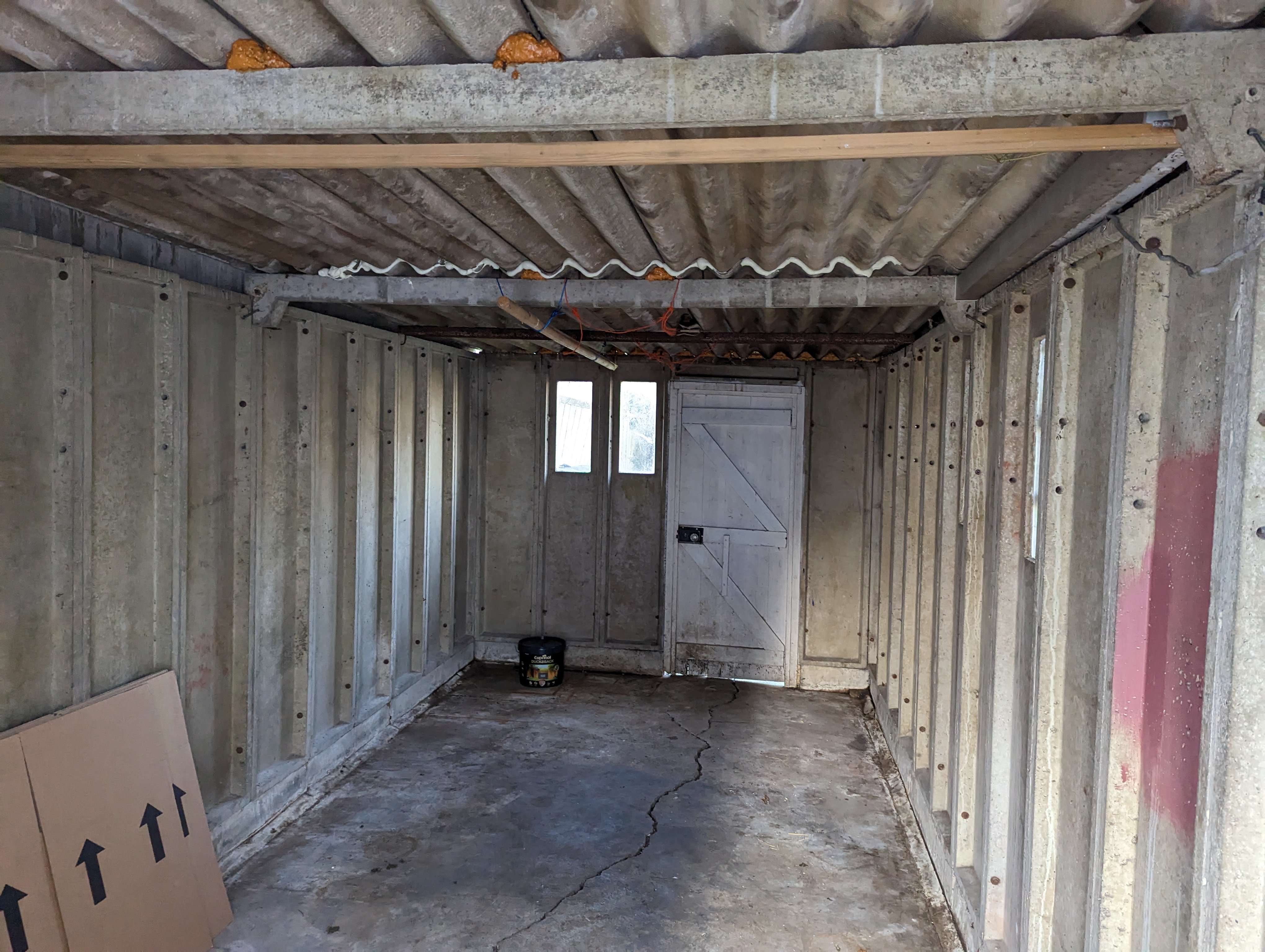
<p>This year we finally moved into a house with a reasonably-sized garden. As is common practice in the 50s in the UK (1950s, just in case you are reading this after the 2050s), the garage is behind the house, with a narrow driveway for access shared with a neighbour. Cars nowadays are much wider than they were back then, so it is no longer usable as a garage. But that’s a perfect new home for my workshop!</p>

<!-- _includes/responsive_image.html -->

<div class="image-wrapper">
    <a href="/images/garden_workshop/old_garage.jpg" title="" target="_blank">
        <img src="/images/garden_workshop/old_garage.jpg" width="4080" height="3072" srcset="   /images/resized/garden_workshop/old_garage-2048.jpg 2048w,   /images/resized/garden_workshop/old_garage-1024.jpg 1024w,   /images/resized/garden_workshop/old_garage-518.jpg 518w,   /images/resized/garden_workshop/old_garage-250.jpg 250w, /images/garden_workshop/old_garage.jpg 4080w" alt="Old garage." loading="lazy" />
    </a>
    <p class="image-caption">Old garage.
</p>
</div>

<p>Only a few small issues:</p>
<ul>
  <li>It’s made out of prefab concrete blocks with tiny windows, so it’s quite dark</li>
  <li>The mitre saw trips the circuit breaker</li>
  <li>The concrete base has cracked and moved significantly over the years</li>
  <li>Oh, and it’s got an asbestos roof</li>
</ul>

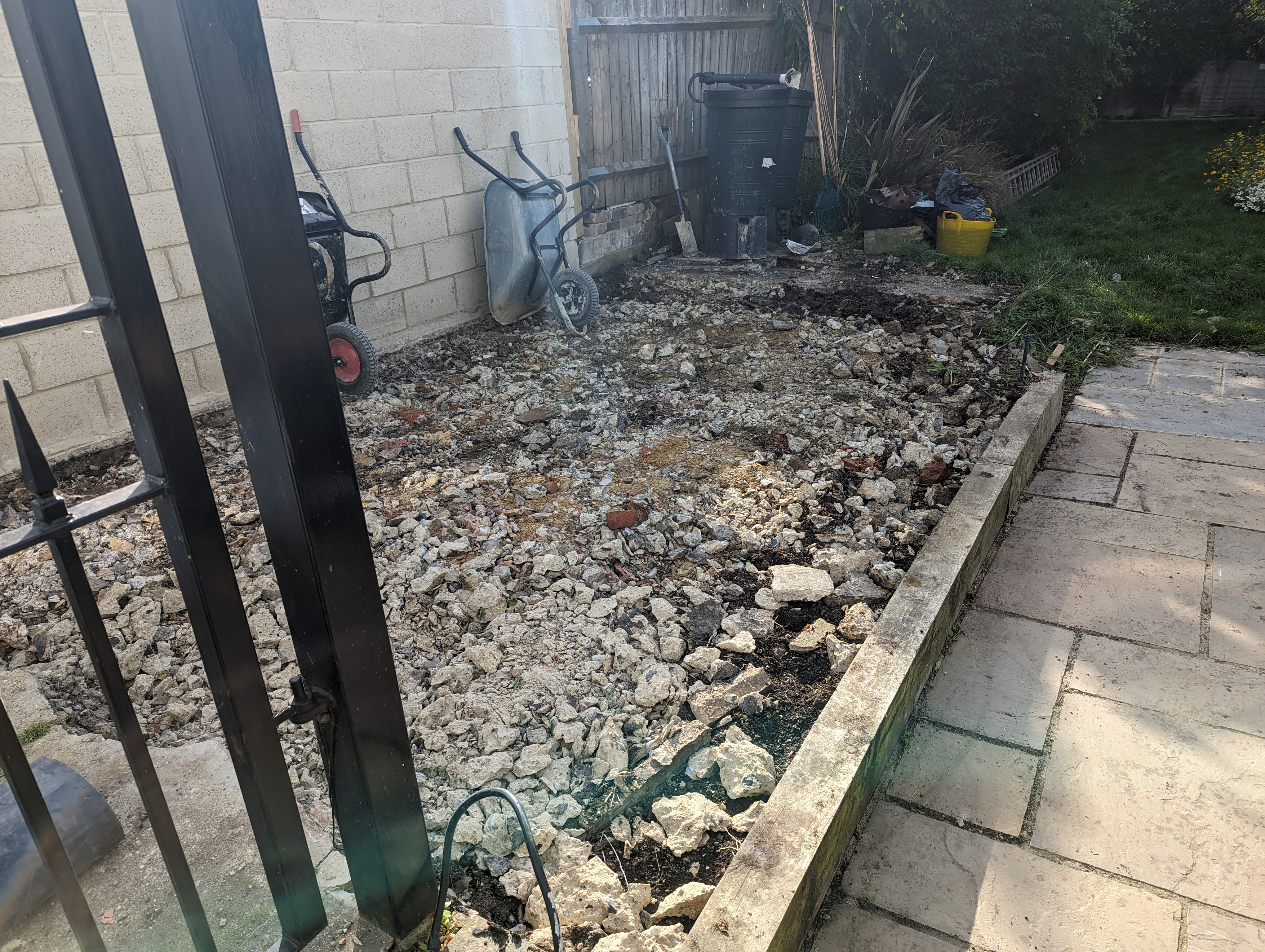
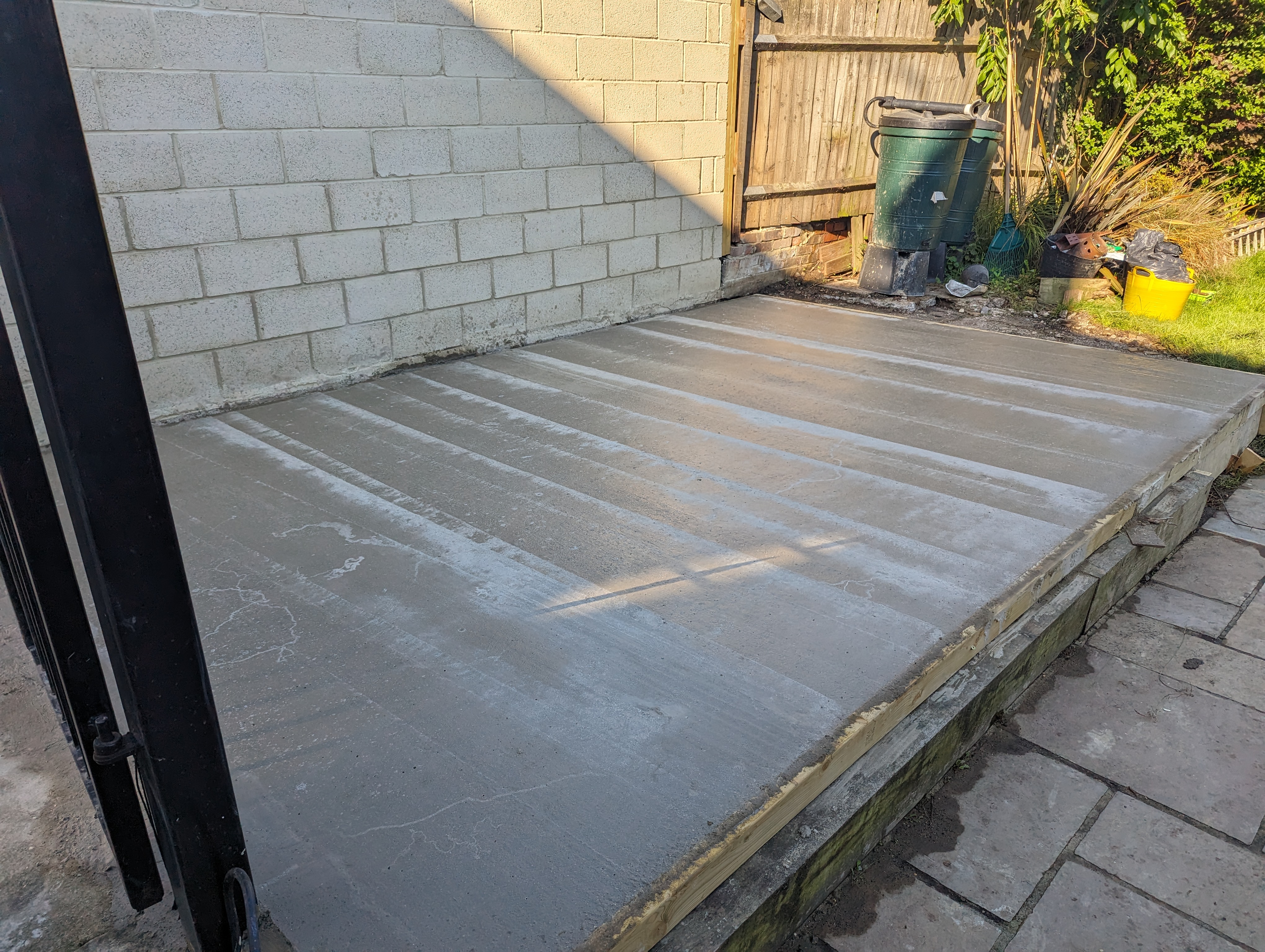
<p>So we got it demolished and hired someone to pour a new reinforced concrete slab.</p>

<!-- _includes/responsive_image.html -->

<div class="image-wrapper">
    <a href="/images/garden_workshop/demolished.jpg" title="" target="_blank">
        <img src="/images/garden_workshop/demolished.jpg" width="4080" height="3072" srcset="   /images/resized/garden_workshop/demolished-2048.jpg 2048w,   /images/resized/garden_workshop/demolished-1024.jpg 1024w,   /images/resized/garden_workshop/demolished-518.jpg 518w,   /images/resized/garden_workshop/demolished-250.jpg 250w, /images/garden_workshop/demolished.jpg 4080w" alt="Bye!" loading="lazy" />
    </a>
    <p class="image-caption">Bye!
</p>
</div>

<!-- _includes/responsive_image.html -->

<div class="image-wrapper">
    <a href="/images/garden_workshop/new_base.jpg" title="" target="_blank">
        <img src="/images/garden_workshop/new_base.jpg" width="4080" height="3072" srcset="   /images/resized/garden_workshop/new_base-2048.jpg 2048w,   /images/resized/garden_workshop/new_base-1024.jpg 1024w,   /images/resized/garden_workshop/new_base-518.jpg 518w,   /images/resized/garden_workshop/new_base-250.jpg 250w, /images/garden_workshop/new_base.jpg 4080w" alt="New reinforced concrete base." loading="lazy" />
    </a>
    <p class="image-caption">New reinforced concrete base.
</p>
</div>

<p>When it comes to actually getting a new building in, there are quite a few choices - primarily brick/blocks, prefab SIP (structural insulated panels), timber framing, and log cabins.</p>

<p>Brick made out of sand and lime is the traditional option. Durable, but labour-intensive and has a tendency of developing cracks over time. Concrete blocks is the more modern option that is cheaper, stronger, but less durable.</p>

<p><a href="https://www.sips.org/what-are-sips">SIPs</a> are another modern option that is very clever - two chipboards sandwiching some insulation foam, and glued together with construction adhesive. They can be cut to size at the factory and sold as kits. They provide very good thermal insulation, but sometimes humidity problems (due to the very good sealing), and they are quite expensive. They are also not inherently waterproof on the outside, and require a waterproof cladding to be installed, which is often also expensive.</p>

<p>Timber framing is a method very popular in North America, where construction timber is used to create a skeleton of the building, with plasterboard (drywall for North Americans) on either side, and cladding/rendering on the outside for protection from the environment. Relatively cheap, but also quite labour intensive.</p>

<p>Another interesting option is “log cabin” kits, where the company supply wooden tongue-and-groove planks that simply slot together to form the walls. Cheapest option, but the building will grow and shrink over the seasons, and thermal insulation is also not great.</p>

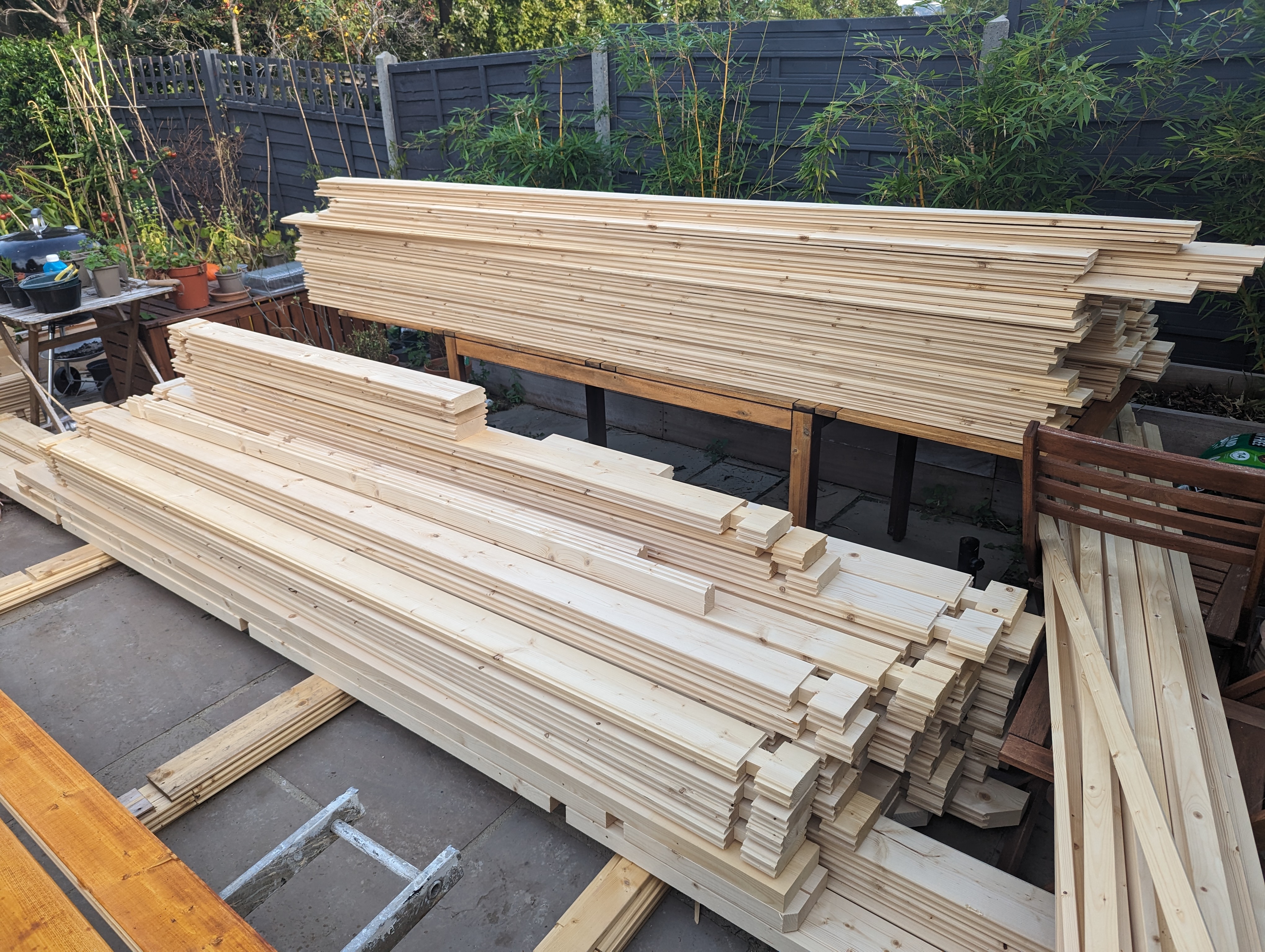
<p>In the end I decided to go with a log cabin option as I quite like the idea of having a wood workshop be made out of wood itself, and be easy to modify using tools in the workshop. The wood movement requires some care to work around (especially for wiring), but since we are going to be woodworkers, that’s something we need to be very familiar with anyways. Here is the delivered kit:</p>

<!-- _includes/responsive_image.html -->

<div class="image-wrapper">
    <a href="/images/garden_workshop/cabin_kit.jpg" title="" target="_blank">
        <img src="/images/garden_workshop/cabin_kit.jpg" width="4080" height="3072" srcset="   /images/resized/garden_workshop/cabin_kit-2048.jpg 2048w,   /images/resized/garden_workshop/cabin_kit-1024.jpg 1024w,   /images/resized/garden_workshop/cabin_kit-518.jpg 518w,   /images/resized/garden_workshop/cabin_kit-250.jpg 250w, /images/garden_workshop/cabin_kit.jpg 4080w" alt="The kit as delivered." loading="lazy" />
    </a>
    <p class="image-caption">The kit as delivered.
</p>
</div>

<p>They are available in all sorts of dimensions from multiple suppliers here in the UK, and we decided to go with a 15m<sup>2</sup> kit because that’s the largest size that doesn’t require planning permission in England (this is not legal advice - the actual rules are a bit more complicated than that). We also chose a pent roof design because we want to put solar panels on top of it.</p>

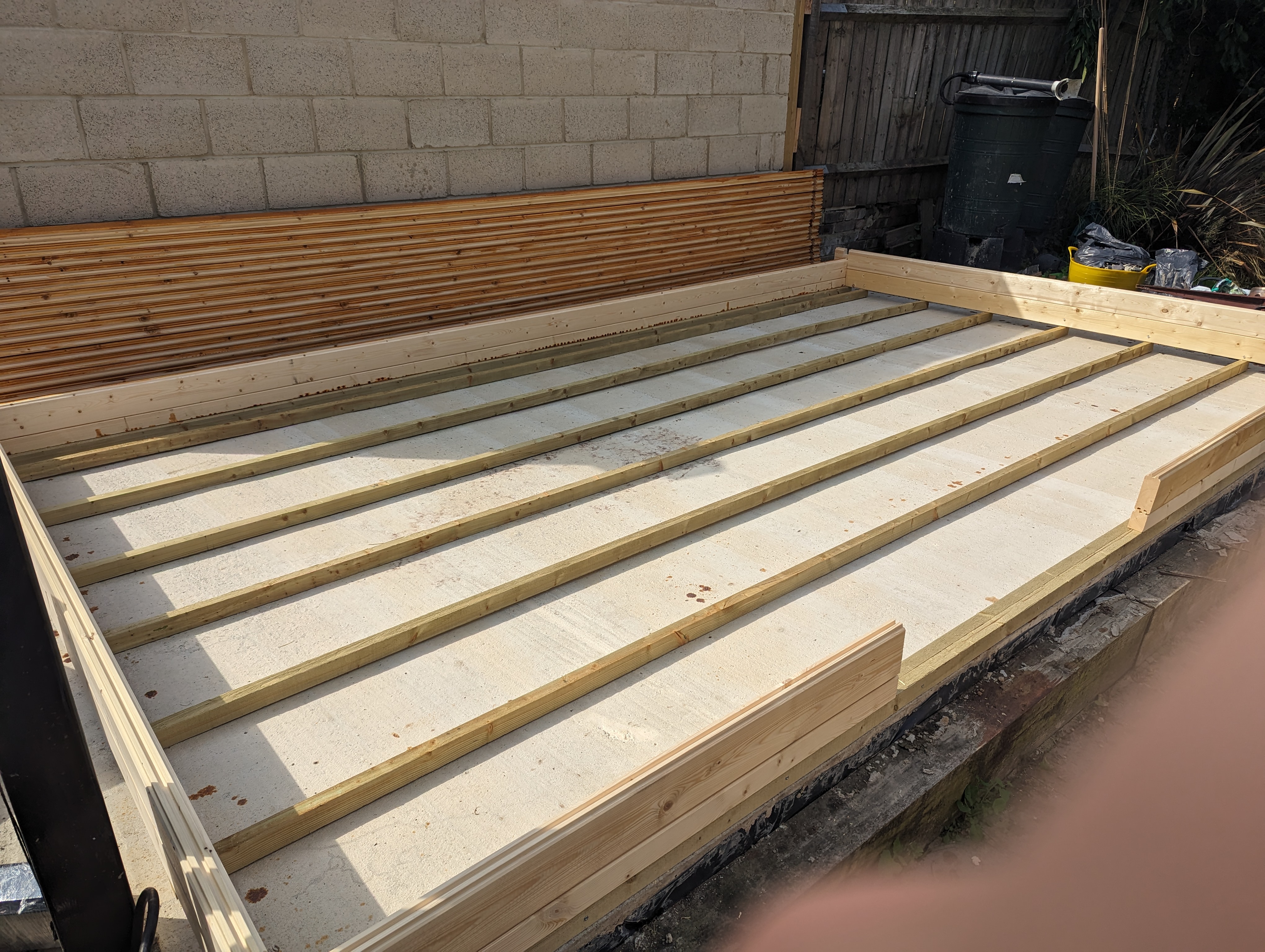
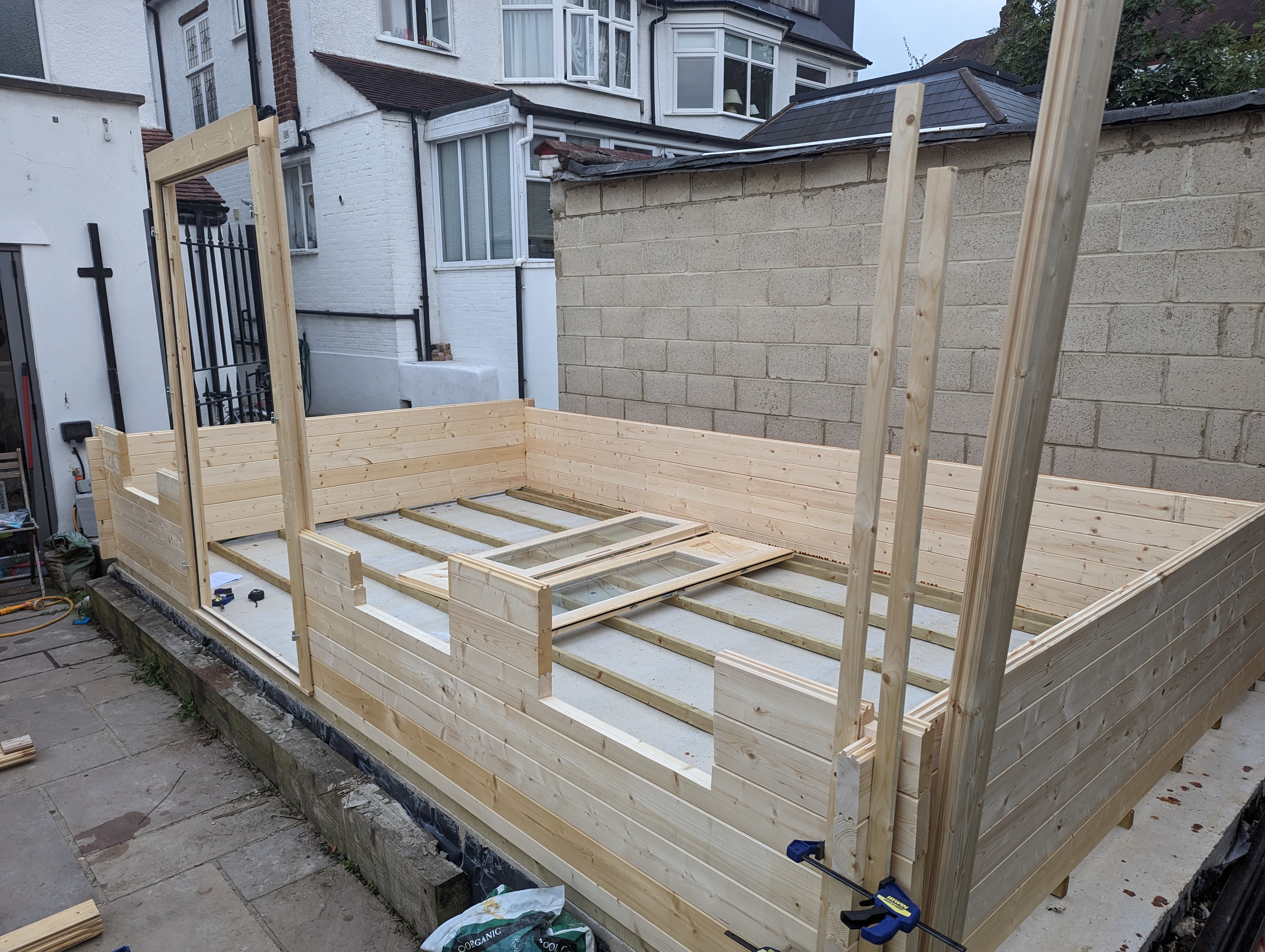
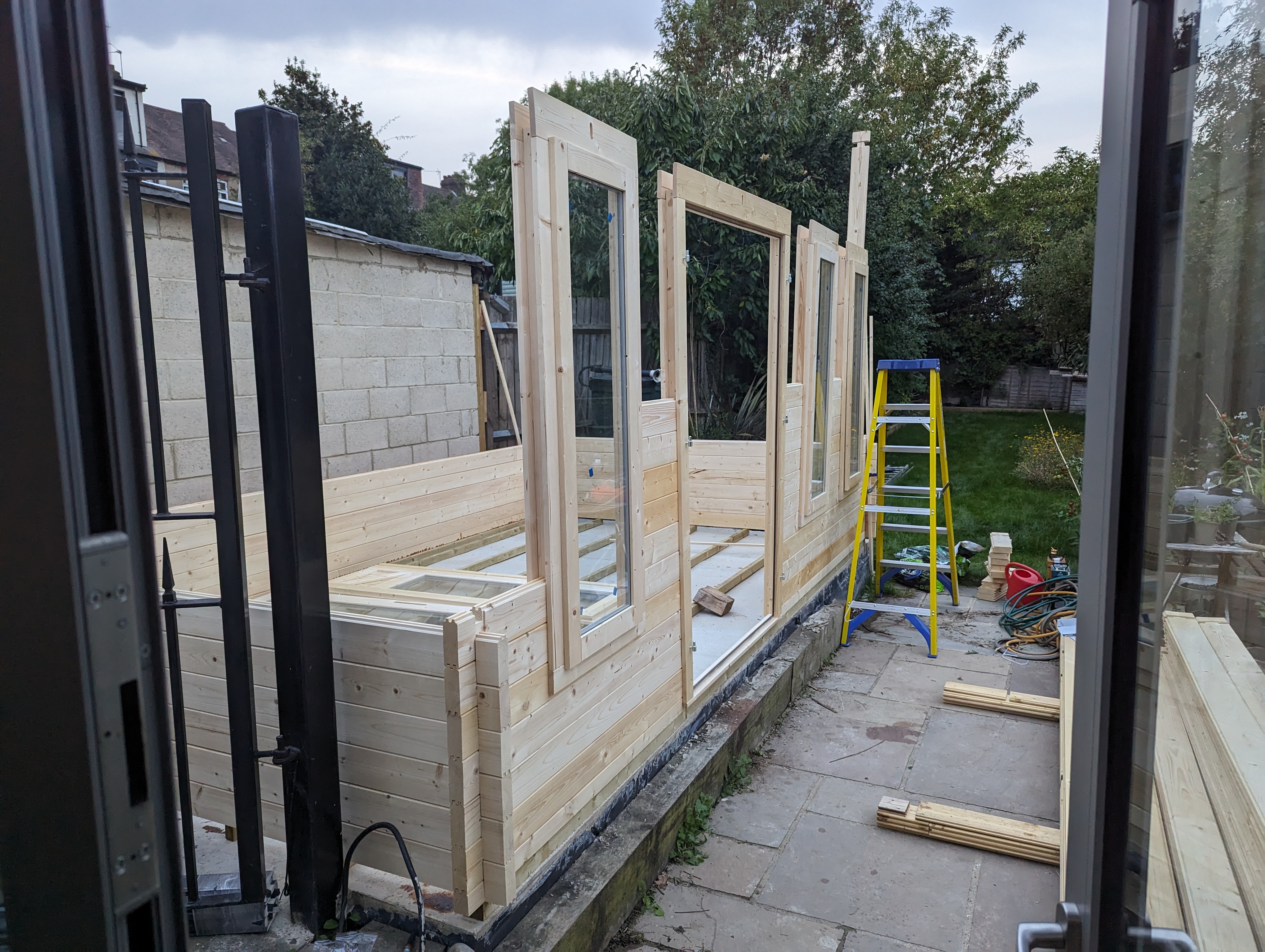
<p>The build process itself is fairly straight forward with two people. Most of the build happened over a weekend, though we did need a bit more time to finish it up. The instructions say it should take two people two days… I guess that’s possible if it’s your 5th build! If you are planning on building one I would recommend budgeting more time than that. Reading the instruction front to back to understand the whole process first is very helpful, as well as arranging the bits so that they are stacked in reverse order of when they are needed. That makes the build process much more pleasant as you won’t have to be digging for every piece.</p>

<p>Otherwise it’s really just hard labour lifting every piece and hammering them in. Some pieces will be a bit warped (to be expected as it’s a natural material) and require some creativity and cursing to install, but otherwise it’s really just like IKEA assembly. For the really warped pieces we wetted them a bit and clamped them overnight with some straight pieces. Old woodworking trick.</p>

<!-- _includes/responsive_image.html -->

<div class="image-wrapper">
    <a href="/images/garden_workshop/cabin1.jpg" title="" target="_blank">
        <img src="/images/garden_workshop/cabin1.jpg" width="4080" height="3072" srcset="   /images/resized/garden_workshop/cabin1-2048.jpg 2048w,   /images/resized/garden_workshop/cabin1-1024.jpg 1024w,   /images/resized/garden_workshop/cabin1-518.jpg 518w,   /images/resized/garden_workshop/cabin1-250.jpg 250w, /images/garden_workshop/cabin1.jpg 4080w" alt="First an elevated base to allow airflow underneath." loading="lazy" />
    </a>
    <p class="image-caption">First an elevated base to allow airflow underneath.
</p>
</div>

<!-- _includes/responsive_image.html -->

<div class="image-wrapper">
    <a href="/images/garden_workshop/cabin2.jpg" title="" target="_blank">
        <img src="/images/garden_workshop/cabin2.jpg" width="4080" height="3072" srcset="   /images/resized/garden_workshop/cabin2-2048.jpg 2048w,   /images/resized/garden_workshop/cabin2-1024.jpg 1024w,   /images/resized/garden_workshop/cabin2-518.jpg 518w,   /images/resized/garden_workshop/cabin2-250.jpg 250w, /images/garden_workshop/cabin2.jpg 4080w" alt="Building up the walls." loading="lazy" />
    </a>
    <p class="image-caption">Building up the walls.
</p>
</div>

<!-- _includes/responsive_image.html -->

<div class="image-wrapper">
    <a href="/images/garden_workshop/cabin3.jpg" title="" target="_blank">
        <img src="/images/garden_workshop/cabin3.jpg" width="4080" height="3072" srcset="   /images/resized/garden_workshop/cabin3-2048.jpg 2048w,   /images/resized/garden_workshop/cabin3-1024.jpg 1024w,   /images/resized/garden_workshop/cabin3-518.jpg 518w,   /images/resized/garden_workshop/cabin3-250.jpg 250w, /images/garden_workshop/cabin3.jpg 4080w" alt="Slotting the window and door frames in." loading="lazy" />
    </a>
    <p class="image-caption">Slotting the window and door frames in.
</p>
</div>

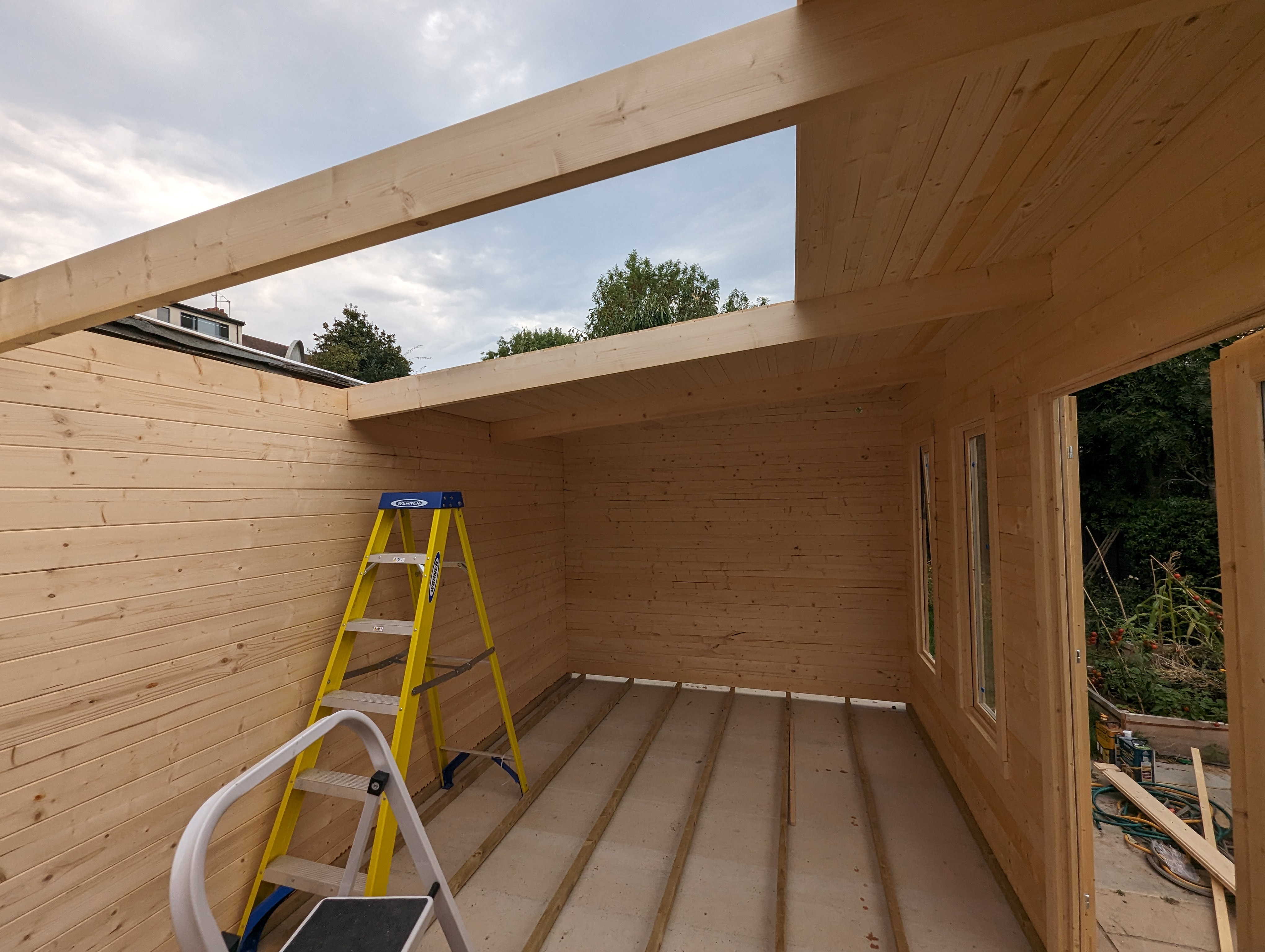
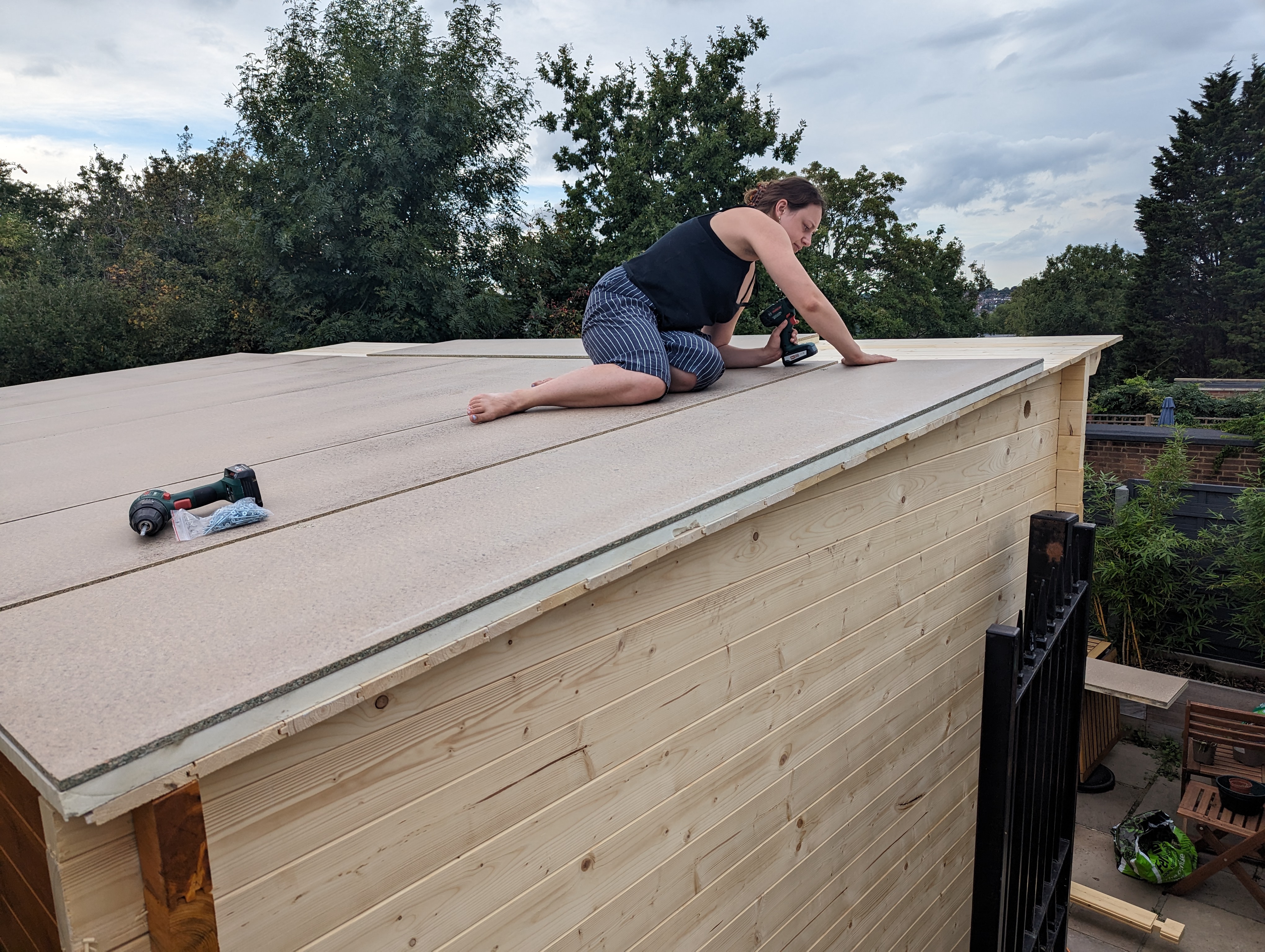
<p>The only slightly tricky bit is the roof, and only because we had to climb on it.</p>

<!-- _includes/responsive_image.html -->

<div class="image-wrapper">
    <a href="/images/garden_workshop/cabin_roof1.jpg" title="" target="_blank">
        <img src="/images/garden_workshop/cabin_roof1.jpg" width="4080" height="3072" srcset="   /images/resized/garden_workshop/cabin_roof1-2048.jpg 2048w,   /images/resized/garden_workshop/cabin_roof1-1024.jpg 1024w,   /images/resized/garden_workshop/cabin_roof1-518.jpg 518w,   /images/resized/garden_workshop/cabin_roof1-250.jpg 250w, /images/garden_workshop/cabin_roof1.jpg 4080w" alt="Nailing the roof boards." loading="lazy" />
    </a>
    <p class="image-caption">Nailing the roof boards.
</p>
</div>

<!-- _includes/responsive_image.html -->

<div class="image-wrapper">
    <a href="/images/garden_workshop/cabin_roof2.jpg" title="" target="_blank">
        <img src="/images/garden_workshop/cabin_roof2.jpg" width="1920" height="1080" srcset="   /images/resized/garden_workshop/cabin_roof2-1024.jpg 1024w,   /images/resized/garden_workshop/cabin_roof2-518.jpg 518w,   /images/resized/garden_workshop/cabin_roof2-250.jpg 250w, /images/garden_workshop/cabin_roof2.jpg 1920w" alt="Slightly precarious." loading="lazy" />
    </a>
    <p class="image-caption">Slightly precarious.
</p>
</div>

<!-- _includes/responsive_image.html -->

<div class="image-wrapper">
    <a href="/images/garden_workshop/cabin_roof_insulation.jpg" title="" target="_blank">
        <img src="/images/garden_workshop/cabin_roof_insulation.jpg" width="4080" height="3072" srcset="   /images/resized/garden_workshop/cabin_roof_insulation-2048.jpg 2048w,   /images/resized/garden_workshop/cabin_roof_insulation-1024.jpg 1024w,   /images/resized/garden_workshop/cabin_roof_insulation-518.jpg 518w,   /images/resized/garden_workshop/cabin_roof_insulation-250.jpg 250w, /images/garden_workshop/cabin_roof_insulation.jpg 4080w" alt="Insulation boards." loading="lazy" />
    </a>
    <p class="image-caption">Insulation boards.
</p>
</div>

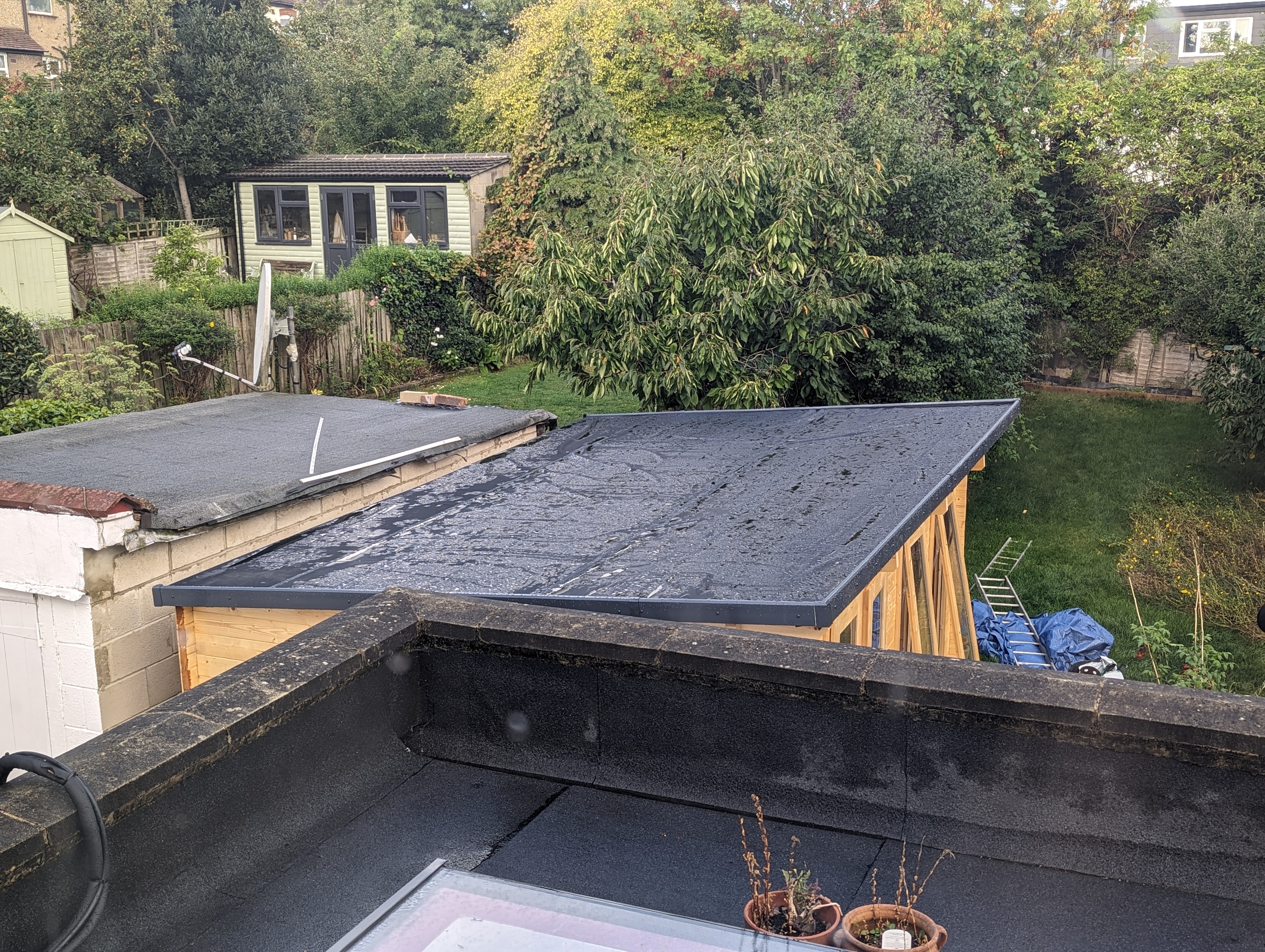
<p>We then needed some kind of roof covering. Felt is the standard option, and the cabin company could have supplied that, but we ended up going with a EPDM rubber roof that’s more durable and also easier to seal against, which is important because we are also doing a DIY solar panel install, and that require putting quite a few holes through the roof. Unfortunately we didn’t glue it down very evenly, so water pools a bit on the low side. Oops! Hopefully that doesn’t cause a problem.</p>

<!-- _includes/responsive_image.html -->

<div class="image-wrapper">
    <a href="/images/garden_workshop/cabin_roof_epdm.jpg" title="" target="_blank">
        <img src="/images/garden_workshop/cabin_roof_epdm.jpg" width="4080" height="3072" srcset="   /images/resized/garden_workshop/cabin_roof_epdm-2048.jpg 2048w,   /images/resized/garden_workshop/cabin_roof_epdm-1024.jpg 1024w,   /images/resized/garden_workshop/cabin_roof_epdm-518.jpg 518w,   /images/resized/garden_workshop/cabin_roof_epdm-250.jpg 250w, /images/garden_workshop/cabin_roof_epdm.jpg 4080w" alt="Rubber roof." loading="lazy" />
    </a>
    <p class="image-caption">Rubber roof.
</p>
</div>

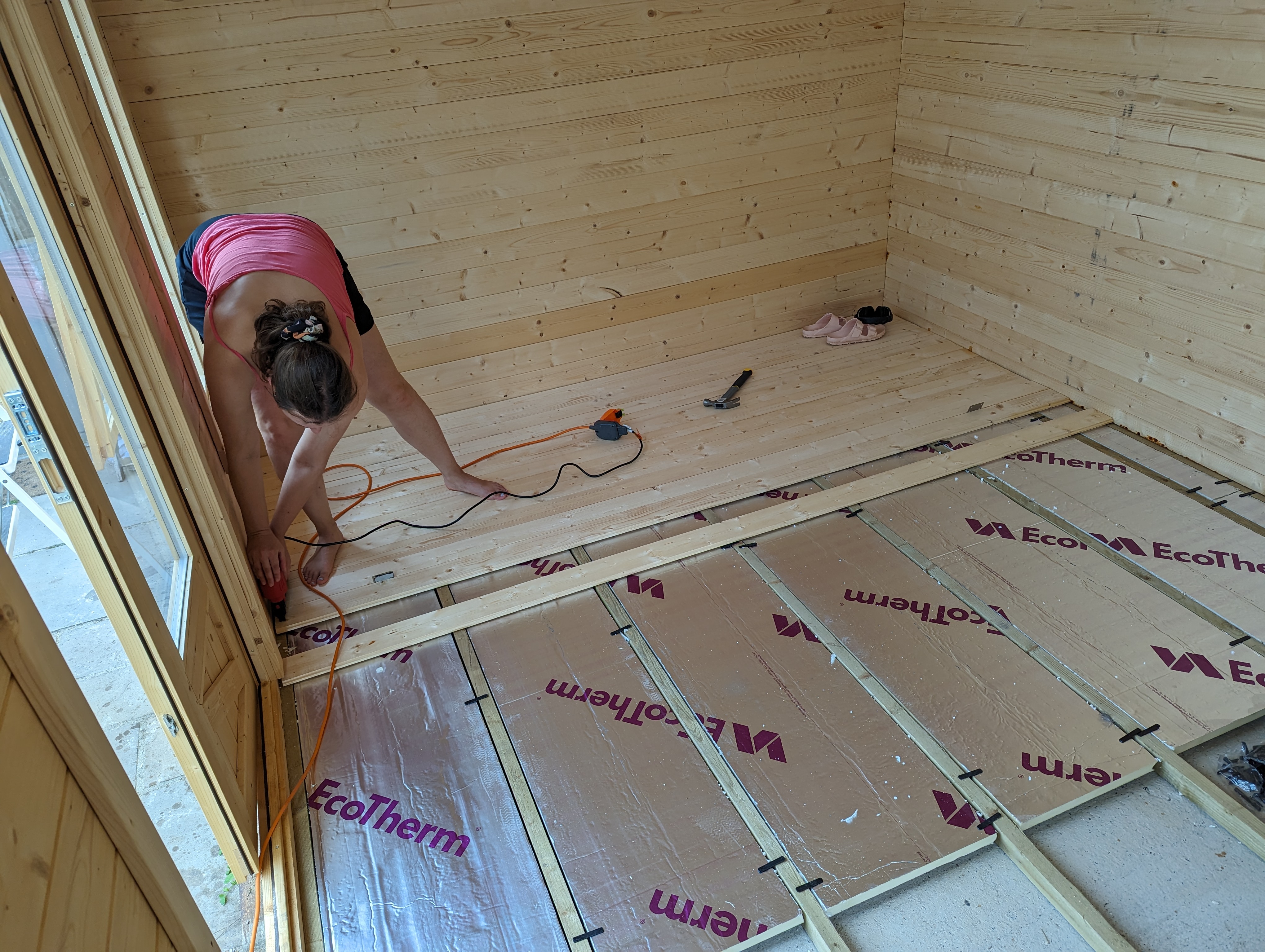
<p>The last thing to go in is the floor insulation (suspended with clips to allow airflow underneath) and the floor boards. We used a nail gun here to speed things up and to save our arms from further punishment after having to hammer all the roof boards in. Roof boards need longer and stronger nails because they need to stop the roof flying off in strong wind - floor boards are only nailed (with expansion gaps) to stop them moving around too much, so brad nails with the nail gun are good enough for the floor, but not the roof.</p>

<!-- _includes/responsive_image.html -->

<div class="image-wrapper">
    <a href="/images/garden_workshop/cabin_floor.jpg" title="" target="_blank">
        <img src="/images/garden_workshop/cabin_floor.jpg" width="4080" height="3072" srcset="   /images/resized/garden_workshop/cabin_floor-2048.jpg 2048w,   /images/resized/garden_workshop/cabin_floor-1024.jpg 1024w,   /images/resized/garden_workshop/cabin_floor-518.jpg 518w,   /images/resized/garden_workshop/cabin_floor-250.jpg 250w, /images/garden_workshop/cabin_floor.jpg 4080w" alt="Floor insulation + boards." loading="lazy" />
    </a>
    <p class="image-caption">Floor insulation + boards.
</p>
</div>

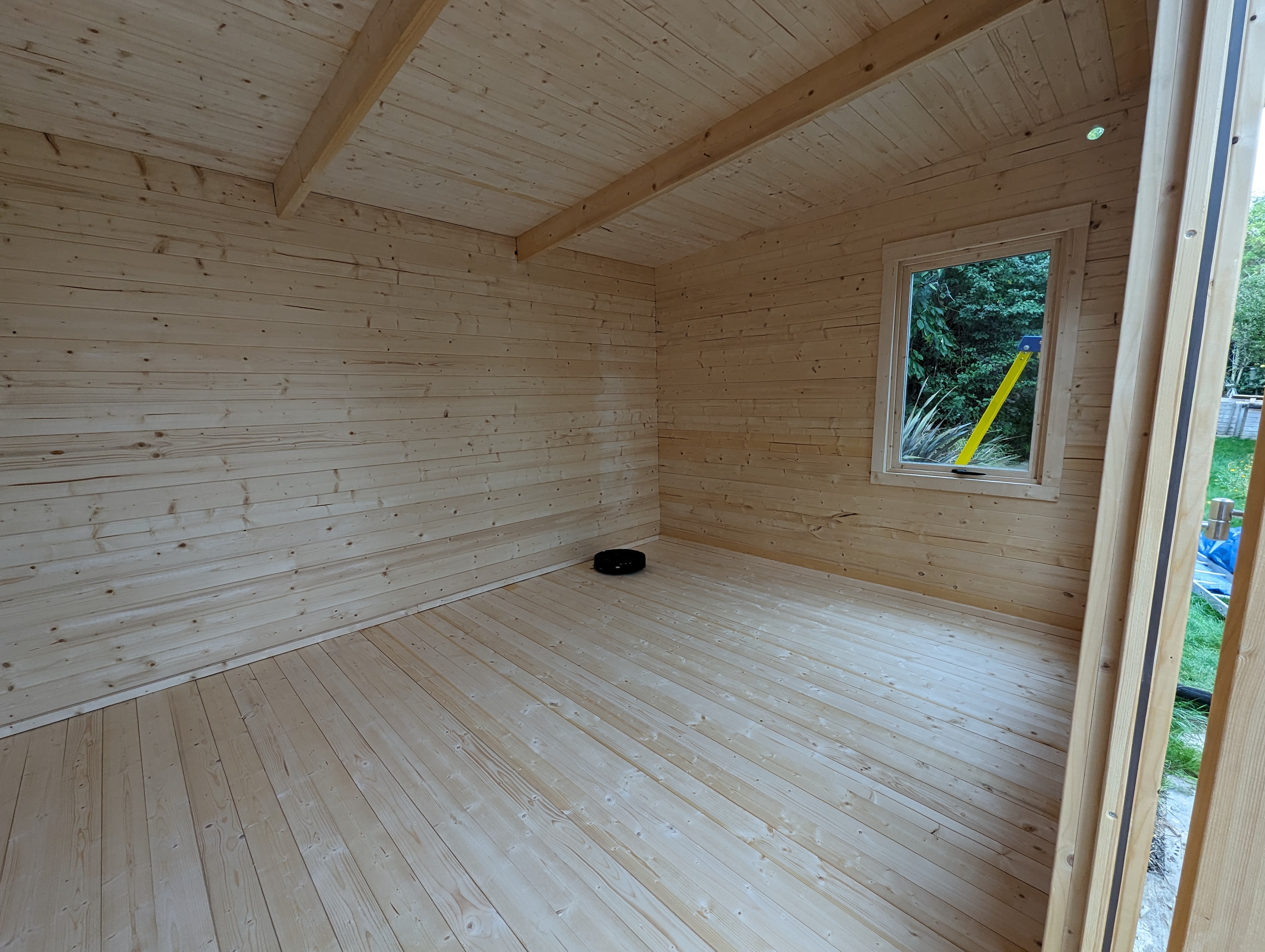
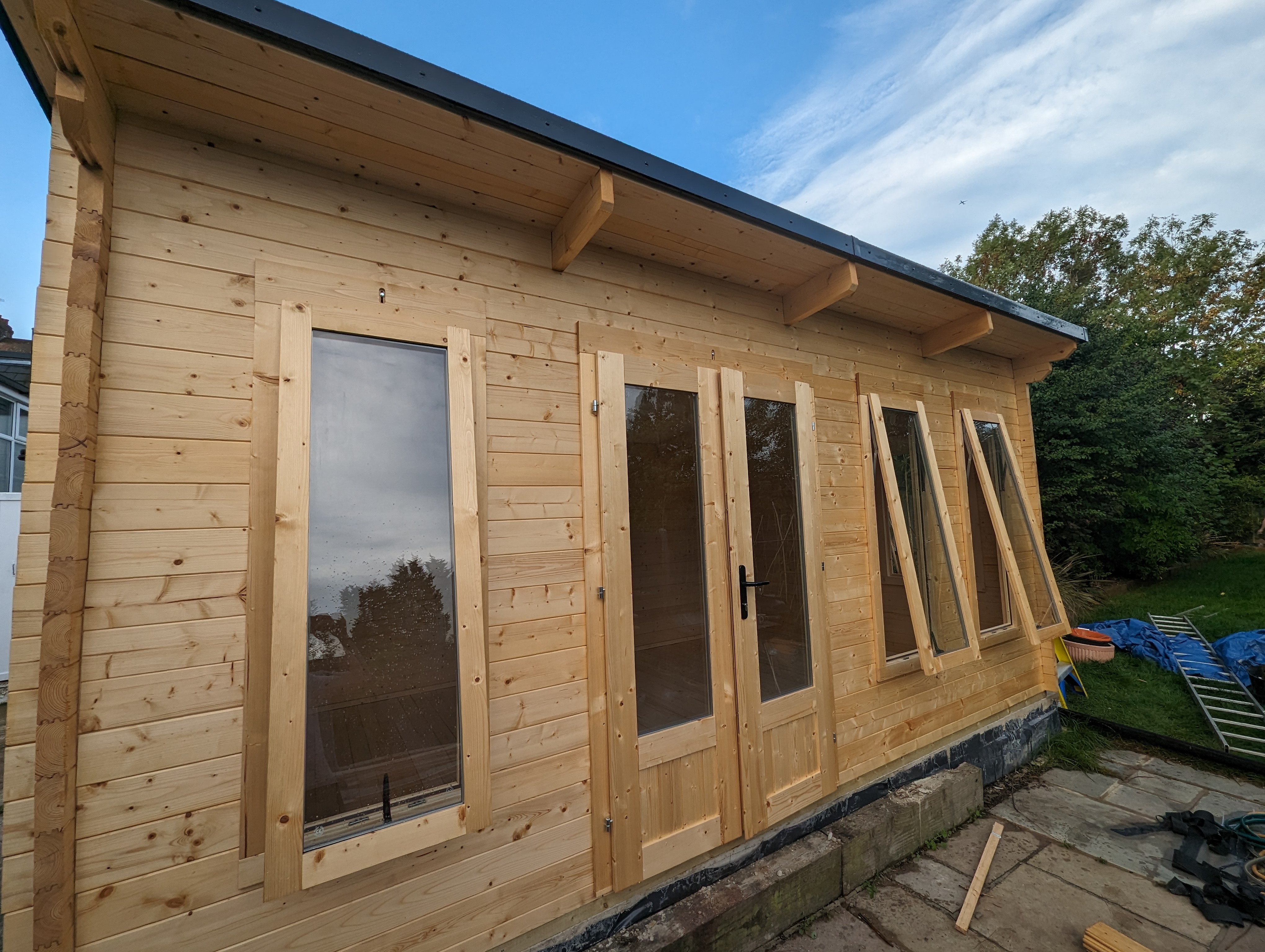
<p>All done!</p>

<!-- _includes/responsive_image.html -->

<div class="image-wrapper">
    <a href="/images/garden_workshop/cabin_done_inside.jpg" title="" target="_blank">
        <img src="/images/garden_workshop/cabin_done_inside.jpg" width="4080" height="3072" srcset="   /images/resized/garden_workshop/cabin_done_inside-2048.jpg 2048w,   /images/resized/garden_workshop/cabin_done_inside-1024.jpg 1024w,   /images/resized/garden_workshop/cabin_done_inside-518.jpg 518w,   /images/resized/garden_workshop/cabin_done_inside-250.jpg 250w, /images/garden_workshop/cabin_done_inside.jpg 4080w" alt="Inside." loading="lazy" />
    </a>
    <p class="image-caption">Inside.
</p>
</div>

<!-- _includes/responsive_image.html -->

<div class="image-wrapper">
    <a href="/images/garden_workshop/cabin_done_exterior.jpg" title="" target="_blank">
        <img src="/images/garden_workshop/cabin_done_exterior.jpg" width="4080" height="3072" srcset="   /images/resized/garden_workshop/cabin_done_exterior-2048.jpg 2048w,   /images/resized/garden_workshop/cabin_done_exterior-1024.jpg 1024w,   /images/resized/garden_workshop/cabin_done_exterior-518.jpg 518w,   /images/resized/garden_workshop/cabin_done_exterior-250.jpg 250w, /images/garden_workshop/cabin_done_exterior.jpg 4080w" alt="Outside." loading="lazy" />
    </a>
    <p class="image-caption">Outside.
</p>
</div>

<p>We treated all the exposed surfaces inside and outside over the next few days, and it was ready for electrics. The old garage was supplied from the main house consumer unit with a 16A supply, which was plenty for the garage, but not quite enough for what we had planned for this new workshop. Fortunately, they had the foresight to use 6mm<sup>2</sup> armoured cable for the run (much bigger cable than they needed), so we were able to change the upstream circuit breaker to 40A, which allows us to have 32A circuits inside the workshop. Why do we need a 40A upstream supply to have 32A circuits, instead of 32A + 32A? Using the same size breakers would theoretically work, but we would lose <a href="https://en.wikipedia.org/wiki/Selectivity_%28circuit_breakers%29">discrimination</a>. What that means is when that circuit is overloaded, it’s not guaranteed which circuit breaker will trip first, and best practice is to be able to guarantee that the downstream one will trip. With 40A/32A we don’t have full discrimination since those breakers have sensitivity ranges that overlap, but it’s better than using identically rated breakers. In this case since there is no safety consideration, only conveniece (if the upstream trips first, it will kill all circuits in the workshop, and we have to go into the house to reset it), full discrimination is not a regulatory requirement.</p>

<p>In the UK you can do a surprising amount of electrical work yourself without certification (but you still need to be competent and do the work to BS7671 standards). Unfortunately a new consumer unit isn’t one of them, so this is one for the pros. When hiring an electrician to wire up a log cabin it’s very important to stress to them the necessity to allow for wood movement, otherwise <a href="https://www.hortonsgroup.com/Log-Cabin-Questions#Services%20installation%20%28electrics,%20plumbing,%20etc%29">terrible things will happen</a> when seasons change.</p>

<p>We decided to go with a design based on round conduits. No glue is used to bond the conduits to the back boxes or the corner bend pieces, so they are free to slide in and out, and the expansion gaps are all hidden.</p>

<!-- _includes/responsive_image.html -->

<div class="image-wrapper">
    <a href="/images/garden_workshop/cabin_wiring_1.jpg" title="" target="_blank">
        <img src="/images/garden_workshop/cabin_wiring_1.jpg" width="4080" height="3072" srcset="   /images/resized/garden_workshop/cabin_wiring_1-2048.jpg 2048w,   /images/resized/garden_workshop/cabin_wiring_1-1024.jpg 1024w,   /images/resized/garden_workshop/cabin_wiring_1-518.jpg 518w,   /images/resized/garden_workshop/cabin_wiring_1-250.jpg 250w, /images/garden_workshop/cabin_wiring_1.jpg 4080w" alt="" loading="lazy" />
    </a>
    <p class="image-caption">
</p>
</div>

<!-- _includes/responsive_image.html -->

<div class="image-wrapper">
    <a href="/images/garden_workshop/cabin_wiring_2.jpg" title="" target="_blank">
        <img src="/images/garden_workshop/cabin_wiring_2.jpg" width="3072" height="4080" srcset="   /images/resized/garden_workshop/cabin_wiring_2-2048.jpg 2048w,   /images/resized/garden_workshop/cabin_wiring_2-1024.jpg 1024w,   /images/resized/garden_workshop/cabin_wiring_2-518.jpg 518w,   /images/resized/garden_workshop/cabin_wiring_2-250.jpg 250w, /images/garden_workshop/cabin_wiring_2.jpg 3072w" alt="" loading="lazy" />
    </a>
    <p class="image-caption">
</p>
</div>

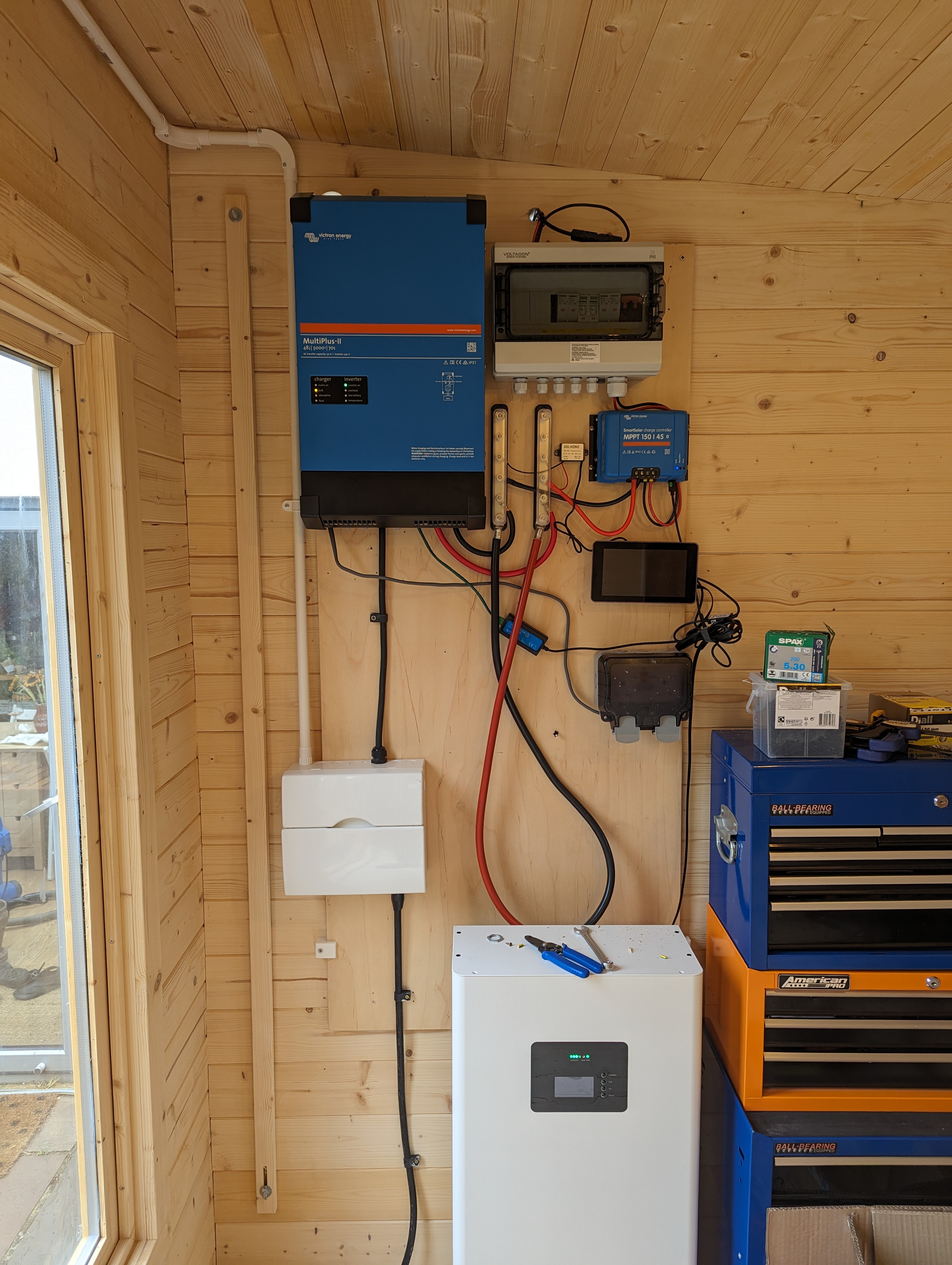
<p>What’s with all the extra stuff? That’s my DIY solar + battery system for the whole house, but that’s another story for another day!</p>

<p>Overall we are quite happy with how it all turned out - a bit more work than the companies would have you believe, but really not too bad with a bit of DIY skills, and it’s actually a lot of fun to build!</p>

<p>Next - workshop layout and the solar + energy storage system.</p>]]></content><author><name>Matthew Lai</name></author><category term="woodworking" /><summary type="html"><![CDATA[We built a workshop in the garden… from a kit! Bonus: evolution of my woodworking spaces.]]></summary><media:thumbnail xmlns:media="http://search.yahoo.com/mrss/" url="https://dubiouscreations.com/images/resized/garden_workshop/cabin_done_exterior-518.jpg" /><media:content medium="image" url="https://dubiouscreations.com/images/resized/garden_workshop/cabin_done_exterior-518.jpg" xmlns:media="http://search.yahoo.com/mrss/" /></entry><entry><title type="html">Designing an ESP32-based RGB Matrix Driver and Making 500 of Them!</title><link href="https://dubiouscreations.com/2021/05/04/designing-an-esp32-based-rgb-matrix-driver-and-making-500-of-them/" rel="alternate" type="text/html" title="Designing an ESP32-based RGB Matrix Driver and Making 500 of Them!" /><published>2021-05-04T00:23:19+00:00</published><updated>2021-05-04T00:23:19+00:00</updated><id>https://dubiouscreations.com/2021/05/04/designing-an-esp32-based-rgb-matrix-driver-and-making-500-of-them</id><content type="html" xml:base="https://dubiouscreations.com/2021/05/04/designing-an-esp32-based-rgb-matrix-driver-and-making-500-of-them/"><![CDATA[<p>We built a web-connected LED matrix driver for a team of about 500 people, over 4 months. This post is about the hardware design.</p>

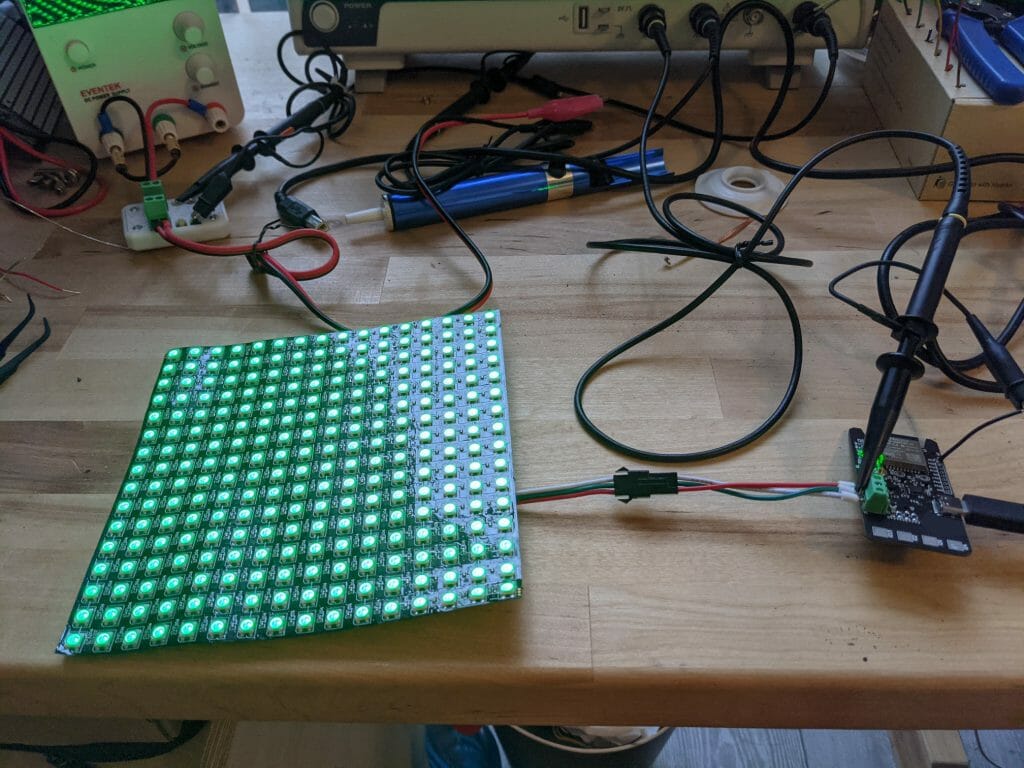
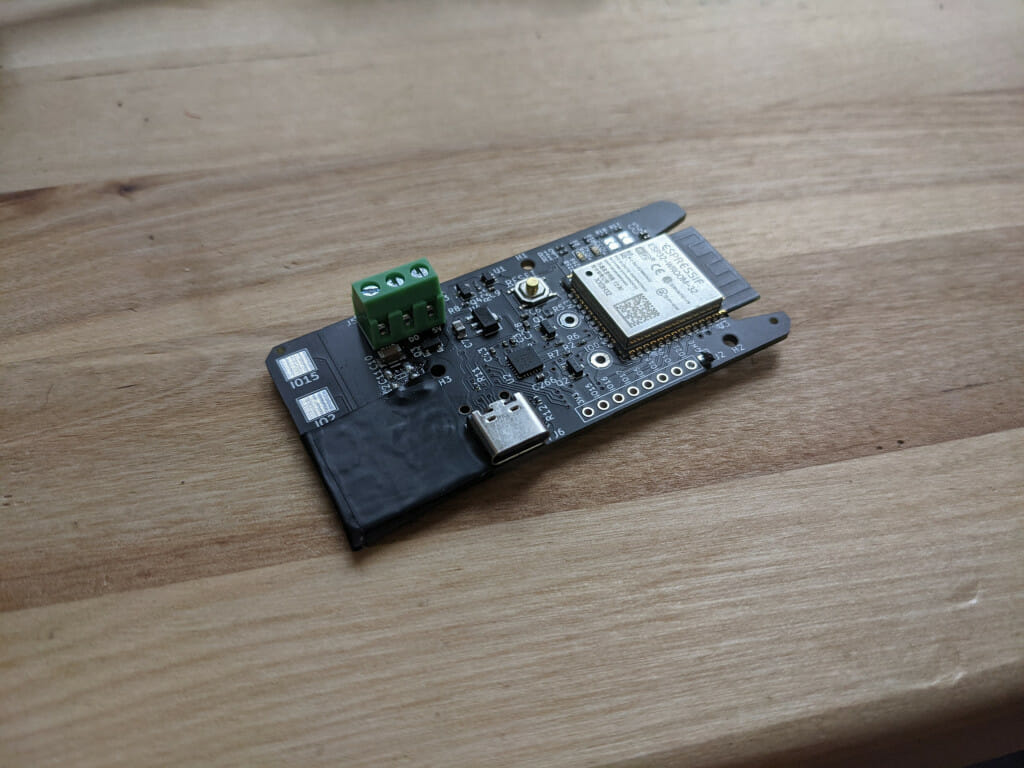
<p>At the end of last year <a href="https://github.com/fheinz">Fede Heinz</a>, a colleague of mine at Google reached out for a collaboration on his <a href="https://github.com/fheinz/Blinkenlights">Blinkenlights project</a>, to build a web-connected LED matrix driver for his team of about 500 people. It took about 4 months, but the hardware design part of the project has finally come to an end, and in this post I will talk about the hardware design, and how we made all the important design decisions, as well as all the problems we ran into (some of them pretty funny in hindsight). The goal is to give everyone an LED matrix with the controller board, so they can send 16×16 images to each other. We went through quite a few brainstorming rounds and design iterations, but in the end decided to build an ESP32-based driver board, powered by a computer through USB-C, and drives an external matrix. This project is open source hardware and software, and you can find the hardware design on <a href="https://github.com/matthewlai/ESP32LEDControl">my GitHub repo</a>, and the firmware/software on <a href="https://github.com/fheinz/Blinkenlights">Fede’s</a>.</p>

<!-- _includes/responsive_image.html -->

<div class="image-wrapper">
    <a href="/images/wp-content/uploads/2021/05/PXL_20210401_180605063-1-1024x768.jpg" title="" target="_blank">
        <img src="/images/wp-content/uploads/2021/05/PXL_20210401_180605063-1-1024x768.jpg" width="1024" height="768" srcset="   /images/resized/wp-content/uploads/2021/05/PXL_20210401_180605063-1-1024x768-518.jpg 518w,   /images/resized/wp-content/uploads/2021/05/PXL_20210401_180605063-1-1024x768-250.jpg 250w, /images/wp-content/uploads/2021/05/PXL_20210401_180605063-1-1024x768.jpg 1024w" alt="BlinkenLights!" loading="lazy" />
    </a>
    <p class="image-caption">BlinkenLights!
</p>
</div>

<!-- _includes/responsive_image.html -->

<div class="image-wrapper">
    <a href="/images/wp-content/uploads/2021/05/PXL_20210503_165909210-1024x535.jpg" title="" target="_blank">
        <img src="/images/wp-content/uploads/2021/05/PXL_20210503_165909210-1024x535.jpg" width="1024" height="535" srcset="   /images/resized/wp-content/uploads/2021/05/PXL_20210503_165909210-1024x535-518.jpg 518w,   /images/resized/wp-content/uploads/2021/05/PXL_20210503_165909210-1024x535-250.jpg 250w, /images/wp-content/uploads/2021/05/PXL_20210503_165909210-1024x535.jpg 1024w" alt="Blinkenlights PCB" loading="lazy" />
    </a>
    <p class="image-caption">Blinkenlights PCB
</p>
</div>

<p>The PCBs for this project were manufactured and assembled by JLCPCB.</p>

<h2 id="high-level-design">High Level Design</h2>

<h3 id="internal-vs-external-matrix">Internal vs external matrix</h3>

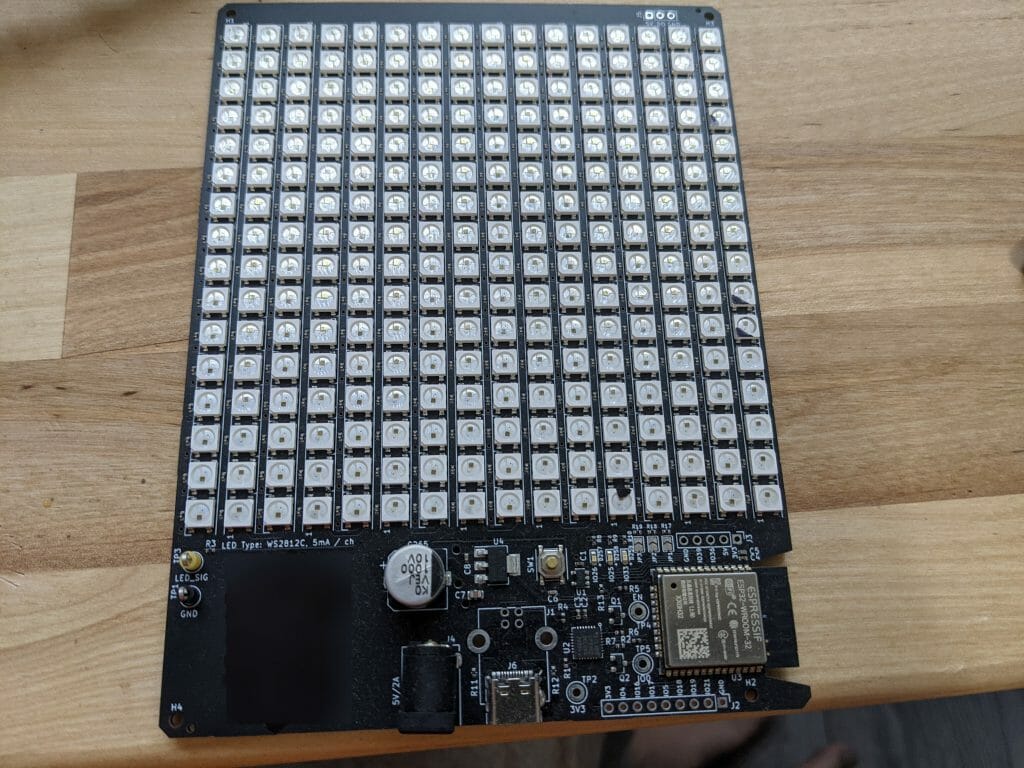
<p>Once we decided on making a custom PCB, we thought it would be cool to have the matrix built-in to the board. JLCPCB has the WS2812 in their catalogue, and it would only be slightly more expensive than buying the matrices separately. Our first prototype included the matrix. Unfortunately the defect rate was unacceptably high – we had 256 LEDs per board, and a defect rate of about 1% of the LEDs, which means we had no totally working boards!</p>

<p>We don’t really have the equipment (an x-ray machine) to figure out why, but as the WS2812 is extremely moisture sensitive at <a href="https://en.wikipedia.org/wiki/Moisture_sensitivity_level">MSL (moisture sensitivity level)</a> 5a, that’s our best guess. This has caused problems for <a href="https://www.eevblog.com/forum/manufacture/msl-parts-storage-and-care-for-the-hobbyistsmall-business/">a lot of people</a>. If we were going for higher quantity it may have made sense to work with the assembly house a bit to try to solve this, but at 500 it doesn’t really make sense, so we decided to use an external matrix instead. We talked to them about this and they took it off their parts library to investigate, but couldn’t guarantee anything.</p>

<!-- _includes/responsive_image.html -->

<div class="image-wrapper">
    <a href="/images/wp-content/uploads/2021/05/PXL_20210503_164933725-1024x768.jpg" title="" target="_blank">
        <img src="/images/wp-content/uploads/2021/05/PXL_20210503_164933725-1024x768.jpg" width="1024" height="768" srcset="   /images/resized/wp-content/uploads/2021/05/PXL_20210503_164933725-1024x768-518.jpg 518w,   /images/resized/wp-content/uploads/2021/05/PXL_20210503_164933725-1024x768-250.jpg 250w, /images/wp-content/uploads/2021/05/PXL_20210503_164933725-1024x768.jpg 1024w" alt="Rev 1 – with integrated matrix" loading="lazy" />
    </a>
    <p class="image-caption">Rev 1 – with integrated matrix
</p>
</div>

<h3 id="usb-c-data--power">USB-C Data + Power</h3>

<p>We need the board to connect to a laptop for data, and the original plan was to include a USB-C connector for that, but have a separate barrel jack for power (you can see this setup in the Rev 1 board above).</p>

<p>But we had a pleasant surprise – as it turned out, all modern laptops with Type C ports can actually supply 1.5A or 3A, and since that’s enough for our use case, we get to save the cost and logistics trouble of providing a separate power supply, all while helping to reduce e-waste.</p>

<p>Note: taking that much power from USB-C ports safely and in a standard-compliant way requires care. I have written <a href="https://dubiouscreations.com/2021/04/06/designing-with-usb-c-lessons-learned/">a post</a> on that topic. Please do not just draw that current without checking.</p>

<p>We are also only supporting laptops with native Type C ports, using C-C cables. This makes our life easier because we don’t need to support the whole pre-C mess with the Battery Charging Specification. We can do this because we are only distributing these boards within Google, so we know (almost) everyone has a recent laptop with Type-C ports. If this was going to be more widely distributed, it would probably be a good idea to support BCS, and maybe with another Type-C port that can use a Type-C supply for power.</p>

<h3 id="microcontroller-choice">Microcontroller Choice</h3>

<p>We wanted something a bit more beefy than an AVR, but we also want Arduino compatibility because we will be encouraging users (who are mostly programmers but not electronics engineers or firmware engineers) to hack it, and being Arduino-compatible makes it much easier.</p>

<p>The ESP32 is an obvious choice – it’s cheap, fast, and has good Arduino support. We don’t actually have plans for WiFi or Bluetooth, and it was still the most cost effective option regardless. Our boards end up costing just over US$4 each manufactured and assembled, so the cost of the ESP32-WROOM-32 module is actually responsible for just under half of the entire cost of the board ($2.0061 from JLCPCB, at 500 qty).</p>

<p>Would be cool to have a microcontroller with built-in USB support so we don’t need a separate chip, but all the ones with built-in USB I have used cost much more than $2, so would not be cost-effective even taking into account the elimination of the USB-UART chip.</p>

<h2 id="schematics">Schematics</h2>

<p>Full schematics: <a href="https://github.com/matthewlai/ESP32LEDControl/raw/main/hardware/esp32_led_controller/doc/esp32_led_controller.pdf">PDF</a></p>

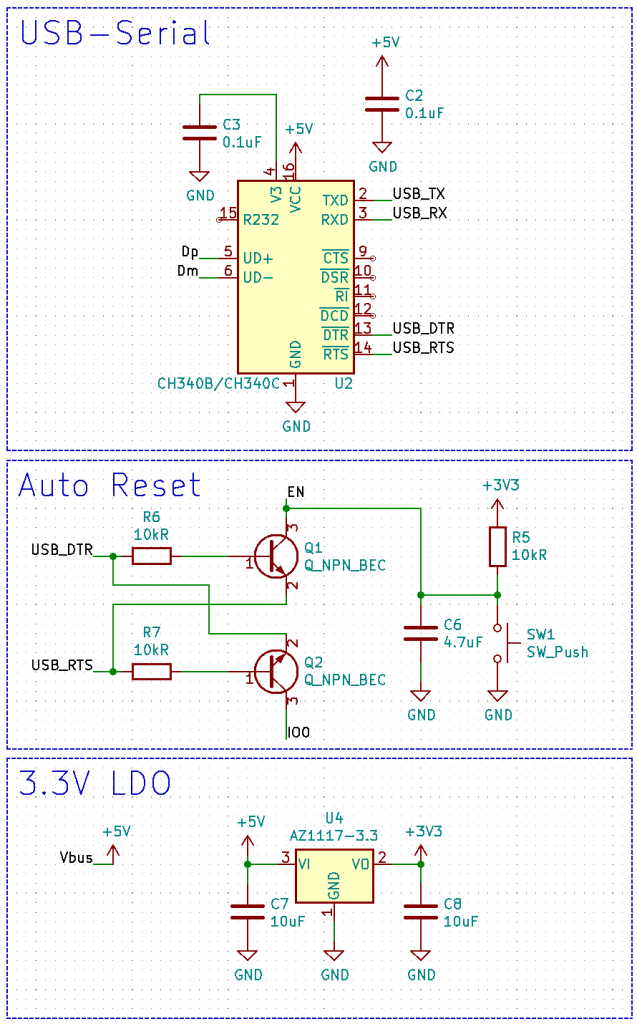
<p>The schematics design is pretty straight forward on the microcontroller side, with the ESP32 module, a CH340B USB-Serial adapter, the standard 2-BJT reset circuit to allow automatic reset from Arduino (more accurately esptool). The reset circuit has slightly different capacitance value from the official recommendations from Espressif, because I found that with the official values it doesn’t reset reliably on Windows sometimes.</p>

<!-- _includes/responsive_image.html -->

<div class="image-wrapper">
    <a href="/images/wp-content/uploads/2021/05/image-4-637x1024.png" title="" target="_blank">
        <img src="/images/wp-content/uploads/2021/05/image-4-637x1024.png" width="637" height="1024" srcset="   /images/resized/wp-content/uploads/2021/05/image-4-637x1024-518.png 518w,   /images/resized/wp-content/uploads/2021/05/image-4-637x1024-250.png 250w, /images/wp-content/uploads/2021/05/image-4-637x1024.png 637w" alt="Power, USB-serial, auto-reset" loading="lazy" />
    </a>
    <p class="image-caption">Power, USB-serial, auto-reset
</p>
</div>

<p>See <a href="https://dubiouscreations.com/2021/04/06/designing-with-usb-c-lessons-learned/">this post</a> for more information on the USB-C part.</p>

<p>I am not a big fan of the CH340 series because the documentation is very sparse, and it doesn’t have a SUSPEND output, which is realistically required to support USB suspend. However, it is available in SOIC package, whereas my preferred chip, the CP2102, is only available in QFN. We used the CP2102 in our first revision prototype, but found that we had a soldering defect rate of about 10%, which is approximately what I have found with my past projects using the same chip. It’s fine for a personal project where I can fix them manually when needed, but we don’t want to have to fix 50 boards in a 500 boards run! If we were building more, it may make sense to try to tweak the footprint a bit to see if we can improve assembly defect rate, but we didn’t want to delay this project. So we switched to the CH340B instead. Those chips are in every low cost ESP32 board and USB-Serial adapters these days.</p>

<p>I quite like the AZ1117 family of regulators for ESP32, because they are rated for 1A, and come in tiny packages (SOT-89 in this case). <a href="https://weatherhelge.wordpress.com/smd/">Here</a> is a nice comparison of standard SMT package sizes. At this package size it can’t handle 1A continuously, but we only need the 1A for current spikes. ESP32 requires up to about 800mA with WiFi and Bluetooth on, but those are always very short spikes, and on average usually it only needs about 100mA. A 1A regulator in a small package is perfect for this kind of applications.</p>

<p>The other significant part is the LED matrix interface:</p>

<!-- _includes/responsive_image.html -->

<div class="image-wrapper">
    <a href="/images/wp-content/uploads/2021/05/image-5-1024x760.png" title="" target="_blank">
        <img src="/images/wp-content/uploads/2021/05/image-5-1024x760.png" width="1024" height="760" srcset="   /images/resized/wp-content/uploads/2021/05/image-5-1024x760-518.png 518w,   /images/resized/wp-content/uploads/2021/05/image-5-1024x760-250.png 250w, /images/wp-content/uploads/2021/05/image-5-1024x760.png 1024w" alt="LED interface" loading="lazy" />
    </a>
    <p class="image-caption">LED interface
</p>
</div>

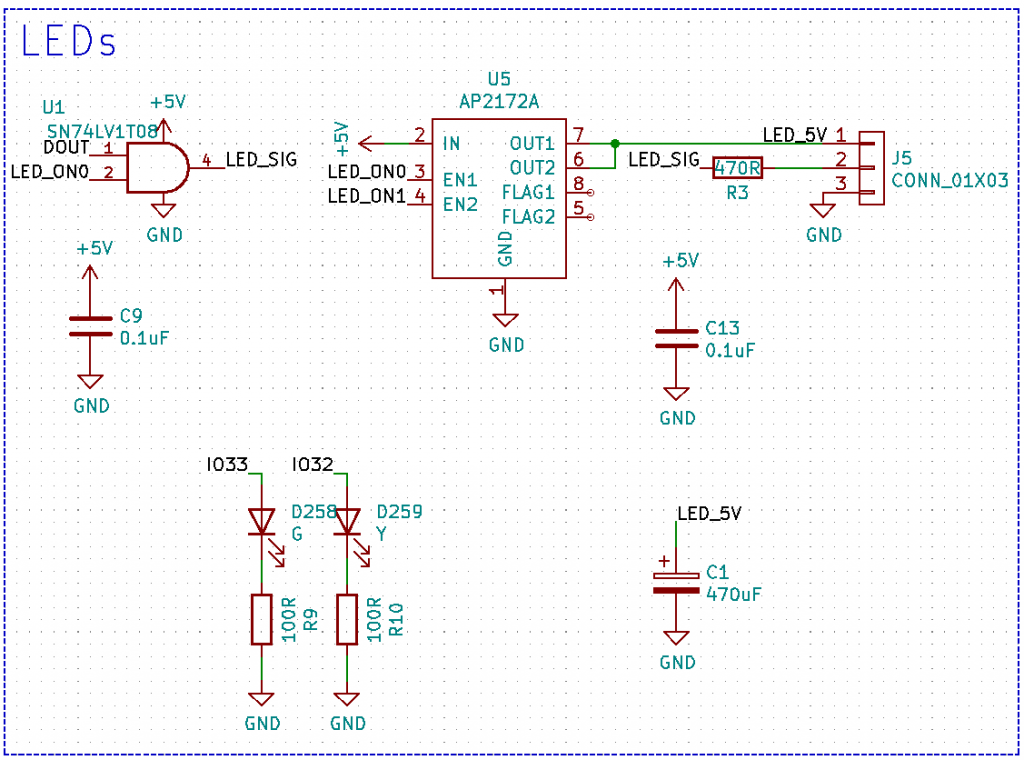
<p>Here we need a level shifter, because the WS2812B uses 5V signalling, and the ESP32 has 3.3V IO. But in addition to that, we also need to power-gate the matrix because it draws about 250mA idle, which exceeds the 100mA maximum we can legally draw from USB without negotiation (and without CC current advertisement / BCS detection). So we have an <a href="https://www.diodes.com/part/view/AP2172A?BackID=8099">AP2172A</a> chip that we use to switch on power to the LED once we know we can draw that current.</p>

<p>The AP2172A actually serves another very important purpose – we need a large capacitance on the LED side for voltage stability, but USB only allows a maximum of 10uF on Vbus. If we connect a 470uF capacitor to Vbus directly, there is a good chance that the host will go into an over-current reset while the capacitor is charging up. We did in fact see this in an earlier prototype without that chip.</p>

<p>With the AP2172A, it will limit the charging current to 1.5A per channel (it has 2 channels that we wire up in parallel), so we can have any amount of capacitance on the LED side. We control the chip using the LED_ON0 and LED_ON1 signals. Why two signals? Because we can get either 1.5A or 3.0A available from the host, and if we only have 1.5A available, we can’t charge at 3.0A. Once we have the capacitors charged, we always turn on both channels to reduce the channel resistance, and apply current limit in firmware instead.</p>

<p>The level shifter is a <a href="https://www.ti.com/product/SN74LV1T08">TI SN74LV1T08</a>, with an AND gate built-in. Why AND gate? Because most chips really don’t like an input voltage higher than supply voltage. This can lead to the input pin powering the whole chip through the ESD protection diodes (which wouldn’t have been rated for this), or <a href="https://en.wikipedia.org/wiki/Latch-up">latch-up</a>. With the signal ANDed with LED_ON0, we ensure that the data pin can never be driven high when the LED power is not on. I like to apply this kind of protections in hardware in addition to firmware just in case, especially since we will be encouraging users to experiment with the firmware.</p>

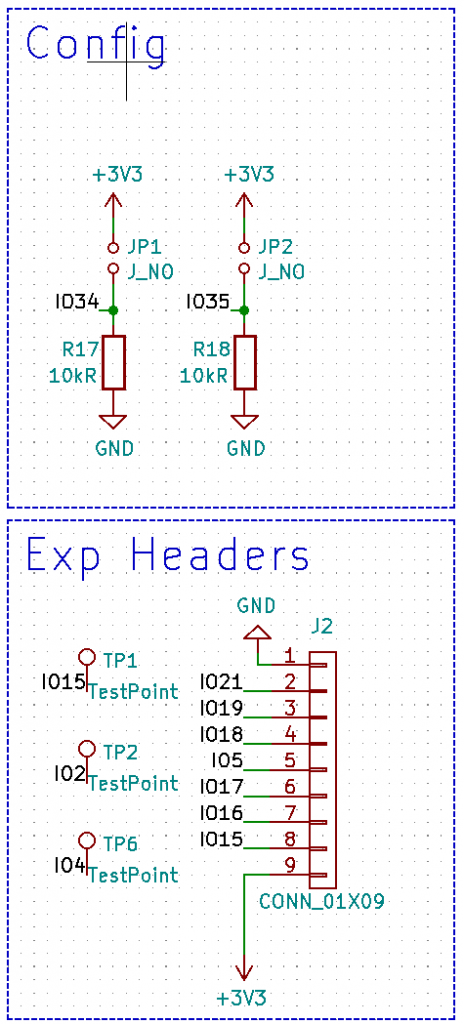
<p>And then we have config strap pins. They are basically input pins connected to a pull-down, with an open solder jumper to Vcc. This allows the user to set some semi-permanent config options that we can support in firmware. They are like DIP switches, but free and take up less board space! (though slightly harder to use)</p>

<p>We also have the extra pins we aren’t using exposed on a header, as well as 3 capacitive touch buttons (for user experimentation). Remember to always put ground and Vcc on expansion headers!</p>

<!-- _includes/responsive_image.html -->

<div class="image-wrapper">
    <a href="/images/wp-content/uploads/2021/05/image-6-464x1024.png" title="" target="_blank">
        <img src="/images/wp-content/uploads/2021/05/image-6-464x1024.png" width="464" height="1024" srcset="   /images/resized/wp-content/uploads/2021/05/image-6-464x1024-250.png 250w, /images/wp-content/uploads/2021/05/image-6-464x1024.png 464w" alt="Straps and expansion headers" loading="lazy" />
    </a>
    <p class="image-caption">Straps and expansion headers
</p>
</div>

<h2 id="pcb-design">PCB Design</h2>

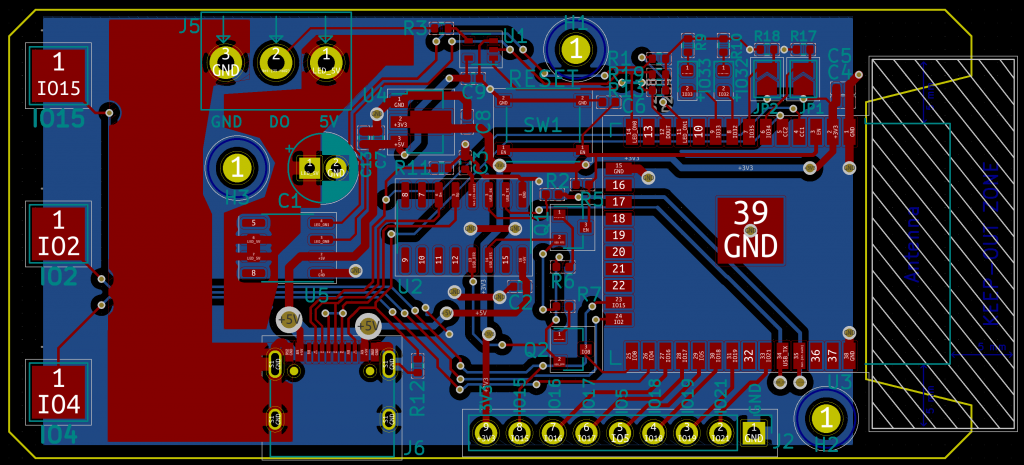
<p>We decided to go for a 2 layers design in this case, because it’s slightly cheaper. At 500 qty we would be paying $0.21/ea for 2 layers, and $0.38/ea for 4 layers. It’s not a lot, and that’s why I have not designed a 2 layer board for my personal projects in a very long time, but for 500 boards it does add up, and 4 layer boards would also restrict us to green soldermask with JLC assembly service. This is a relatively simple board, and easily doable on 2 layers, so we went with that. It does mean we cannot have impedance-controlled traces for USB, but since we are only going for Full Speed, it’s not an issue. At 20ns minimum edge rate for Full Speed, transmission line effects only become significant at ~60cm.</p>

<!-- _includes/responsive_image.html -->

<div class="image-wrapper">
    <a href="/images/wp-content/uploads/2021/05/image-7-1024x465.png" title="" target="_blank">
        <img src="/images/wp-content/uploads/2021/05/image-7-1024x465.png" width="1024" height="465" srcset="   /images/resized/wp-content/uploads/2021/05/image-7-1024x465-518.png 518w,   /images/resized/wp-content/uploads/2021/05/image-7-1024x465-250.png 250w, /images/wp-content/uploads/2021/05/image-7-1024x465.png 1024w" alt="PCB layout" loading="lazy" />
    </a>
    <p class="image-caption">PCB layout
</p>
</div>

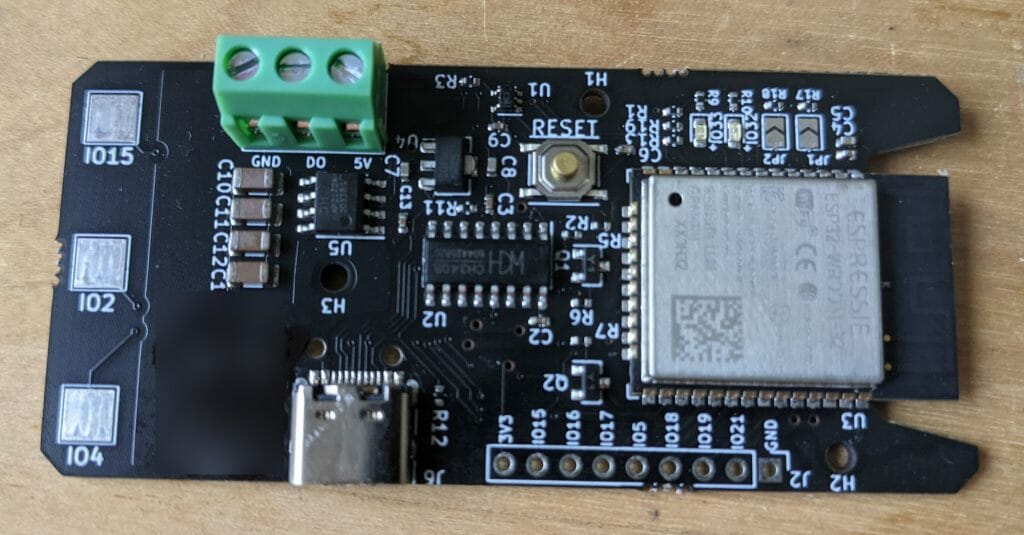
<p>We have a rectangular layout with the LED connector in a screw terminal on top, USB-C connector on the bottom, and the ESP32 antenna on the right with a cut-out. The capacitive touch buttons are on the left side to allow them to be exposed if we have a case covering up the rest of the circuit.</p>

<p>U2 is the CH340B that takes up a lot of space due to the huge SOIC footprint. The CP2102 would be much smaller, but that doesn’t help if we can’t get it soldered reliably!</p>

<p>We are using an aluminium solid polymer capacitor for bulk decoupling of the LED matrix. It’s about $0.03c more than a standard aluminium wet electrolytic capacitor, but it’s smaller and higher performance (probably doesn’t actually matter for this application). We actually used ceramic (MLCC) capacitors in an earlier prototype to keep the board height lower (see picture at the beginning of the post), but unfortunately ran into acoustic noise issues at high power settings due to the <a href="https://e2e.ti.com/blogs_/b/powerhouse/posts/how-to-reduce-acoustic-noise-of-mlccs-in-power-applications#:~:text=When%20an%20electric%20potential%20or,acoustic%20noise%2C%20or%20singing%20noise.&amp;text=Electric%20potential%20operating%20at%20a%20frequency%20within%20an%20audible%20range.">MLCC dielectric being piezoelectric</a>. The other option to keep the board profile low is with a tantalum capacitor, but I avoid using them when possible because tantalum is a <a href="https://en.wikipedia.org/wiki/Conflict_resource#Conflict_minerals">conflict resource</a>. A few manufacturers say their tantalum is conflict-free, but I’ve never really looked into that, and have never really needed to use tantalum. Tantalum is also much more expensive, and have a very exciting failure mode (<a href="https://www.youtube.com/watch?v=VknpLq7DkSM">with an explosion</a>). Be very careful with those!</p>

<h2 id="panelisation-for-manufacturing">Panelisation for Manufacturing</h2>

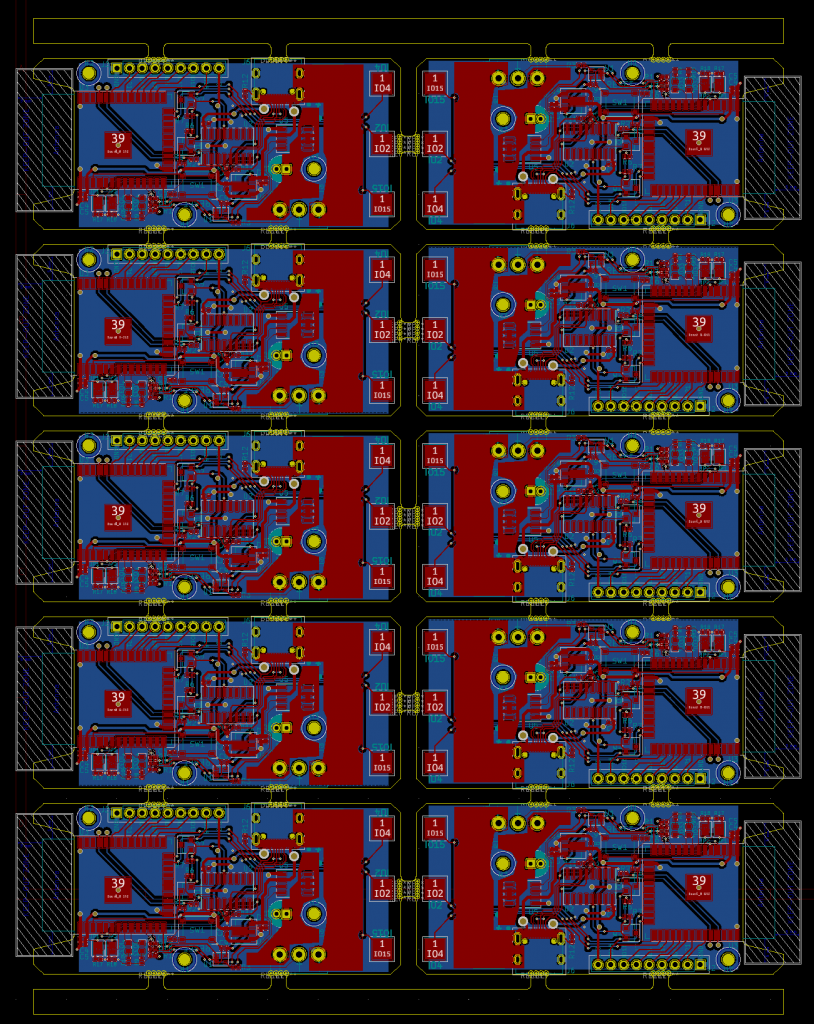
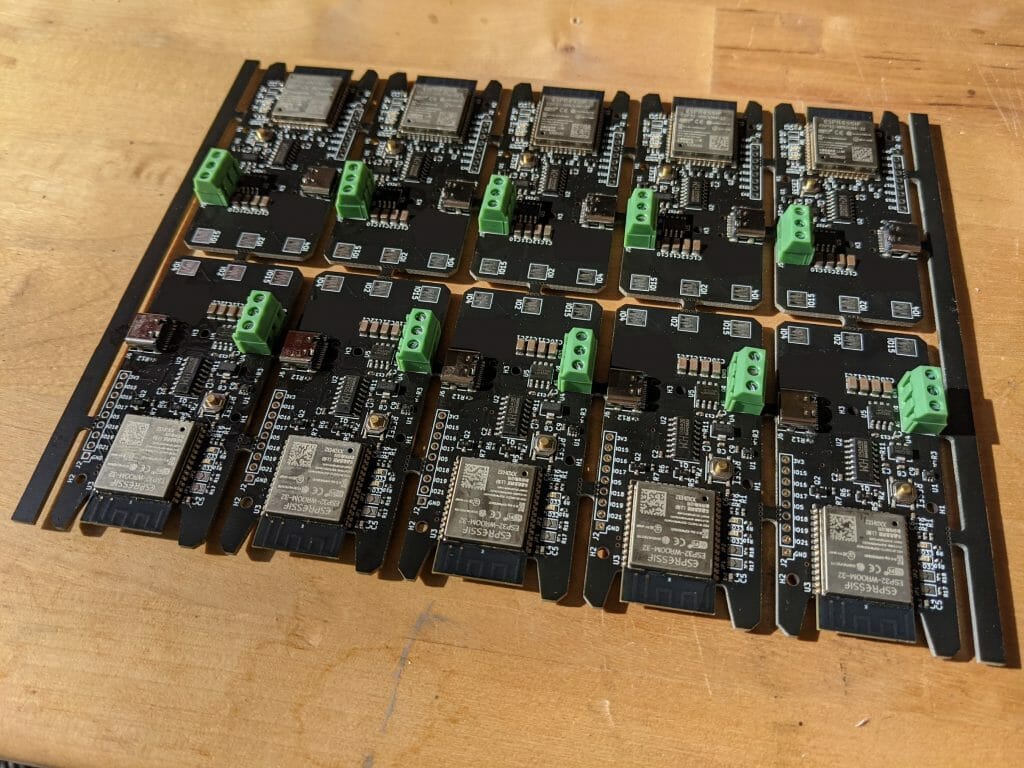
<p>PCB fabs generally don’t want to deal with hundreds of tiny PCBs, and would rather deal with fewer larger ones instead. For example, JLCPCB has a limit of 50 PCBs for assembly, so since we want more than that, we need to put our PCBs in larger grids called panels. This is what our panel looks like:</p>

<!-- _includes/responsive_image.html -->

<div class="image-wrapper">
    <a href="/images/wp-content/uploads/2021/05/image-8-814x1024.png" title="" target="_blank">
        <img src="/images/wp-content/uploads/2021/05/image-8-814x1024.png" width="814" height="1024" srcset="   /images/resized/wp-content/uploads/2021/05/image-8-814x1024-518.png 518w,   /images/resized/wp-content/uploads/2021/05/image-8-814x1024-250.png 250w, /images/wp-content/uploads/2021/05/image-8-814x1024.png 814w" alt="5×2 PCB panel" loading="lazy" />
    </a>
    <p class="image-caption">5×2 PCB panel
</p>
</div>

<p>Different fabs have different preferred panelisation techniques, and JLC requires tabs and mousebites for assembly, which is what we have here. The boards are connected by those little tabs lined with drilled holes, so they can be manufactured and assembled as panels, and we can just break them apart by hand once we receive them. There are rails on the top and bottom – they give the panel some extra rigidity during assembly, and also serve as a place to put order numbers, fiducial marks (marks on the PCB for pick-and-place camera calibration), tooling holes, etc. Those are usually added by the PCB fab, and not something engineers need to care about. Just leave some room for them to do their job. JLC’s panelisation specs and recommendations are <a href="https://jlcpcb.com/capabilities/Capabilities">here</a>. My panels were generated using yaqwsx’s <a href="https://github.com/yaqwsx/KiKit">KiKit</a> tool, and you can see my config <a href="https://github.com/matthewlai/ESP32LEDControl/blob/main/hardware/esp32_led_controller/panelize_config.json">here</a>. It has been successfully manufactured by JLC and seems to work well.</p>

<h2 id="cost">Cost</h2>

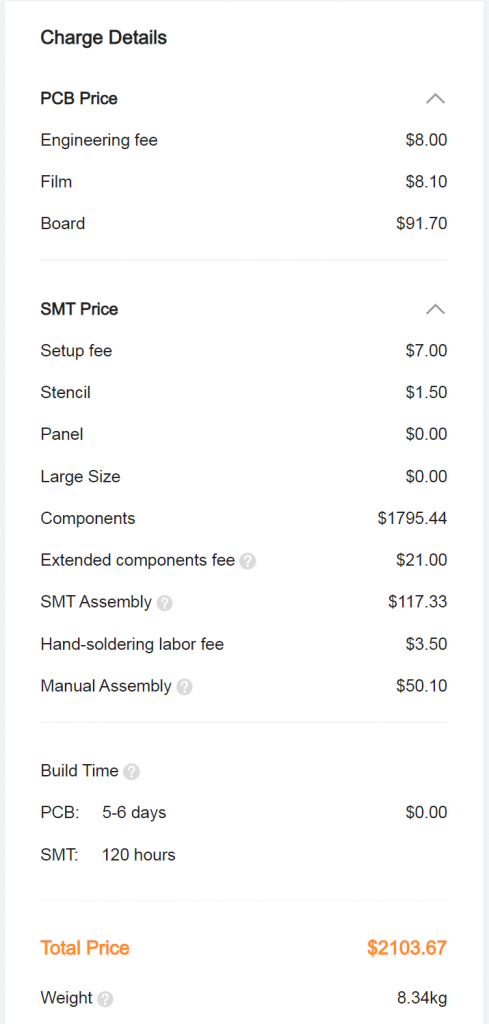
<p>Altogether, the cost is $140 for a 2 panels assembled prototype (20 boards, $7/board).</p>

<p>That comes down to $462 for 10 panels (100 boards, $4.62/board), and finally $2103 for 50 panels (500 boards, $4.20/board).</p>

<!-- _includes/responsive_image.html -->

<div class="image-wrapper">
    <a href="/images/wp-content/uploads/2021/05/image-9-489x1024.png" title="" target="_blank">
        <img src="/images/wp-content/uploads/2021/05/image-9-489x1024.png" width="489" height="1024" srcset="   /images/resized/wp-content/uploads/2021/05/image-9-489x1024-250.png 250w, /images/wp-content/uploads/2021/05/image-9-489x1024.png 489w" alt="Cost breakdown" loading="lazy" />
    </a>
    <p class="image-caption">Cost breakdown
</p>
</div>

<p>Most of that is ~$1800 for components. That’s about $3.60 component cost for each PCB, most of which is the ESP32 module at $2, the CH340B USB serial chip at $0.60, and the AP2172 USB power switch at $0.35. It’s amazing that everything else (regulator, a bunch of capacitors/resistors, some transistors, a level shifter, and a few LEDs) only add up to $0.65.</p>

<h2 id="testing">Testing</h2>

<p>A few days later, our prototype panel arrived! (this is the version with MLCC capacitors that like to sing)</p>

<!-- _includes/responsive_image.html -->

<div class="image-wrapper">
    <a href="/images/wp-content/uploads/2021/05/PXL_20210426_150302738-1024x768.jpg" title="" target="_blank">
        <img src="/images/wp-content/uploads/2021/05/PXL_20210426_150302738-1024x768.jpg" width="1024" height="768" srcset="   /images/resized/wp-content/uploads/2021/05/PXL_20210426_150302738-1024x768-518.jpg 518w,   /images/resized/wp-content/uploads/2021/05/PXL_20210426_150302738-1024x768-250.jpg 250w, /images/wp-content/uploads/2021/05/PXL_20210426_150302738-1024x768.jpg 1024w" alt="Prototype panel" loading="lazy" />
    </a>
    <p class="image-caption">Prototype panel
</p>
</div>

<p>The panel breaks up easily by hand and pliers, so it’s time to do some testing.</p>

<p>Functionally they all flashed fine, which is encouraging (we had problems due to CP2102 soldering defects before). After verifying that all the boards work with my laptop, it’s time to break out the scope.</p>

<p>I don’t usually do such extensive testing on my personal projects, but since this is going to a lot of people, it’s important that we are well within spec since something that is marginal may just happen to work on my laptop, but not others’, and we can’t realistically test it on everyone’s laptops. USB is the interface between our users’ laptops (which we can’t control), and our boards (which we can), so that’s the focus of our testing. We really want to be standard-compliant here, because that means if the laptops are also standard-compliant (and they should be), we will have a working combination.</p>

<p>Also, I am of the opinion that if we put a USB port on our board, we should make sure it’s compliant. I’m less strict about it if it’s just a prototype and I’ll be the only person using it, but if we are selling or giving away devices to others, I try very hard to stick to the spec.</p>

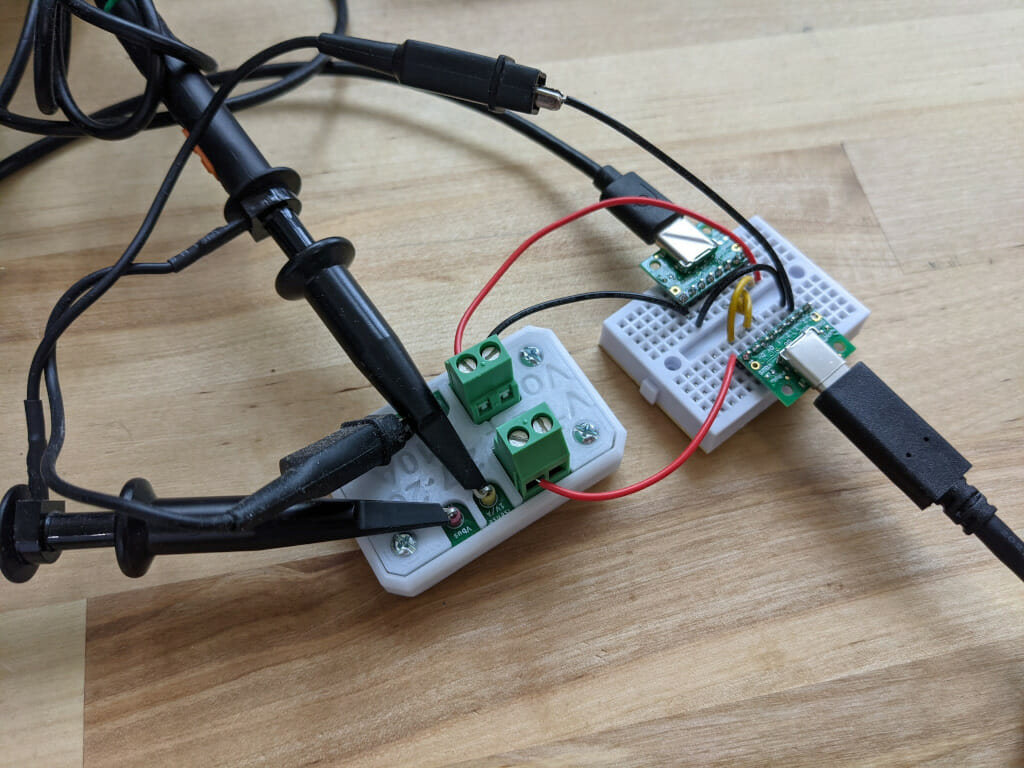
<p>This is the USB-C probing setup using two <a href="https://www.amazon.co.uk/gp/product/B07GZKMPJ8/ref=ppx_yo_dt_b_asin_title_o00_s00?ie=UTF8&amp;psc=1">USB-C breakout boards</a> (with the pulldown resistors removed), and my <a href="https://dubiouscreations.com/2020/08/13/oscilloscope-current-measurement-on-the-cheap/">cheap DIY current probe board</a>.</p>

<!-- _includes/responsive_image.html -->

<div class="image-wrapper">
    <a href="/images/wp-content/uploads/2021/05/PXL_20210501_103413622.jpg" title="" target="_blank">
        <img src="/images/wp-content/uploads/2021/05/PXL_20210501_103413622.jpg" width="1024" height="768" srcset="   /images/resized/wp-content/uploads/2021/05/PXL_20210501_103413622-518.jpg 518w,   /images/resized/wp-content/uploads/2021/05/PXL_20210501_103413622-250.jpg 250w, /images/wp-content/uploads/2021/05/PXL_20210501_103413622.jpg 1024w" alt="" loading="lazy" />
    </a>
    <p class="image-caption">
</p>
</div>

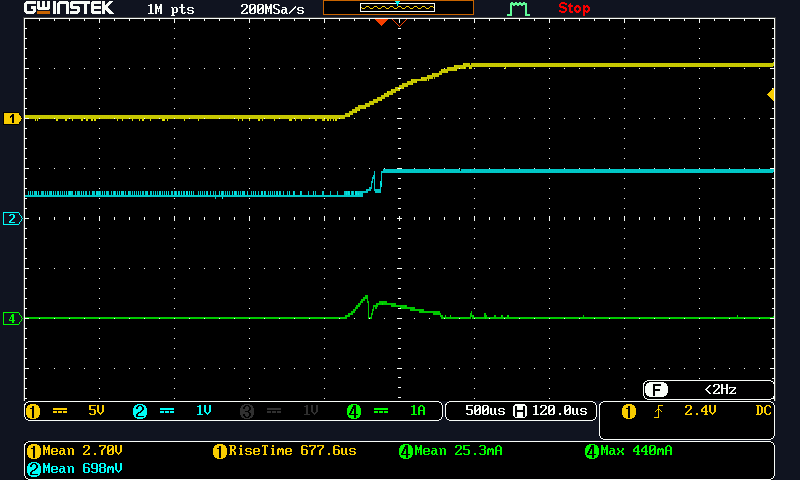
<p>Some cool scope shots, with the board plugged into my MacBook Pro. First we have the plug-in</p>

<!-- _includes/responsive_image.html -->

<div class="image-wrapper">
    <a href="/images/wp-content/uploads/2021/05/plug_in.png" title="" target="_blank">
        <img src="/images/wp-content/uploads/2021/05/plug_in.png" width="800" height="480" srcset="   /images/resized/wp-content/uploads/2021/05/plug_in-518.png 518w,   /images/resized/wp-content/uploads/2021/05/plug_in-250.png 250w, /images/wp-content/uploads/2021/05/plug_in.png 800w" alt="Yellow: Vbus, Blue: CC, Green: Ibus" loading="lazy" />
    </a>
    <p class="image-caption">Yellow: Vbus, Blue: CC, Green: Ibus
</p>
</div>

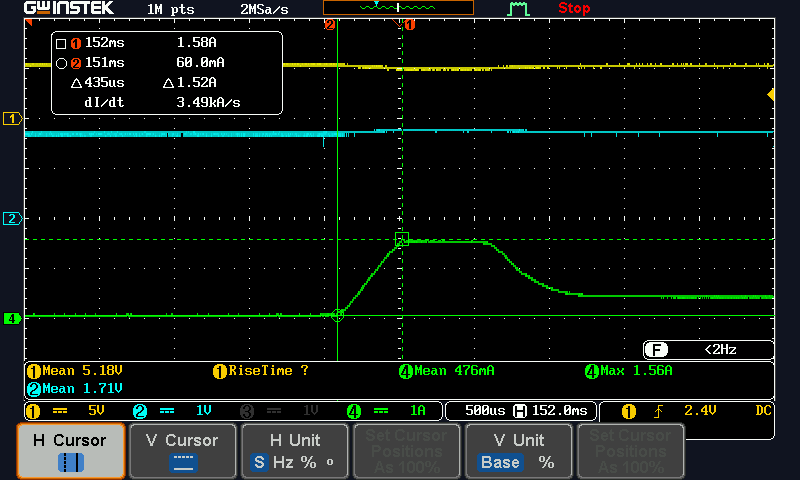
<p>We see that we draw up to 500mA in the first 50 microseconds or so to charge the regulator input capacitance, but at Vbus = ~1V, the regulator turns on and the second pulse starts to charge the capacitances after the regulator, with a nice ramp up and down. We are down to almost 0 current at approximately 200us, once all the capacitances have been charged.</p>

<p>We also see that CC is ~1V, which means the MacBook is advertising 1.5A available.</p>

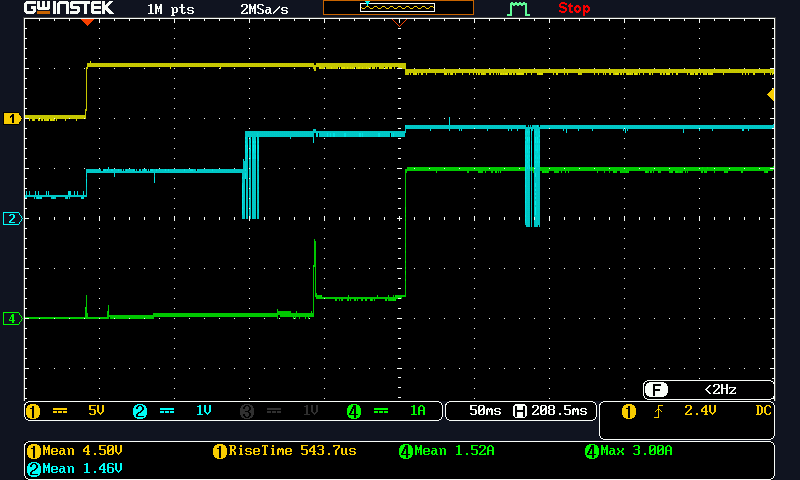
<p>Then we zoom out a bit to see the entire sequence to power-on of the LEDs.</p>

<!-- _includes/responsive_image.html -->

<div class="image-wrapper">
    <a href="/images/wp-content/uploads/2021/05/led_on.png" title="" target="_blank">
        <img src="/images/wp-content/uploads/2021/05/led_on.png" width="800" height="480" srcset="   /images/resized/wp-content/uploads/2021/05/led_on-518.png 518w,   /images/resized/wp-content/uploads/2021/05/led_on-250.png 250w, /images/wp-content/uploads/2021/05/led_on.png 800w" alt="Yellow: Vbus, Blue: CC, Green: Ibus" loading="lazy" />
    </a>
    <p class="image-caption">Yellow: Vbus, Blue: CC, Green: Ibus
</p>
</div>

<p>We see that as the ESP32 boots up (around -3.5div, which is about 50ms after plug-in), current draw increases but is still much lower than the 100mA limit. At -2div, the MacBook changes current advertisement to 3A, and simultaneously sends a Power Delivery message. If we have a more sophisticated controller we can try to decode that message and negotiate using PD instead of the much more crude CC current advertisement mechanism, but we don’t, so we ignore it and just wait for it to stabilise (this is allowed by the standard – devices that don’t understand PD must wait a minimum of 10ms after CC voltage changes to make sure they are not confused by PD messages). Finally, at about -1.2div, our firmware confirms the 3A available change, and turns on the USB power switch to charge the big capacitor, which is the current spike at -1.2div. Once the capacitor is charged, we get back down to about 300mA idle current for the LED matrix. Finally, at +0.1div, we turn the matrix on to all white for testing, drawing 3A. This part looks all good, so let’s zoom in to that capacitor charging spike.</p>

<!-- _includes/responsive_image.html -->

<div class="image-wrapper">
    <a href="/images/wp-content/uploads/2021/05/usb_switch_on.png" title="" target="_blank">
        <img src="/images/wp-content/uploads/2021/05/usb_switch_on.png" width="800" height="480" srcset="   /images/resized/wp-content/uploads/2021/05/usb_switch_on-518.png 518w,   /images/resized/wp-content/uploads/2021/05/usb_switch_on-250.png 250w, /images/wp-content/uploads/2021/05/usb_switch_on.png 800w" alt="Yellow: Vbus, Blue: CC, Green: Ibus" loading="lazy" />
    </a>
    <p class="image-caption">Yellow: Vbus, Blue: CC, Green: Ibus
</p>
</div>

<p>Here we see that we are not exceeding the 1.5A current limit (we designed the firmware to always charge at 1.5A, even though we actually have 3A available in this case). We see that the AP2172A chip is doing its job with a ~500us soft start, and then limiting the charge current to 1.5A, giving us the plateau waveform.</p>

<p>Note that the soft start limits our current slew rate to 3.49kA/s (between the 2 cursor points on the screen). USB spec actually has something to say about that as well – there is a limit of 150mA/us (150kA/s) on current slew rate, so if we limit our current draw to 1.5A, but jump right up to that faster than 150kA/s, we would still not be complaint. Using a USB power switch makes complying with this part of the spec much easier.</p>

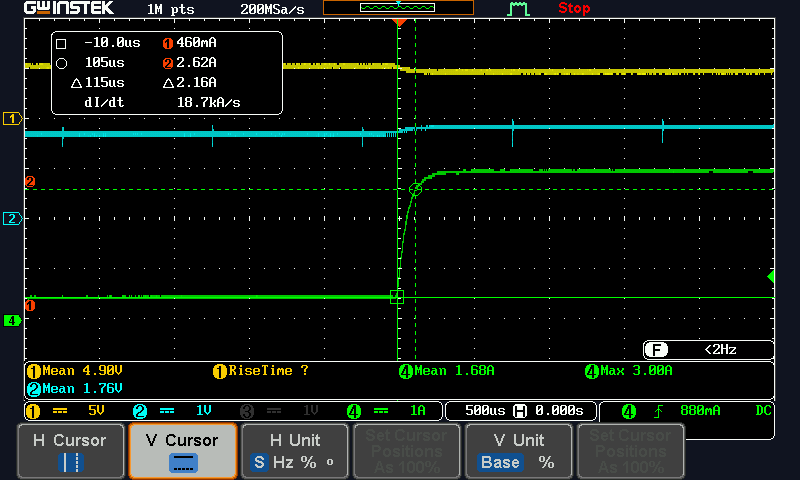
<p>Now let’s look at when the LEDs are suddenly turned on to max power (this is the worst case).</p>

<!-- _includes/responsive_image.html -->

<div class="image-wrapper">
    <a href="/images/wp-content/uploads/2021/05/led_on_current.png" title="" target="_blank">
        <img src="/images/wp-content/uploads/2021/05/led_on_current.png" width="800" height="480" srcset="   /images/resized/wp-content/uploads/2021/05/led_on_current-518.png 518w,   /images/resized/wp-content/uploads/2021/05/led_on_current-250.png 250w, /images/wp-content/uploads/2021/05/led_on_current.png 800w" alt="Yellow: Vbus, Blue: CC, Green: Ibus" loading="lazy" />
    </a>
    <p class="image-caption">Yellow: Vbus, Blue: CC, Green: Ibus
</p>
</div>

<p>We see that the current is limited to 3A (we have a safety margin in our actual firmware – I removed it for testing), and the current slew rate is at 18.7kA/s. If the current slew rate is too high here, we could have compensated for it by increasing the size of the big capacitor, but we are well within the limit here.</p>

<p>Everything looks good on the USB side! I didn’t try to verify actual USB data because that’s handled by the CH340B chip, and I assume it’s compliant since it’s used in many commercial products, and there’s really nothing we can do if it isn’t.</p>

<p>The next thing to look at is the LED data stream. First a zoomed in view of the pulse shape.</p>

<!-- _includes/responsive_image.html -->

<div class="image-wrapper">
    <a href="/images/wp-content/uploads/2021/05/dout_1.png" title="" target="_blank">
        <img src="/images/wp-content/uploads/2021/05/dout_1.png" width="800" height="480" srcset="   /images/resized/wp-content/uploads/2021/05/dout_1-518.png 518w,   /images/resized/wp-content/uploads/2021/05/dout_1-250.png 250w, /images/wp-content/uploads/2021/05/dout_1.png 800w" alt="LED data pulses" loading="lazy" />
    </a>
    <p class="image-caption">LED data pulses
</p>
</div>

<p>The voltage levels look fine, and the edges also look fine. They are a bit overdamped with the 470 ohms series resistor, and that’s why the edges are a bit rounded. But 88.6ns fall and 61.6ns rise is still plenty fast enough for this signal speed, and much better than being under-damped, since ringing can read as additional edges. This also allows the user to use longer wires, where the higher inductance would require more damping.</p>

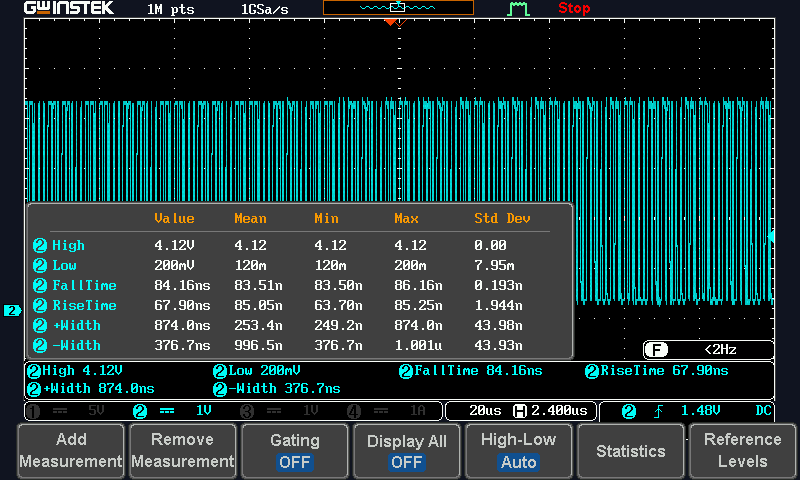
<p>Some pulse statistics when zoomed out:</p>

<!-- _includes/responsive_image.html -->

<div class="image-wrapper">
    <a href="/images/wp-content/uploads/2021/05/dout_stats.png" title="" target="_blank">
        <img src="/images/wp-content/uploads/2021/05/dout_stats.png" width="800" height="480" srcset="   /images/resized/wp-content/uploads/2021/05/dout_stats-518.png 518w,   /images/resized/wp-content/uploads/2021/05/dout_stats-250.png 250w, /images/wp-content/uploads/2021/05/dout_stats.png 800w" alt="Signal statistics" loading="lazy" />
    </a>
    <p class="image-caption">Signal statistics
</p>
</div>

<p>Here we see that the short pulses are 250ns, long pulses 874ns, which are well within spec (220ns – 380ns, and 580ns – 1000ns respectively).</p>

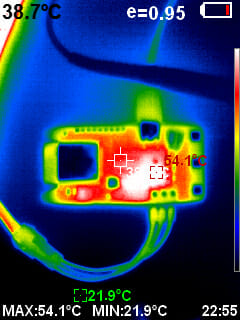
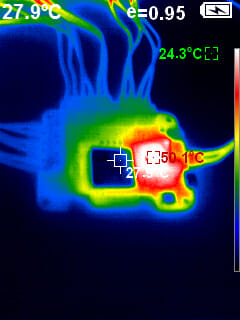
<p>This concludes the scope tests, and just for fun, I also took a picture with my IR camera. This is useful to spot if anything is getting unexpectedly hot.</p>

<!-- _includes/responsive_image.html -->

<div class="image-wrapper">
    <a href="/images/wp-content/uploads/2021/05/20210501-225505.jpg" title="" target="_blank">
        <img src="/images/wp-content/uploads/2021/05/20210501-225505.jpg" width="240" height="320" srcset=" /images/wp-content/uploads/2021/05/20210501-225505.jpg 240w" alt="IR image" loading="lazy" />
    </a>
    <p class="image-caption">IR image
</p>
</div>

<p>The 3.3V regulator and the USB power switches get hot, and that’s as expected. The USB power switch only gets up to 54C, which is acceptable. The chip is fine at this temperature, and 54C is actually also lower than the 60C maximum recommended temperature for exposed heated surfaces in ASTM C1055 (“Standard Guide for Heated System Surface Conditions that Produce Contact Burn Injuries”), so in terms of contact burn risk, this is safe as a consumer product even without an enclosure to stop the user poking the hot bits… at least if the ambient temperature is no higher than about 28C, which would put the chip at 60C.</p>

<p>This concludes our testing! We will be doing the mini-production run soon.</p>

<h2 id="lessons-learned">Lessons Learned</h2>

<p>This is my first ever project to be produced at this kind of quantity, and it has been very interesting experience learning about all the different considerations that go into designing for manufacturability (and design for availability, given the current chip shortage). It’s not difficult, but there are just so many things to think about even for a relatively simple design like this. First we had soldering defects that I would normally not worry about too much but is unacceptable to fix manually at quantity, then we had random basic chips going out of stock between each prototype iteration, chips failing (probably) due to moisture handling, capacitors becoming piezoelectric buzzers, and then there’s the much more extensive testing required to gain confidence that the design will work with a wide range of hardware that we cannot exhaustively test. All very different from personal hobbyist projects where I only need to make sure they work for me, and can do a lot more trial and error, as well as manual hacking to fix things. I knew all those things in theory before, but it’s very different putting them all into practice.</p>

<p>And then of course there is a whole another level out there, designing products that will be produced in the thousands or millions, and require going through certification. As a hobbyist engineer, I will probably never get to work on a product like that, but hopefully I’ll get to do another &gt;100pc design at some point!</p>

<p>I am also in awe how (relatively) easy and affordable getting our boards made and assembled is. With JLC’s assembly service they supply all the parts from LCSC, so although it does mean you have to design using the parts they have, they do have a pretty extensive library, and if your design works with just their components, it’s about as turnkey as assembly services get. You don’t have to worry about sourcing and shipping parts to them, or have them source your parts and potentially end up with “substitutes” that don’t actually work in your design, or counterfeit parts, as you would with other assembly services. To be fair, we did run into some assembly quality problems that required designing around (the LEDs and the CP2102 chip), but still, I’ve always imagined getting boards assembled would be much more work than this as a hobbyist.</p>

<p>Disclosure: JLC sponsored some of my projects.</p>]]></content><author><name>matthew</name></author><category term="Electronics" /><summary type="html"><![CDATA[We built a web-connected LED matrix driver for a team of about 500 people, over 4 months. This post is about the hardware design.]]></summary><media:thumbnail xmlns:media="http://search.yahoo.com/mrss/" url="https://dubiouscreations.com/images/resized/wp-content/uploads/2021/05/PXL_20210401_180605063-1-1024x768-250.jpg" /><media:content medium="image" url="https://dubiouscreations.com/images/resized/wp-content/uploads/2021/05/PXL_20210401_180605063-1-1024x768-250.jpg" xmlns:media="http://search.yahoo.com/mrss/" /></entry><entry><title type="html">Designing with USB-C: Lessons Learned</title><link href="https://dubiouscreations.com/2021/04/06/designing-with-usb-c-lessons-learned/" rel="alternate" type="text/html" title="Designing with USB-C: Lessons Learned" /><published>2021-04-05T23:10:19+00:00</published><updated>2021-04-05T23:10:19+00:00</updated><id>https://dubiouscreations.com/2021/04/06/designing-with-usb-c-lessons-learned</id><content type="html" xml:base="https://dubiouscreations.com/2021/04/06/designing-with-usb-c-lessons-learned/"><![CDATA[<p>I spent hours reading the USB-C spec so you don’t have to. A guide to designing compliant circuits with USB-C for hobbyists.</p>

<!-- _includes/responsive_image.html -->

<div class="image-wrapper">
    <a href="/images/wp-content/uploads/2021/04/image-12-1-1024x768.jpg" title="" target="_blank">
        <img src="/images/wp-content/uploads/2021/04/image-12-1-1024x768.jpg" width="1024" height="768" srcset="   /images/resized/wp-content/uploads/2021/04/image-12-1-1024x768-518.jpg 518w,   /images/resized/wp-content/uploads/2021/04/image-12-1-1024x768-250.jpg 250w, /images/wp-content/uploads/2021/04/image-12-1-1024x768.jpg 1024w" alt="My first USB-C design!" loading="lazy" />
    </a>
    <p class="image-caption">My first USB-C design!
</p>
</div>

<p><em>Disclosure: JLCPCB sponsors some of my projects, but I would never recommend something that I wouldn’t otherwise. Their SMT Assembly service I believe is unique in the industry, and is great for hobbyists who need high quality assembled prototypes for cheap, without having to deal with logistics of component supply.</em></p>

<p>TLDR: Scroll to the “Putting It All Together” section. Implement that circuit, and use it like a good old Type B port.</p>

<h2 id="introduction-and-history">Introduction and History</h2>

<p>USB is really a miracle connector. I have been designing PCBs for about a decade now (mostly as a hobbyist due to selling out and joining the software world for my career after my EE degree), and of the dozens of boards I’ve designed, I can probably count on one hand all the designs without a USB port.</p>

<p>Why do I put a USB port on virtually all my boards? Because it:</p>

<ul>
  <li>Supplies power at a convenient voltage.</li>
  <li>Most of the microcontrollers I use nowadays have either a serial bootloader (ESP32) or built-in USB DFU bootloader (STM32), so it can be used to program the chip.</li>
  <li>A serial port for debugging (either through a USB-UART chip or enumerating as a CDC-ACM virtual serial port in firmware for STM32).</li>
</ul>

<p>What more can you ask from an ubiquitous connector that takes up minimal board space, and uses cables you can buy from even grocery stores? If you want to power your project with a wall wart, USB chargers are readily available, too (even from grocery stores).</p>

<p>But wait, it gets even better. Back in 2014, the USB-C standard was finalised, and Google was the first major manufacturer to adopt it with the 2015 Chromebook Pixel, with Apple following shortly after with the 2015 MacBook. Initial adoption was a bit slow, but over the past few years, USB-C has taken over the consumer electronics market, and most laptops and smartphones come with USB-C nowadays. That’s a very good thing, because USB-B had many pain points –</p>

<ul>
  <li>USB was not designed to supply significant amount of power initially – only 5V @ 500mA. As a result, to support battery charging, manufacturers started adding proprietary extensions for higher current (and sometimes voltage) – Qualcomm’s Quick Charge, Sony had their own thing, Apple had their own thing, and Samsung had their own thing. None of them were inter-operable, making designing a “universal” power sink very challenging. Eventually USB-IF (the governing body of USB) came up with the Battery Charging Specification (BCS), but it was a bit too late, and it’s also unnecessarily complicated due to having to make do with the existing data pins. It must not break existing devices that don’t understand BCS, and in designs where we need both high current and data transfer, having to multiplex BCS detection circuitry with data lines is always a pain. It’s also limited to only 5V@1.5A, because A-B cables don’t have any identification mechanism, and burning down a user’s house trying to push 5A through a cable designed for 1.5A is frowned upon.</li>
  <li>Different connectors for USB 1.1/2.0 and 3.0.</li>
  <li>Different connectors for host vs device. The initial design calls for USB-A ports on hosts, USB-B ports on devices, with a few size variations for both (mini and micro – they are electrically identical to full fat versions… more or less). It made sense – if all hosts have Type A ports, all devices have Type B ports, and we only make A-B cables, everything works as long as they fit! … Well, until we realised that we want some things to be devices some of the time, and hosts some of the time – phones and tablets. They need to be device when charging or plugged into a computer, but host when we want them to read a USB flash drive or use a USB keyboard to write a long blog post. So like BCS, we bolted it on with the USB OTG abomination, which also left a lot to be desired.</li>
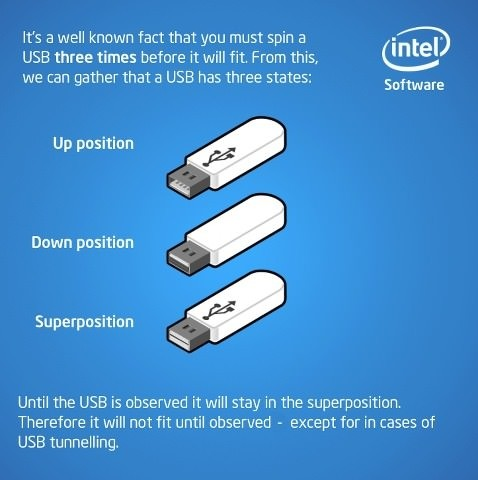
  <li><a href="https://www.reddit.com/r/ProgrammerHumor/comments/226qum/usb_superposition/">USB superposition</a>.</li>
</ul>

<!-- _includes/responsive_image.html -->

<div class="image-wrapper">
    <a href="/images/wp-content/uploads/2021/04/image-1.png" title="" target="_blank">
        <img src="/images/wp-content/uploads/2021/04/image-1.png" width="478" height="480" srcset="   /images/resized/wp-content/uploads/2021/04/image-1-250.png 250w, /images/wp-content/uploads/2021/04/image-1.png 478w" alt="USB Superposition" loading="lazy" />
    </a>
    <p class="image-caption">USB Superposition
</p>
</div>

<p>USB-C solved all those problems from the ground up:</p>

<ul>
  <li>We can now get up to 5V@3A with a very simple detection mechanism that just requires 2 ADC pins, or 1 if we add a bit of additional hardware. No complicated multiplexing needed because they are not on data pins. If we want higher voltage/current, we can get up to 20V@5A with the new Type C Power Delivery standard though that is more complicated. Best of all, this is all standardised. Nothing is proprietary, and all USB-C devices support these (ok, maybe that’s optimistic… let’s just say all devices from reputable manufacturers do).</li>
  <li>One connector rules them all – USB 1.1/2.0, 3.0/3.1/3.2, 4.0, even DP, HDMI, audio, and a few other things.</li>
  <li>One cable rules them all – C to C is all we need (ok that’s a lie, we actually have two types of cables, one basic type for up to USB 2.0 @ 3A, and a fancier type that self-identifies their capabilities). Roles are determined electrically, not using connectors.</li>
  <li>No more superposition!!</li>
</ul>

<p>Despite being a big fan of Type C from the early days, I have only just designed my first PCB with USB-C, in 2021, feeling like a hypocrite this whole time buying only USB-C devices, and still making micro-B ones!</p>

<p>Why? Mostly because Type-C connectors tend to be much harder to solder (much more pins, about the same total connector size). The standard is also much more complicated, though as we will see shortly, actual implementation is VERY simple if we just want to use it to replace micro-B in USB 2.0 devices (as opposed to hosts).</p>

<p>What changed? Well, JLCPCB started offering Type C connectors with their SMT assembly service, so I have no excuse now!</p>

<p>I did a lot of reading up on Type C for my first project, both official and unofficial sources, and I thought I would write a post summarising all I have learned and de-mystify it a bit, and hopefully encourage other hobbyists/makers to adopt USB-C.</p>

<h2 id="scope">Scope</h2>

<p>Type C is a very big standard. The “bible” – <a href="https://www.usb.org/sites/default/files/USB%20Type-C%20Spec%20R2.0%20-%20August%202019.pdf">Universal Serial Bus Type-C Cable and Connector Specification</a>, is 373 pages long. They clearly learned from their mistake before, and decided to include EVERYTHING that anyone can conceivably need into the standard. But for basic applications, you don’t actually need to know all those things. You should (if I do my job) be able to use Type-C as a micro-B replacement in a standard-compliant way by just reading this post.</p>

<p>I’ll limit the discussion in this post to designing Type-C pure devices (called upstream-facing port or UFP in the spec), pure power sinks (USB-C actually allows devices to negotiate switching power supply direction without switching data host/device!), and communicate at up to USB 2.0 HighSpeed. This I think encompasses most hobbyist applications.</p>

<p>Let’s get started.</p>

<h2 id="connectors">Connectors</h2>

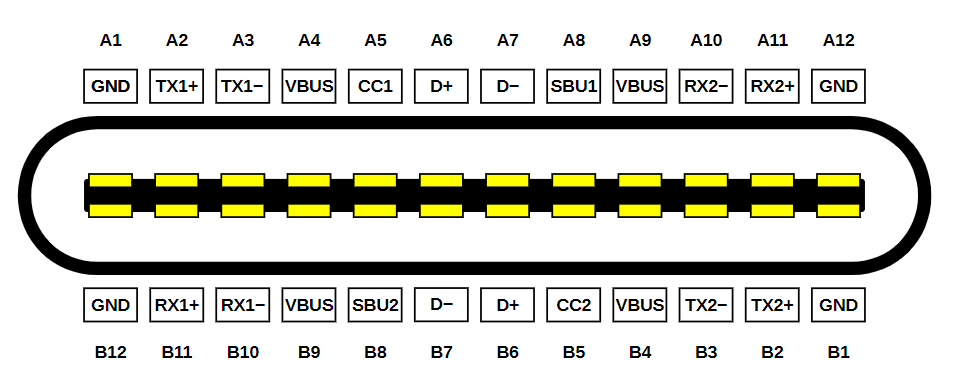
<p>This is the connector pinout from Wikipedia:</p>

<!-- _includes/responsive_image.html -->

<div class="image-wrapper">
    <a href="/images/wp-content/uploads/2021/04/image-2.png" title="" target="_blank">
        <img src="/images/wp-content/uploads/2021/04/image-2.png" width="955" height="385" srcset="   /images/resized/wp-content/uploads/2021/04/image-2-518.png 518w,   /images/resized/wp-content/uploads/2021/04/image-2-250.png 250w, /images/wp-content/uploads/2021/04/image-2.png 955w" alt="USB-C Connector Pinout (By Chindi.ap, CC BY-SA 4.0, Wikipedia)" loading="lazy" />
    </a>
    <p class="image-caption">USB-C Connector Pinout (By Chindi.ap, CC BY-SA 4.0, Wikipedia)
</p>
</div>

<p>It looks quite daunting, but we actually don’t care about most of those pins for our application:</p>

<ul>
  <li>TXn+, TXn-, RXn+, RXn- pins are for USB 3 SuperSpeed, so we can ignore them.</li>
  <li>SBU1/2 pins are for side band use (used for low speed communication when the port is used for something like DP or HDMI), so we can also ignore them.</li>
</ul>

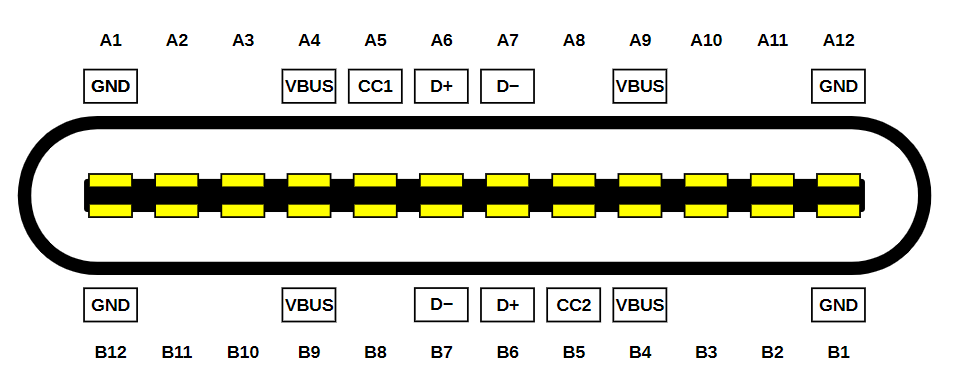
<p>That leaves us with these pins –</p>

<!-- _includes/responsive_image.html -->

<div class="image-wrapper">
    <a href="/images/wp-content/uploads/2021/04/image-3.png" title="" target="_blank">
        <img src="/images/wp-content/uploads/2021/04/image-3.png" width="953" height="383" srcset="   /images/resized/wp-content/uploads/2021/04/image-3-518.png 518w,   /images/resized/wp-content/uploads/2021/04/image-3-250.png 250w, /images/wp-content/uploads/2021/04/image-3.png 953w" alt="Simplified USB-C Connector Pinout" loading="lazy" />
    </a>
    <p class="image-caption">Simplified USB-C Connector Pinout
</p>
</div>

<p>Much more manageable. Most of them are pins we already know and love – VBUS, D+, D-, GND. Except they are all doubled/quadrupled now to support reversible insertion. They can (and should) all be shorted together.</p>

<p>The only new pins are CC1 and CC2 (channel configuration), and they do a few things:</p>

<ul>
  <li>Pull down resistors on the device side tells the host that a connection has been made with a device, and VBUS should be turned on. Unlike Type A, in Type C VBUS is never energised until a host knows a device is there, because the user may plug two hosts into each other, and terrible things would happen if they are permanently live.</li>
  <li>On the device side, one of them will read as ground, and the other some higher voltage. This tells us the cable orientation. It’s important for 3.0/SuperSpeed operations, but we don’t actually care about orientation for 2.0, since we are shorting all the other pins together! I will refer to the non-ground one as CC from now on, though it can be physically on either CC1 or CC2 depending on orientation (and we must account for both possibilities, otherwise our device will only work with cable inserted one way). No, we cannot short them.</li>
  <li>The CC voltage is used to determine how much current is available from the upstream port, and whether there is a connection. This voltage is determined by a voltage divider between host and device.</li>
  <li>If we want to do Power Delivery (we need more than 5V@3A), the communication also happens on the CC pin, but it’s much more involved and we probably want to use a PD sink controller to handle that for us (eg. ST <a href="https://www.st.com/en/interfaces-and-transceivers/stusb4500.html">STUSB4500</a>).</li>
</ul>

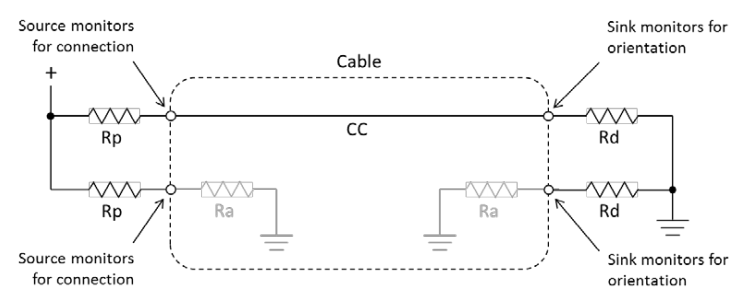
<p>The standard requires that CC1 and CC2 be pulled down to ground on the device side with a 5.1k ±10% Ω resistor each (Table 4-25 in the spec), and with a basic C-C cable, only one will be connected to the host, which will have different valued pull-up resistors to indicate how much current it can supply – 56kΩ, 22kΩ, or 10kΩ to 5V, or an equivalent current source, or equivalent pull-ups to 3.3V (Table 4-24).</p>

<p>So in the end, the whole circuit looks like this:</p>

<!-- _includes/responsive_image.html -->

<div class="image-wrapper">
    <a href="/images/wp-content/uploads/2021/04/image-4.png" title="" target="_blank">
        <img src="/images/wp-content/uploads/2021/04/image-4.png" width="740" height="307" srcset="   /images/resized/wp-content/uploads/2021/04/image-4-518.png 518w,   /images/resized/wp-content/uploads/2021/04/image-4-250.png 250w, /images/wp-content/uploads/2021/04/image-4.png 740w" alt="Connectors + cables circuit (Silicon Labs)" loading="lazy" />
    </a>
    <p class="image-caption">Connectors + cables circuit (Silicon Labs)
</p>
</div>

<p>In a basic USB 2.0 3A cable, Ra doesn’t exist, but fancy cables that support higher speeds or higher currents will have them to power electronics in the cable so they can tell the host their capabilities. On the device side we don’t care about that, but that’s the reason why we can’t short the CC pins and just use one resistor. Raspberry Pi Foundation did that with early revisions of the Raspberry Pi 4, and it <a href="https://hackaday.com/2019/07/16/exploring-the-raspberry-pi-4-usb-c-issue-in-depth/">didn’t end well for them</a>. Don’t be like them.</p>

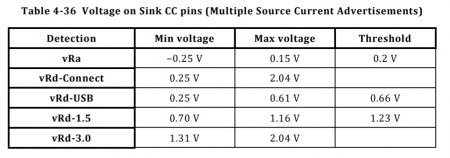
<p>In terms of determining how much current you can draw, just read the CC voltage (remember that it’s the higher of CC1 and CC2). Thresholds are as follows:</p>

<!-- _includes/responsive_image.html -->

<div class="image-wrapper">
    <a href="/images/wp-content/uploads/2021/04/image-5-450x158.png" title="" target="_blank">
        <img src="/images/wp-content/uploads/2021/04/image-5-450x158.png" width="450" height="158" srcset="   /images/resized/wp-content/uploads/2021/04/image-5-450x158-250.png 250w, /images/wp-content/uploads/2021/04/image-5-450x158.png 450w" alt="Table 4-36: Current advertisement" loading="lazy" />
    </a>
    <p class="image-caption">Table 4-36: Current advertisement
</p>
</div>

<p>So what that means is:</p>

<ul>
  <li>[0V – 0.2V]: No connection (we only care about this if the device is self-powered, because in a bus-powered device, the fact that we have power and the firmware is running means there is a connection)</li>
  <li>[0.2V – 0.66V]: Standard USB current available (the host either has no high current capability, or we are connected to a legacy host with a A-C cable – see “How Much Current Can I Draw?” for more details)</li>
  <li>[0.66V – 1.23V]: 1.5A available</li>
  <li>[1.23V+]: 3.0A available</li>
</ul>

<p>In practice, most laptops will supply 1.5A or 3.0A, most wall warts will supply 3.0A, and phones (if we use them as host) will support standard USB. The CC voltage may change over time and should be continually monitored. When it changes, the device has 60ms to be compliant with the new advertised current limit (tSinkAdj, Table 4-29).</p>

<p>If we are using a USB-A power supply with an A-C cable, it will always show vRd-USB because the pull-ups are actually inside the cable, since a USB-A host knows nothing about CC signals, and a compliant A-C cable can’t assume the host can supply more. There ARE non-compliant cables that do advertise high current support to device without checking with host. <a href="https://www.extremetech.com/computing/217556-google-engineer-challenges-usb-c-cables-for-sale-at-amazon">They are a fire risk and should never be used</a>. Fortunately they are less common now in 2021. So if we want to draw more current from a legacy power supply, we have to go back to the pre-Type-C madness on data lines.</p>

<h2 id="putting-it-all-together-aka-tldr">Putting It All Together (aka TLDR)</h2>

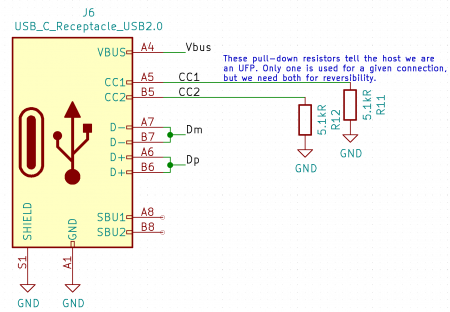
<p>With that, we arrive at the schematics for using a Type C port as a micro-B replacement –</p>

<!-- _includes/responsive_image.html -->

<div class="image-wrapper">
    <a href="/images/wp-content/uploads/2021/04/image-6-450x312.png" title="" target="_blank">
        <img src="/images/wp-content/uploads/2021/04/image-6-450x312.png" width="450" height="312" srcset="   /images/resized/wp-content/uploads/2021/04/image-6-450x312-250.png 250w, /images/wp-content/uploads/2021/04/image-6-450x312.png 450w" alt="Simple Type C schematic" loading="lazy" />
    </a>
    <p class="image-caption">Simple Type C schematic
</p>
</div>

<p>Vbus, D+, D-, and Gnd are used just like in legacy connectors.</p>

<p>CC1 and CC2 must have a 5.1kΩ pull-down each. If you want to take advantage of the new Type C current advertisement mechanism, they should be routed to ADC pins on your microcontroller, but if you don’t need that, leaving them alone with just the pull-downs is perfectly fine, too, and it will act just like a standard Type B port electrically.</p>

<p>Note that I am using a connector with only the USB 2.0 pins. If you are using a fully-featured connector, all other pins can be left unconnected.</p>

<h2 id="choosing-a-connector">Choosing a Connector</h2>

<p>Now that we have decided to add USB-C to our project, we need to pick a connector to use. It’s not easy – there is a huge variety on the market, and some are much harder to use than others. Generally, they are one of these four types.</p>

<h3 id="full-featured-all-smt">Full Featured All SMT</h3>

<p>First type is a fully featured connector with two rows of SMT pads. They are probably the most difficult to use for hobbyists, because there is no way to inspect/fix the inner pads, and at ~0.3mm pitch, those pads are very close together, and may short if your reflow process isn’t absolutely perfect.</p>

<p>If you are getting your boards professionally assembled, this may be ok, but there’s no need to risk it if you don’t need USB 3.0 SuperSpeed.</p>

<p>Here is <a href="https://datasheet.lcsc.com/szlcsc/1811131825_Korean-Hroparts-Elec-TYPE-C-31-M-05_C106817.pdf">one example</a>: Korean Hroparts TYPE-C-31-M-05.</p>

<!-- _includes/responsive_image.html -->

<div class="image-wrapper">
    <a href="/images/wp-content/uploads/2021/04/image-7-450x206.png" title="" target="_blank">
        <img src="/images/wp-content/uploads/2021/04/image-7-450x206.png" width="450" height="206" srcset="   /images/resized/wp-content/uploads/2021/04/image-7-450x206-250.png 250w, /images/wp-content/uploads/2021/04/image-7-450x206.png 450w" alt="Full featured connector" loading="lazy" />
    </a>
    <p class="image-caption">Full featured connector
</p>
</div>

<h3 id="full-featured-12-smt-12-th">Full Featured 1/2 SMT 1/2 TH</h3>

<p>And then we have connectors where the back row uses through-hole pins instead of pads. They are probably easier, but the pins are very close together, and it seems like a huge hassle.</p>

<p>Example: JAE <a href="https://www.mouser.co.uk/datasheet/2/206/DX07S024XA8R700-1920422.pdf">DX07S024XA8R700</a>.</p>

<!-- _includes/responsive_image.html -->

<div class="image-wrapper">
    <a href="/images/wp-content/uploads/2021/04/image-8-390x450.png" title="" target="_blank">
        <img src="/images/wp-content/uploads/2021/04/image-8-390x450.png" width="390" height="450" srcset="   /images/resized/wp-content/uploads/2021/04/image-8-390x450-250.png 250w, /images/wp-content/uploads/2021/04/image-8-390x450.png 390w" alt="JAE DX07S024XA8R700" loading="lazy" />
    </a>
    <p class="image-caption">JAE DX07S024XA8R700
</p>
</div>

<h3 id="usb-20-only-smt">USB 2.0-Only SMT</h3>

<p>And then we have connectors that omit all the pins not required for USB 2.0, and we end up with a connector with just one row of SMD pads, with reasonable spacing. This option I believe works the best for our applications, and my chosen connector is the Korean Hroparts <a href="https://datasheet.lcsc.com/szlcsc/1811131825_Korean-Hroparts-Elec-TYPE-C-31-M-12_C165948.pdf">TYPE-C-31-M-12</a> (LCSC part number <a href="https://lcsc.com/product-detail/USB-Connectors_Korean-Hroparts-Elec-TYPE-C-31-M-12_C165948.html/?href=jlc-SMT">C165948</a>).</p>

<p>JLC has a lot of them in stock as of this writing, and offers them for $0.307 at qty 1, and a few cents to solder them for us.</p>

<!-- _includes/responsive_image.html -->

<div class="image-wrapper">
    <a href="/images/wp-content/uploads/2021/04/image-10.png" title="" target="_blank">
        <img src="/images/wp-content/uploads/2021/04/image-10.png" width="501" height="405" srcset="   /images/resized/wp-content/uploads/2021/04/image-10-250.png 250w, /images/wp-content/uploads/2021/04/image-10.png 501w" alt="Korean Hroparts TYPE-C-31-M-12" loading="lazy" />
    </a>
    <p class="image-caption">Korean Hroparts TYPE-C-31-M-12
</p>
</div>

<p>It has worked very well for me so far – perfect assembly quality from JLC, using KiCad’s built-in footprint for this connector.</p>

<p>I have never had to solder it myself, but because the pins actually extend past the housing (unlike many micro-B connectors), I feel this is probably pretty easy to hand-solder, too, if you are used to soldering QFPs.</p>

<h3 id="power-only-smt">Power-Only SMT</h3>

<p>If we don’t need data transfer at all, there are even simpler connectors that only have power and the CC pins (so we can determine how much current we can draw). I have not tried them.</p>

<p>Example: Korean Hroparts <a href="https://datasheet.lcsc.com/szlcsc/1811101526_Korean-Hroparts-Elec-TYPE-C-31-M-17_C283540.pdf">TYPE-C-31-M-17</a>. It’s $0.191 from JLC, so you save about 11 cents.</p>

<!-- _includes/responsive_image.html -->

<div class="image-wrapper">
    <a href="/images/wp-content/uploads/2021/04/image-11-450x184.png" title="" target="_blank">
        <img src="/images/wp-content/uploads/2021/04/image-11-450x184.png" width="450" height="184" srcset="   /images/resized/wp-content/uploads/2021/04/image-11-450x184-250.png 250w, /images/wp-content/uploads/2021/04/image-11-450x184.png 450w" alt="Korean Hroparts TYPE-C-31-M-17" loading="lazy" />
    </a>
    <p class="image-caption">Korean Hroparts TYPE-C-31-M-17
</p>
</div>

<h2 id="how-much-current-can-i-draw">How Much Current Can I Draw?</h2>

<h3 id="continuous">Continuous</h3>

<p>If you have a USB-C power supply, just read the CC voltage, and refer to Table 4-36 copied above. If you want to support legacy power supplies as well with A-C cables, you also have to implement detection based on Battery Charging Specification 1.2.</p>

<p>Maxim has a guide on how to do that: <a href="https://pdfserv.maximintegrated.com/en/an/TUT5801.pdf">https://pdfserv.maximintegrated.com/en/an/TUT5801.pdf</a></p>

<p>But it basically boils down to this (as I understand it) – there are 3 types of ports. Standard Downstream Port (SDP) which is data only with no high current capacity, a Charging Downstream Port (CDP) which is data + 1.5A, and a Dedicated Charging Port (DCP) which is 1.5A with no data.</p>

<p>One possible detection algorithm is to apply 3.3V to D+, and read D-. If it’s 3.3V, we have either CDP or DCP (otherwise SDP). Then we do the same, but reversed (apply voltage to D- and read D+). If D+ reads 3.3V, we have a bi-directional short between D+ and D-, which means we have a DCP. Otherwise it’s a CDP.</p>

<p>And remember that you have to multiplex it with data, if you also want to do data transfer.</p>

<p>If you want to support proprietary implementations, that’s a whole nother can of worms. Both Apple and Sony use resistive dividers on data lines that can be read with an ADC. Quick Charge I believe requires a dedicated controller.</p>

<p>Without either CC showing 1.5A/3A or BCS showing CDP or DCP, we have standard USB current, and that’s a lot more complicated. In this case you are allowed to draw 500mA only if your device cannot enumerate. If your device does enumerate, it must draw maximum of 100mA until negotiated otherwise with the host as part of the enumeration process (up to 500mA).</p>

<h3 id="startup-current">Startup Current</h3>

<p>So either Type C current advertisement or BCS tells us the maximum continuous current, but what about peak current at plug-in, when all the capacitances charge up?</p>

<p>The spec allows for 10µF on Vbus (Table 4-3: VBus Sink Characteristics) or equivalent. What that means exactly is not 100% clear, but most people take it to mean that the initial current spike above the max continuous current allowed, when integrated over time, should be no more than 50µC, which is what a 10µF capacitor will draw at 5V. So if we have a huge capacitor behind a regulator, that would count, too, unless our regulator is current-limiting.</p>

<p>It does NOT mean we can’t have more capacitance than that. What that means is if we have more capacitance, we have to limit the inrush current so that they don’t appear as “naked” capacitance on Vbus (it may trigger overcurrent reset from the host). If we limit the charging speed of our capacitance to the max continuous current, we can have as much capacitance as we want.</p>

<p>Fortunately, there are many chips (usually called USB Power Distribution Switches) that can handle this for us. For example, the Diodes Incorporated <a href="https://www.diodes.com/assets/Datasheets/AP2162_72.pdf">AP2162/2172</a>.</p>

<h3 id="current-slew-rate">Current Slew Rate</h3>

<p>This one is a bit harder to design for, and is probably more practically verified on the prototype rather than ensured by design. The maximum current slew rate (dI/dt) is 150mA/us, both on ramp up and down. This is the iLoadStepRate(max) in the spec, and the reason why it’s limited is because too much dI/dt can cause unacceptable Vbus voltage drop on the host due to inductance in the power supply path. If your design is exceeding this, it needs more capacitance (potentially requiring the use of a current-limiting switch, as described above).</p>

<h3 id="suspend-mode">Suspend Mode</h3>

<p>A compliant device must implement suspend mode. In short, if there is no traffic on the data bus for 3ms, the device has 7ms to enter suspend mode where it must draw no more than 2.5mA. This may be difficult to implement if you don’t do USB yourself, but for example, the Silicon Labs CP210x USB-UART chip has SUSPEND outputs for this purpose. The microcontroller can monitor it, and turn into go into sleep mode if/when it goes high.</p>

<p>This requirement may be ignored if either CC indicates 1.5A/3.0A, or the host is a CDP/DCP port as detected through BCS.</p>

<h2 id="pcb-design">PCB Design</h2>

<!-- _includes/responsive_image.html -->

<div class="image-wrapper">
    <a href="/images/wp-content/uploads/2021/04/image-12-367x450.png" title="" target="_blank">
        <img src="/images/wp-content/uploads/2021/04/image-12-367x450.png" width="367" height="450" srcset="   /images/resized/wp-content/uploads/2021/04/image-12-367x450-250.png 250w, /images/wp-content/uploads/2021/04/image-12-367x450.png 367w" alt="PCB Design" loading="lazy" />
    </a>
    <p class="image-caption">PCB Design
</p>
</div>

<p>It depends on what connector you choose, but in my case it’s pretty simple. All the shorting does make it a bit more complicated, but still easily doable on 2 layers, which is a requirement for this project due to cost-sensitivity (most of my other projects are 4 layers now).</p>

<p>For routing the data traces, standard rules apply (this is not specific to USB-C). They should be routed close together, with minimal vias and parallel runs of traces on another layer. Do we need impedance-controlled routing? Well, if you have a 4 layers board and you get free impedance control from your fab (like JLC), might as well do it. But whether that’s necessary or not depends on speed (edge rate) and trace length.</p>

<p>The general rule of thumb is if the edge rate divided by signal travel time is smaller than 6, we need to think about treating it as a transmission line (with controlled impedance).</p>

<p>USB minimum edge rates are 75ns for Low Speed, 20ns for Full Speed, and 500ps for High Speed. That gives us a maximum propagation time of 12.5ns, 3.33ns, and 83ps respectively. Velocity of propagation is ~0.6c, which gives us a maximum trace lengths of 2.2m, 60cm, and 1.49cm respectively, without having to worry about transmission line effects. In practice that means we don’t really need to worry unless we are doing High Speed (or we have very long traces).</p>

<p>So what if we need controlled impedance? We have to calculate the trace width and spacing, based on the dielectric our fab is using. For example, <a href="https://cart.jlcpcb.com/impedanceCalculation?_ga=2.230527258.705169438.1590068961-649473211.1589804663">this is JLC’s calculator</a>. USB spec requires differential impedance to be 90Ω, which means that given a trace space of 5 mil (that’s a free parameter), we need 8.1 mil traces with the JLC7628 dielectric, or 5.17 mil traces with the JLC2313 dielectric. Using their standard stackup for 4 layers 1.6mm boards.</p>

<!-- _includes/responsive_image.html -->

<div class="image-wrapper">
    <a href="/images/wp-content/uploads/2021/04/image-13-1024x470.jpg" title="" target="_blank">
        <img src="/images/wp-content/uploads/2021/04/image-13-1024x470.jpg" width="1024" height="470" srcset="   /images/resized/wp-content/uploads/2021/04/image-13-1024x470-518.jpg 518w,   /images/resized/wp-content/uploads/2021/04/image-13-1024x470-250.jpg 250w, /images/wp-content/uploads/2021/04/image-13-1024x470.jpg 1024w" alt="Impedance calculator" loading="lazy" />
    </a>
    <p class="image-caption">Impedance calculator
</p>
</div>

<p>Your result will be different depending on the fab, dielectric, and the stackup they use. There should always be a solid ground plane underneath the transmission line, and no other trace should be within 3x the width of the traces.</p>

<p>CC lines are low speed, and you can do whatever you want with them (within reason…).</p>

<p>Good luck with your designs and hope we will soon be in USB-C-opia!</p>

<p>Discussions on Reddit: <a href="https://www.reddit.com/r/diyelectronics/comments/mlyedi/guide_to_designing_with_usbc/">https://www.reddit.com/r/diyelectronics/comments/mlyedi/guide_to_designing_with_usbc/</a></p>

<!-- _includes/responsive_image.html -->

<div class="image-wrapper">
    <a href="/images/wp-content/uploads/2021/04/Untitled-1-450x337.jpg" title="" target="_blank">
        <img src="/images/wp-content/uploads/2021/04/Untitled-1-450x337.jpg" width="450" height="337" srcset="   /images/resized/wp-content/uploads/2021/04/Untitled-1-450x337-250.jpg 250w, /images/wp-content/uploads/2021/04/Untitled-1-450x337.jpg 450w" alt="" loading="lazy" />
    </a>
    <p class="image-caption">
</p>
</div>]]></content><author><name>matthew</name></author><category term="Electronics" /><category term="Tutorial" /><summary type="html"><![CDATA[I spent hours reading the USB-C spec so you don’t have to. A guide to designing compliant circuits with USB-C for hobbyists.]]></summary><media:thumbnail xmlns:media="http://search.yahoo.com/mrss/" url="https://dubiouscreations.com/images/resized/wp-content/uploads/2021/04/image-12-1-1024x768-250.jpg" /><media:content medium="image" url="https://dubiouscreations.com/images/resized/wp-content/uploads/2021/04/image-12-1-1024x768-250.jpg" xmlns:media="http://search.yahoo.com/mrss/" /></entry><entry><title type="html">Building an ESP32 Light Controller</title><link href="https://dubiouscreations.com/2020/08/16/building-an-esp32-light-controller/" rel="alternate" type="text/html" title="Building an ESP32 Light Controller" /><published>2020-08-15T23:37:50+00:00</published><updated>2020-08-15T23:37:50+00:00</updated><id>https://dubiouscreations.com/2020/08/16/building-an-esp32-light-controller</id><content type="html" xml:base="https://dubiouscreations.com/2020/08/16/building-an-esp32-light-controller/"><![CDATA[<p>In this post I am going to do a deep dive into the electronics design for my <a href="https://dubiouscreations.com/2020/08/09/simulating-sunrise-sunset-for-my-aquarium/">simulated sunrise/sunset aquarium light project</a>. If you have not read that post, I recommend starting with that.</p>

<!-- _includes/responsive_image.html -->

<div class="image-wrapper">
    <a href="/images/wp-content/uploads/2020/08/controller_annotated-450x338.jpg" title="" target="_blank">
        <img src="/images/wp-content/uploads/2020/08/controller_annotated-450x338.jpg" width="450" height="338" srcset="   /images/resized/wp-content/uploads/2020/08/controller_annotated-450x338-250.jpg 250w, /images/wp-content/uploads/2020/08/controller_annotated-450x338.jpg 450w" alt="The victim" loading="lazy" />
    </a>
    <p class="image-caption">The victim
</p>
</div>

<p>Disclosure: <a href="https://jlcpcb.com/">JLCPCB</a> is sponsoring my projects, but I had already been a big fan of their PCB manufacturing/assembly services for a long time before that, and can recommend them without reservation.</p>

<h2 id="requirements">Requirements</h2>

<ul>
  <li>12V power</li>
  <li>Control 8x 12V lights at up to 1A each, with PWM at &lt;= 20 kHz</li>
  <li>WiFi for time sync and remote override</li>
  <li>As small as I can make it so it doesn’t become an eyesore on my fish tank</li>
</ul>

<h2 id="design">Design</h2>

<h3 id="main-controller">Main Controller</h3>

<p>I am using the <a href="https://www.espressif.com/en/products/modules/esp32">ESP32-WROOM-32</a> module for this project. It’s got a dual core 240 MHz 32-bit Xtensa CPU with an integrated WiFi controller. The module integrates all the external components required for the ESP32 chip – flash, crystal, and high frequency decoupling, as well as an impedance matching network and a <a href="https://en.wikipedia.org/wiki/Inverted-F_antenna">MIFA PCB antenna</a>. At about £3 (~US$4) each from Digi-Key, it’s also incredibly inexpensive for what you get.</p>

<p>Why? WiFi. Most of my IoT devices already run on WiFi, so using another standard would require getting another hub, and except in very low power designs and devices that need very long range, WiFi is a good choice for convenience (both in hardware and software setup), and data rate.</p>

<p>I can go with something like TI CC3000 with a separate controller, but since my microcontroller needs in this project are very modest (just PWMing 8 MOSFETs!), it’s easier and cheaper to just use the ESP32.</p>

<p>The circuit is basically a copy of the example circuit supplied in the datasheet. There’s really not much to it:</p>

<!-- _includes/responsive_image.html -->

<div class="image-wrapper">
    <a href="/images/wp-content/uploads/2020/08/image-13-322x450.png" title="" target="_blank">
        <img src="/images/wp-content/uploads/2020/08/image-13-322x450.png" width="322" height="450" srcset="   /images/resized/wp-content/uploads/2020/08/image-13-322x450-250.png 250w, /images/wp-content/uploads/2020/08/image-13-322x450.png 322w" alt="ESP32 circuit" loading="lazy" />
    </a>
    <p class="image-caption">ESP32 circuit
</p>
</div>

<h3 id="integrated-usb-uart-bridge">Integrated USB-&gt;UART bridge</h3>

<p>The ESP32 is programmed over UART, and I can either break out a UART header to attach an adapter cable to, or integrate a bridge IC so I can just use USB. Using a separate adapter is cheaper because I only need one of those, but the Silicon Labs CP2104 is $1.29 from JLC. I went for the convenience of only having to plug in a USB cable.</p>

<p>The CH340G is an even cheaper ($0.36) option from a Chinese company, but I wasn’t too worried about cost since I am only making a few of these, and I have successfully used CP2104 before. The CH340G also requires a crystal, which means larger board area, and of course you have to pay for the crystal (and compensation capacitors for the crystal). It’s also in SOIC instead of QFN. I didn’t think I would ever come to prefer QFN over SOIC when I was hand soldering my boards, but now that JLC is soldering them, the space savings with QFN is great!</p>

<p>The circuit is, again, mostly just a copy of the recommended application circuit in the datasheet.</p>

<!-- _includes/responsive_image.html -->

<div class="image-wrapper">
    <a href="/images/wp-content/uploads/2020/08/image-14-450x336.png" title="" target="_blank">
        <img src="/images/wp-content/uploads/2020/08/image-14-450x336.png" width="450" height="336" srcset="   /images/resized/wp-content/uploads/2020/08/image-14-450x336-250.png 250w, /images/wp-content/uploads/2020/08/image-14-450x336.png 450w" alt="USB circuit" loading="lazy" />
    </a>
    <p class="image-caption">USB circuit
</p>
</div>

<h3 id="mosfet-choice">MOSFET Choice</h3>

<p>This board needs to do one thing – switch lights on and off (very quickly). If it can’t do that one thing well… I’d be sad. The choice of the MOSFET is crucial. I want to be able to pass 1A, and support up to 20 kHz PWM. We can often get away with a lower frequency, but there’s always the possibility of audible resonance, which is very annoying and impossible to predict, and can be solved by taking PWM frequency above audible range (20 kHz). So whenever possible, it’s a good idea to design the hardware for 20 kHz, and lower it to reduce switching losses if possible. I did end up running into the noise problem on this board, and had to run PWM at 20 kHz.</p>

<p>I know my requirements are modest, so I am primarily optimising for space and cost.</p>

<p>JLC doesn’t have the best parts search interface, but here are the basic MOSFET options:</p>

<!-- _includes/responsive_image.html -->

<div class="image-wrapper">
    <a href="/images/wp-content/uploads/2020/08/image-6-1024x389.png" title="" target="_blank">
        <img src="/images/wp-content/uploads/2020/08/image-6-1024x389.png" width="1024" height="389" srcset="   /images/resized/wp-content/uploads/2020/08/image-6-1024x389-518.png 518w,   /images/resized/wp-content/uploads/2020/08/image-6-1024x389-250.png 250w, /images/wp-content/uploads/2020/08/image-6-1024x389.png 1024w" alt="" loading="lazy" />
    </a>
    <p class="image-caption">
</p>
</div>

<p>I wanted something that’s a “basic part” because those are the parts already loaded on their pick and place machine, and don’t require an additional charge. They charge $3 for each type of extended part used.</p>

<p>Looking at the single N-channel MOSFETs, our choices are 2N7002 (not suitable because it’s a small signal MOSFET – designed to be fast but can’t take much current), and AO3400A.</p>

<p>As it turned out, the <a href="https://datasheet.lcsc.com/szlcsc/Alpha-Omega-Semicon-AOS-AO3400A_C20917.pdf">AO3400A</a> is perfect. It’s tiny (SOT23 package), has an Rds(on) of 48 mΩ even with only 2.5V Vgs, and a maximum drain current of 5.7A (at Vgs=10).</p>

<p>I decided to drive the FET with ESP32 digital output instead of using a MOSFET driver. This is a somewhat risky thing to do, for two reasons –</p>

<ol>
  <li>We will only be driving the gate with 3.3V, and MOSFETs can pass more current and with a lower on state resistance when the gate is driven to a higher voltage.</li>
  <li>The current output of a microcontroller digital pin is limited, which means we may not switch the MOSFET on/off fast enough (that requires charging/discharging the gate charge).</li>
</ol>

<p>So we have to do the math to prove to ourselves that it will be fine. We start with <a href="https://datasheet.lcsc.com/szlcsc/Alpha-Omega-Semicon-AOS-AO3400A_C20917.pdf">the datasheet</a>.</p>

<p>First thing is to verify that we are below the absolute maximum Vds rating. That’s 30V here, and we are fine.</p>

<p>Then we look at how “turned on” the MOSFET will be at 3.3V.</p>

<p>Figure 1 (Id vs Vds) tells us all we need to know.</p>

<!-- _includes/responsive_image.html -->

<div class="image-wrapper">
    <a href="/images/wp-content/uploads/2020/08/image-8-450x376.png" title="" target="_blank">
        <img src="/images/wp-content/uploads/2020/08/image-8-450x376.png" width="450" height="376" srcset="   /images/resized/wp-content/uploads/2020/08/image-8-450x376-250.png 250w, /images/wp-content/uploads/2020/08/image-8-450x376.png 450w" alt="Id vs Vds" loading="lazy" />
    </a>
    <p class="image-caption">Id vs Vds
</p>
</div>

<p>It gives us Id vs Vds plots for different Vgs options. Ideally we want the MOSFET to behave like a resistor when on, and that means we want to stay in the saturation region, and not the later linear region, where increasing voltage over the MOSFET does not result in higher current flow (ie. it’s no longer behaving like a resistor).</p>

<p>It does not have a plot for 3.3V, so we go down to the next conservative option, which is 3V in this case (because we know that the MOSFET will be “more on” at 3.3V than 3V). We see that it’s totally linear until about 30A, and that’s way more than plenty (remember that we only need 1A).</p>

<p>We can also work out the Rds(on) from the slope of the linear region, but it’s easier to consult another graph –</p>

<!-- _includes/responsive_image.html -->

<div class="image-wrapper">
    <a href="/images/wp-content/uploads/2020/08/image-9-450x386.png" title="" target="_blank">
        <img src="/images/wp-content/uploads/2020/08/image-9-450x386.png" width="450" height="386" srcset="   /images/resized/wp-content/uploads/2020/08/image-9-450x386-250.png 250w, /images/wp-content/uploads/2020/08/image-9-450x386.png 450w" alt="Rds(on) vs Vgs" loading="lazy" />
    </a>
    <p class="image-caption">Rds(on) vs Vgs
</p>
</div>

<p>Here we see that for Vgs = 3.3V, we are looking at about 22 mΩ at 25C, and about 35 mΩ at 125C. I know this circuit will mostly be kept around room temperature, so I’ll use 25 mΩ.</p>

<p>Now we can calculate power dissipation in the MOSFET in on state –</p>

<p>P = I^2 * R, for I = 1A, and R = 0.025Ω. We get P = 0.025W. This MOSFET won’t even get warm!</p>

<p>With power dissipation out of the way, let’s look at how fast we can switch the thing, and that involves looking at the various parasitic capacitances that affect the gate, because we have to charge and discharge them every time. Now there are much more complicated models available because MOSFET gates don’t actually have constant capacitance (if components that have constant resistance is called ohmic, can we call this non-faradian?). This is due to the Miller effect. You can learn all about that in this <a href="https://www.microsemi.com/document-portal/doc_view/14697-making-use-of-gate-charge-information-in-mosfet-and-igbt-data-sheets">nice tutorial from Microsemi</a> if you are interested. But unless we are working very close to the limit, we can use a vastly simplified model – total gate charge (Qg), which is the total charge that needs to be injected into the gate, divided by Vgs gives us the gate capacitance, and we just think about charging/discharging that capacitance.</p>

<p>Figure 7 tells us what we need to know:</p>

<!-- _includes/responsive_image.html -->

<div class="image-wrapper">
    <a href="/images/wp-content/uploads/2020/08/image-10-450x365.png" title="" target="_blank">
        <img src="/images/wp-content/uploads/2020/08/image-10-450x365.png" width="450" height="365" srcset="   /images/resized/wp-content/uploads/2020/08/image-10-450x365-250.png 250w, /images/wp-content/uploads/2020/08/image-10-450x365.png 450w" alt="Vgs vs Qg" loading="lazy" />
    </a>
    <p class="image-caption">Vgs vs Qg
</p>
</div>

<p>Here we see that at Vgs = 3.3V, we get a gate charge of about 5nC, which means a gate capacitance of about 1.5nF. Notice that this is tested at Vds = 15V and Id = 5.7A, which is not quite how we will be operating the FET. We have a lower Vds (12V), and a lower Id (1A), so our actual Qg won’t be exactly the same as in the figure. Generally speaking, a lower Id increases gate charge, and a lower Vds reduces it. This would be something to look into if we get close to the limit. We’ll use the value straight from the figure for now. In practice, if I am getting close to the limit, I will just add a gate driver instead for the peace of mind. My go-to chip for this is the <a href="https://www.microchip.com/wwwproducts/en/MCP1416">MCP1416</a>. It’s tiny, cheap, has a very wide operating voltage range, gives me a nice 1.5A gate drive, and is very easy to use.</p>

<p>How fast can we charge it? The <a href="https://www.espressif.com/sites/default/files/documentation/esp32_datasheet_en.pdf">ESP32 datasheet</a> says we can source 40mA, and sink 28mA before the output voltage changes significantly (from 3.3V to 2.64V and 0V to 0.495V).</p>

<!-- _includes/responsive_image.html -->

<div class="image-wrapper">
    <a href="/images/wp-content/uploads/2020/08/image-11-450x147.png" title="" target="_blank">
        <img src="/images/wp-content/uploads/2020/08/image-11-450x147.png" width="450" height="147" srcset="   /images/resized/wp-content/uploads/2020/08/image-11-450x147-250.png 250w, /images/wp-content/uploads/2020/08/image-11-450x147.png 450w" alt="Ioh and Iol" loading="lazy" />
    </a>
    <p class="image-caption">Ioh and Iol
</p>
</div>

<p>For simplicity we will use a 100Ω gate resistor, which would limit the current to about 33mA (3.3V / 100Ω). So now we need to figure out how fast we can charge a 1.5nF capacitance through a 100Ω resistance, and this is an application of the basic exponential capacitor charging equation, where the time constant τ = RC. That’s 150 nanoseconds in this case, to charge to 63.2% of the final value, and and 300 nanoseconds (two time constants) to charge to 86.5%. That’s a good enough approximation of the rise/fall time for our purposes.</p>

<p>Remember that we were aiming for a PWM frequency of 20 kHz, which has a period of 50 microseconds. In general, we want the rise and fall time to be less than 1/10 of the period, or 5 microseconds in this case. We are plenty fast enough. In fact, we are good for up to about 300 kHz, but there’s really no point going above 20 kHz.</p>

<p>At $0.075/FET, looks like we have a winner! This is a very impressive MOSFET. Low Qg vs low Rds(on) is the major tradeoff in MOSFET design, and usually you can’t have both. This FET seems to have done the impossible, and I don’t think FETs like these existed say 20 years ago.</p>

<p>The circuit. We also added a pull-down resistor to make sure the FET is off at power on, before the microcontroller starts controlling the gate. I also have a <a href="https://en.wikipedia.org/wiki/Flyback_diode">flyback diode</a>. That’s probably not necessary in this case, because lights are not typically inductive, but I’m thinking I may want to re-purpose this board to drive motors or solenoids later on, and the diodes are only $0.03 each, and someone else is soldering them.</p>

<!-- _includes/responsive_image.html -->

<div class="image-wrapper">
    <a href="/images/wp-content/uploads/2020/08/image-15-450x413.png" title="" target="_blank">
        <img src="/images/wp-content/uploads/2020/08/image-15-450x413.png" width="450" height="413" srcset="   /images/resized/wp-content/uploads/2020/08/image-15-450x413-250.png 250w, /images/wp-content/uploads/2020/08/image-15-450x413.png 450w" alt="" loading="lazy" />
    </a>
    <p class="image-caption">
</p>
</div>

<h3 id="power-supply">Power Supply</h3>

<!-- _includes/responsive_image.html -->

<div class="image-wrapper">
    <a href="/images/wp-content/uploads/2020/08/image-16-450x218.png" title="" target="_blank">
        <img src="/images/wp-content/uploads/2020/08/image-16-450x218.png" width="450" height="218" srcset="   /images/resized/wp-content/uploads/2020/08/image-16-450x218-250.png 250w, /images/wp-content/uploads/2020/08/image-16-450x218.png 450w" alt="Power supply circuit" loading="lazy" />
    </a>
    <p class="image-caption">Power supply circuit
</p>
</div>

<p>Here we have the power supply. The two Schottky diodes allow for two sources of power – 12V main supply or 5V USB Vbus (which ever is higher will supply the current). This allows me to program and debug the board without 12V power connected.</p>

<p>I am using a linear regulator, which is horribly inefficient going from 12V to 3.3V, but we are drawing less than 100mA at 3.3V, and the lights are drawing about 4A total. Insignificant at the end of the day.</p>

<p>The only decisions to make here are the input and output capacitors. Followed what the datasheet recommends. Very important for the stability of many regulators.</p>

<h3 id="pcb">PCB</h3>

<p>And finally we get to the PCB design. I designed this as a 4 layer board to minimise size. As an aside, I almost never make 2 layer boards anymore. JLC can make 5x 100mm by 100mm 4 layer boards for $7. Why make my life more difficult trying to route this on 2 layers (and suffer worse signal integrity)? My time is worth a lot more than the $5 that would be saved (they charge $2 for 2 layer of the same size).</p>

<p>The ground plane first:</p>

<!-- _includes/responsive_image.html -->

<div class="image-wrapper">
    <a href="/images/wp-content/uploads/2020/08/image-17-450x399.png" title="" target="_blank">
        <img src="/images/wp-content/uploads/2020/08/image-17-450x399.png" width="450" height="399" srcset="   /images/resized/wp-content/uploads/2020/08/image-17-450x399-250.png 250w, /images/wp-content/uploads/2020/08/image-17-450x399.png 450w" alt="Ground plane" loading="lazy" />
    </a>
    <p class="image-caption">Ground plane
</p>
</div>

<p>The middle section is for the ESP32, and the outer ring has the load-switching MOSFETs (which handle the return current from the loads). This is a <a href="https://resources.altium.com/p/how-to-use-a-star-point-for-analog-ground-digital-ground-connection">star grounding</a> design to prevent load return current (which is on the order of 4A – very high for the size of the plane) from passing under the ESP32 and introducing ground noise there.</p>

<p>The power plane looks similar:</p>

<!-- _includes/responsive_image.html -->

<div class="image-wrapper">
    <a href="/images/wp-content/uploads/2020/08/image-18-450x393.png" title="" target="_blank">
        <img src="/images/wp-content/uploads/2020/08/image-18-450x393.png" width="450" height="393" srcset="   /images/resized/wp-content/uploads/2020/08/image-18-450x393-250.png 250w, /images/wp-content/uploads/2020/08/image-18-450x393.png 450w" alt="Power plane" loading="lazy" />
    </a>
    <p class="image-caption">Power plane
</p>
</div>

<p>But the two parts of the plane aren’t connected. The inner part is for 3.3V, and the outer part of 12V.</p>

<p>And finally the signal layers:</p>

<!-- _includes/responsive_image.html -->

<div class="image-wrapper">
    <a href="/images/wp-content/uploads/2020/08/image-19-450x400.png" title="" target="_blank">
        <img src="/images/wp-content/uploads/2020/08/image-19-450x400.png" width="450" height="400" srcset="   /images/resized/wp-content/uploads/2020/08/image-19-450x400-250.png 250w, /images/wp-content/uploads/2020/08/image-19-450x400.png 450w" alt="Signal layers" loading="lazy" />
    </a>
    <p class="image-caption">Signal layers
</p>
</div>

<p>This is quite dense routing, but pretty straight forward. I used it as an exercise to see how small I can make things, and most of the 50x60mm board is taken up by connectors. All the passives are 0402. Hey, someone else is soldering them!</p>

<h2 id="assemble-and-test">Assemble and Test</h2>

<p>A few days later, I got the boards in the mail from JLC, and soldered the connectors, ESP module, and the USB port myself.</p>

<!-- _includes/responsive_image.html -->

<div class="image-wrapper">
    <a href="/images/wp-content/uploads/2020/08/controller_annotated-450x338.jpg" title="" target="_blank">
        <img src="/images/wp-content/uploads/2020/08/controller_annotated-450x338.jpg" width="450" height="338" srcset="   /images/resized/wp-content/uploads/2020/08/controller_annotated-450x338-250.jpg 250w, /images/wp-content/uploads/2020/08/controller_annotated-450x338.jpg 450w" alt="(Almost) assembled" loading="lazy" />
    </a>
    <p class="image-caption">(Almost) assembled
</p>
</div>

<p>Does it work? Yes!</p>

<!-- _includes/responsive_image.html -->

<div class="image-wrapper">
    <a href="/images/wp-content/uploads/2020/08/testing-1-450x338.jpg" title="" target="_blank">
        <img src="/images/wp-content/uploads/2020/08/testing-1-450x338.jpg" width="450" height="338" srcset="   /images/resized/wp-content/uploads/2020/08/testing-1-450x338-250.jpg 250w, /images/wp-content/uploads/2020/08/testing-1-450x338.jpg 450w" alt="Tested" loading="lazy" />
    </a>
    <p class="image-caption">Tested
</p>
</div>

<p>How about the MOSFET gate rise time that we spent so much time calculating?</p>

<!-- _includes/responsive_image.html -->

<div class="image-wrapper">
    <a href="/images/wp-content/uploads/2020/08/pwm-450x270.png" title="" target="_blank">
        <img src="/images/wp-content/uploads/2020/08/pwm-450x270.png" width="450" height="270" srcset="   /images/resized/wp-content/uploads/2020/08/pwm-450x270-250.png 250w, /images/wp-content/uploads/2020/08/pwm-450x270.png 450w" alt="PWM scope shot" loading="lazy" />
    </a>
    <p class="image-caption">PWM scope shot
</p>
</div>

<p>Beautiful waveform at 20 kHz. 364ns rise time and 297ns fall time. Almost exactly what we calculated, even though we used a vastly simplified model that would have driven a power systems engineer bananas.</p>

<p>And just for fun, this is what the waveform looks like if the edges are too slow for the frequency. This is at 500 kHz.</p>

<!-- _includes/responsive_image.html -->

<div class="image-wrapper">
    <a href="/images/wp-content/uploads/2020/08/500khz_pwm-450x270.png" title="" target="_blank">
        <img src="/images/wp-content/uploads/2020/08/500khz_pwm-450x270.png" width="450" height="270" srcset="   /images/resized/wp-content/uploads/2020/08/500khz_pwm-450x270-250.png 250w, /images/wp-content/uploads/2020/08/500khz_pwm-450x270.png 450w" alt="500 kHz PWM" loading="lazy" />
    </a>
    <p class="image-caption">500 kHz PWM
</p>
</div>

<p>Here we see that the rise and fall times take up significant portion of the period, which means the FET will spend a lot of time in the saturation region, where they are partially on. We want the MOSFETs to be in fully on (aka triode or linear region) or fully off (aka cutoff) regions as much as possible, since there is very little power dissipation in both.</p>

<p>P = VI. When the FET is fully on, the voltage is very low (0 for an ideal FET). When the FET is fully off, the current is very low (0 for an ideal FET). During transition is the only time where there is a significant voltage drop across the FET as well as a significant current passing through it.</p>

<p>I like to look at all my boards with an infrared camera to see if anything is unexpectedly hot.</p>

<!-- _includes/responsive_image.html -->

<div class="image-wrapper">
    <a href="/images/wp-content/uploads/2020/08/20200806-065634-1.jpg" title="" target="_blank">
        <img src="/images/wp-content/uploads/2020/08/20200806-065634-1.jpg" width="240" height="320" srcset=" /images/wp-content/uploads/2020/08/20200806-065634-1.jpg 240w" alt="IR image" loading="lazy" />
    </a>
    <p class="image-caption">IR image
</p>
</div>

<p>The MOSFETs are not heating up at all, even after extended operation. Of course, we knew that already from the calculations. The regulator, on the other hand, is getting quite toasty.</p>

<p>You can see the whole system in operation in the video at the beginning of the <a href="https://dubiouscreations.com/2020/08/09/simulating-sunrise-sunset-for-my-aquarium/">original post</a>.</p>

<h2 id="files">Files</h2>

<p>All files below are hereby released under <a href="https://creativecommons.org/licenses/by-sa/4.0/">CC BY-SA</a>.</p>

<p>KiCad: <a href="https://github.com/matthewlai/WiredHut/tree/master/hardware/light_control/light_control">https://github.com/matthewlai/WiredHut/tree/master/hardware/light_control/light_control</a></p>]]></content><author><name>matthew</name></author><category term="Electronics" /><category term="Project Log" /><category term="Tutorial" /><summary type="html"><![CDATA[In this post I am going to do a deep dive into the electronics design for my simulated sunrise/sunset aquarium light project. If you have not read that post, I recommend starting with that.]]></summary><media:thumbnail xmlns:media="http://search.yahoo.com/mrss/" url="https://dubiouscreations.com/images/wp-content/uploads/2020/08/controller_annotated-450x338.jpg" /><media:content medium="image" url="https://dubiouscreations.com/images/wp-content/uploads/2020/08/controller_annotated-450x338.jpg" xmlns:media="http://search.yahoo.com/mrss/" /></entry><entry><title type="html">Oscilloscope Current Measurement on the Cheap</title><link href="https://dubiouscreations.com/2020/08/13/oscilloscope-current-measurement-on-the-cheap/" rel="alternate" type="text/html" title="Oscilloscope Current Measurement on the Cheap" /><published>2020-08-13T15:34:22+00:00</published><updated>2020-08-13T15:34:22+00:00</updated><id>https://dubiouscreations.com/2020/08/13/oscilloscope-current-measurement-on-the-cheap</id><content type="html" xml:base="https://dubiouscreations.com/2020/08/13/oscilloscope-current-measurement-on-the-cheap/"><![CDATA[<p>Modern oscilloscopes are invaluable for debugging high speed circuits. But what if we want to look at current instead of voltage? Can we do it for cheap?</p>

<p>I have been spending a lot of time working on microcontroller power optimisation recently, and not having a current probe for my oscilloscope has been quite inconvenient. Working with current optimisation without a current probe is like designing a circuit without an oscilloscope – shooting in the dark.</p>

<h2 id="can-i-just-buy-something">Can I Just Buy Something?</h2>

<p>Yes, but commercial current probes are very expensive and unwieldy. For example, this is (as far as I can tell) the lowest end current probe from Rigol (known for extremely cheap test equipment):</p>

<!-- _includes/responsive_image.html -->

<div class="image-wrapper">
    <a href="/images/wp-content/uploads/2020/08/image-3-450x347.jpg" title="" target="_blank">
        <img src="/images/wp-content/uploads/2020/08/image-3-450x347.jpg" width="450" height="347" srcset="   /images/resized/wp-content/uploads/2020/08/image-3-450x347-250.jpg 250w, /images/wp-content/uploads/2020/08/image-3-450x347.jpg 450w" alt="Rigol RP1001C" loading="lazy" />
    </a>
    <p class="image-caption">Rigol RP1001C
</p>
</div>

<p>It’s a hall effect probe to be clamped around a conductor, and requires a separate power supply. All for the bargain basement price of £791 (~US$1000), which is a bit more than double what I paid for my oscilloscope! It’s also very bulky and requires its own power supply.</p>

<p>Now if you need the specs they offer (100A peak, 300 kHz bandwidth, and no voltage drop), that’s probably the way to go.</p>

<p>But my requirements are much more modest – I only realistically need up to 10A (&lt;1A 99% of the time), 10 kHz, and don’t mind a reasonably small burden voltage since the boards I work with all have onboard regulators anyways.</p>

<p>So I set out to build something that is at least an order of magnitude cheaper, and also an order of magnitude smaller.</p>

<h2 id="the-theory">The Theory</h2>

<p>The general idea of a shunt-based current sensor is very simple:</p>

<!-- _includes/responsive_image.html -->

<div class="image-wrapper">
    <a href="/images/wp-content/uploads/2020/08/image-330x450.png" title="" target="_blank">
        <img src="/images/wp-content/uploads/2020/08/image-330x450.png" width="330" height="450" srcset="   /images/resized/wp-content/uploads/2020/08/image-330x450-250.png 250w, /images/wp-content/uploads/2020/08/image-330x450.png 330w" alt="Shunt current sensor" loading="lazy" />
    </a>
    <p class="image-caption">Shunt current sensor
</p>
</div>

<p>We put a resistor in series with the load, and measure voltage drop across the resistor, and use V = IR to work out current through the resistor (and therefore the load). Nice and simple, but two problems:</p>

<ul>
  <li>We want (Isense+ – Isense-) to be large so we can make a low noise measurement, but that means we have a high voltage drop to the load that depends on the current (basically we are increasing the source resistance of the power supply), which we want to minimise. The voltage drop due to current measurement device is called burden voltage.</li>
  <li>The voltages are on the +Vs side, which are hard to measure (this is called high-side sensing). Why not have the sensing resistor between the load and ground? It’s possible, but if the load is a circuit that needs to communicate with another circuit referenced to the same ground, we really don’t want to “lift” the ground when the load draws current, which would be the case here. That’s why the vast majority of applications use high side sensing. Generally supply voltage dropping is less of a problem for circuits than ground rising.</li>
</ul>

<p>The solution is to use a differential amplifier to amplify the voltage across Rsense, and output an amplified voltage difference relative to ground. This solves both problems – the amplification allows us to use a very small Rsense and have a very small voltage drop, while still getting a large sense voltage for measurements, and shifting the sense voltage to be relative to ground makes it easier to measure.</p>

<h2 id="component-choices">Component Choices</h2>

<p>This is a very common application, so although you can use a generic differential amplifier (or <a href="https://en.wikipedia.org/wiki/Instrumentation_amplifier">instrumentation amplifier</a>), there are many products designed and optimised specifically for this use, with most of the necessary external components integrated into the chip, usually sold as “current-shunt monitors/amplifiers”, and it’s a good idea to use them. I chose the <a href="https://www.ti.com/lit/ds/symlink/ina213.pdf?ts=1597322915167&amp;ref_url=https%253A%252F%252Fwww.ti.com%252Fproduct%252FINA213">Texas Instruments INA213</a> current shunt monitor, because it’s cheap (US$0.587 each from JLC), has a very low offset voltage (Voff) of ±35 µV, which allows me to minimise the burden voltage by using a very small shunt resistor. There are also versions with high precision integrated ADC with digital (either I2C or SPI) output, and they are good choices if you are integrating current sensing into your microcontroller project, but since we are reading with an oscilloscope, we will go with a standard voltage output device.</p>

<p>Voff can be thought of as a voltage error on the input. The larger the Voff, the larger the Rsense we need, to maintain the same signal-to-noise ratio (SNR). Therefore, Voff is one of the most important parameters for a differential amplifier.</p>

<p>The INA21x series comes in many different gain options from 50 to 1000. Generally, higher gains allow the use of a smaller resistance and hence lower burden voltage, but increases noise, and decreases bandwidth, since amplifier bandwidth is usually inversely proportional to gain – see <a href="https://en.wikipedia.org/wiki/Gain%E2%80%93bandwidth_product#:~:text=2%20Transistors-,Relevance%20to%20design,or%20bandwidth">Gain-bandwidth product</a>%20and%20vice%20versa.). That is the case here as well. The 50x gain version I chose has an advertised bandwidth of 80 kHz typical, whereas the 1000x version has a bandwidth of 4 kHz. I chose 50x gain because bandwidth is more important to me than burden voltage, which is already low enough at 50x, which would give me a 1V output from a 20 mV burden voltage. My circuits don’t usually care about anything as small as 20 mV.</p>

<p>The INA21x series can also be powered by anything from 2.7V to 26V, which covers all the supply voltages I use. That means I can make the setup simpler by trading flexibility for convenience and just power the amplifier from my power supply.</p>

<h2 id="circuit-design">Circuit Design</h2>

<p>Here is the circuit design:</p>

<!-- _includes/responsive_image.html -->

<div class="image-wrapper">
    <a href="/images/wp-content/uploads/2020/08/image-1-1024x953.png" title="" target="_blank">
        <img src="/images/wp-content/uploads/2020/08/image-1-1024x953.png" width="1024" height="953" srcset="   /images/resized/wp-content/uploads/2020/08/image-1-1024x953-518.png 518w,   /images/resized/wp-content/uploads/2020/08/image-1-1024x953-250.png 250w, /images/wp-content/uploads/2020/08/image-1-1024x953.png 1024w" alt="Schematics" loading="lazy" />
    </a>
    <p class="image-caption">Schematics
</p>
</div>

<p>Pretty straight forward. I am using a 20 mΩ resistor, so that at a maximum current of 10A, I get a voltage of 200mV, which amplifies to 10V, giving us a nice 1 V/A relationship on the output. 10A ^ 2 * 20 mΩ = 2W, so I got a 2W rated resistor.</p>

<p>I used two INA213 devices because I want to be able to measure both positive and negative currents (eg. during motor flyback), so they are wired identically, with just SENSE_N and SENSE_P swapped. This is technically not necessary – if you look at the datasheet, it says the device is capable of bi-directional measurements. The way that works is by wiring REF to (usually) Vdd/2, so if the output voltage is higher than Vdd/2, it’s positive, and vice versa. I didn’t want to do that because that would make it harder to read oscilloscope output, and also harder to get the oscilloscope’s variable gain amplifier to amplify small outputs (since they always amplify relative to ground). The INA213 only costs US$0.587 each, so the easiest solution is to just use two amplifiers. Where a unified trace is needed, I can probe both, and use MATH function on the scope to take the difference. That does require the use of two channels – I am not too worried about that because I have a 4 channel scope. If you want to save a channel, you can also build some additional circuit (eg. charge pump inverter) to generate a negative supply, and power the INA213 with +Vs and -Vs, with REF tied to ground. I thought about doing that, but it would reduce maximum supply voltage to 13V, and having 26V supply range is more important to me. Of course, you can also add a regulator, but then your minimum supply voltage will go up from 2.7V, due to regulator dropout, and I really want to support 3.3V supply, which makes it difficult. At the end of the day, this is an extremely cheap device, and I can always make another one with different design decisions should it become necessary.</p>

<h2 id="pcb-design-and-gotchas">PCB Design and Gotchas</h2>

<!-- _includes/responsive_image.html -->

<div class="image-wrapper">
    <a href="/images/wp-content/uploads/2020/08/image-2-450x273.png" title="" target="_blank">
        <img src="/images/wp-content/uploads/2020/08/image-2-450x273.png" width="450" height="273" srcset="   /images/resized/wp-content/uploads/2020/08/image-2-450x273-250.png 250w, /images/wp-content/uploads/2020/08/image-2-450x273.png 450w" alt="PCB design" loading="lazy" />
    </a>
    <p class="image-caption">PCB design
</p>
</div>

<p>PCB design is the hardest part of this project. We are working with very low voltages, so we need to pay a lot of attention to minimising noise. I have the input and output connectors on the left, Rsense and the two amplifiers on the right, with the outputs brought out to <a href="https://uk.rs-online.com/web/p/terminal-posts/2622220/">test terminal posts</a> for easy probing. I also have ground and Vsupply broken out into test terminals. Ground is especially important – for precise measurements we always want to ground the probe as close as possible to the test point.</p>

<p>Let’s talk about ground first. This is the ground plane:</p>

<!-- _includes/responsive_image.html -->

<div class="image-wrapper">
    <a href="/images/wp-content/uploads/2020/08/image-3-450x277.png" title="" target="_blank">
        <img src="/images/wp-content/uploads/2020/08/image-3-450x277.png" width="450" height="277" srcset="   /images/resized/wp-content/uploads/2020/08/image-3-450x277-250.png 250w, /images/wp-content/uploads/2020/08/image-3-450x277.png 450w" alt="Ground plane" loading="lazy" />
    </a>
    <p class="image-caption">Ground plane
</p>
</div>

<p>The entire back layer is ground, but I have a thin slot splitting it down the middle, only connected at a tiny point at the bottom. This way the left side is used by the load (I want a very low impedance connection from input ground to output ground), and the right side is ground for the amplifiers. It’s important to split them to ensure that load return current doesn’t go under the amplifiers, because that would lift the amplifier ground, and load transients may inductively couple to amplifier signals. Not something we want for precise measurements! This is called star grounding topography. Altium has a <a href="https://resources.altium.com/p/how-to-use-a-star-point-for-analog-ground-digital-ground-connection">very nice article</a> on this for further reading.</p>

<p>Now back to the front side:</p>

<!-- _includes/responsive_image.html -->

<div class="image-wrapper">
    <a href="/images/wp-content/uploads/2020/08/image-4-450x275.png" title="" target="_blank">
        <img src="/images/wp-content/uploads/2020/08/image-4-450x275.png" width="450" height="275" srcset="   /images/resized/wp-content/uploads/2020/08/image-4-450x275-250.png 250w, /images/wp-content/uploads/2020/08/image-4-450x275.png 450w" alt="Front side" loading="lazy" />
    </a>
    <p class="image-caption">Front side
</p>
</div>

<p>Here we have two copper pours to connect input supply voltage to Rsense, and from Rsense to output supply voltage. Why pours? Because we want very low impedance paths, as well as provide some heatsinking for Rsense, which will get very hot if we do actually push 10A through it! But again, I don’t want to go over to the amplifier side, due to potential for introducing noise.</p>

<p>Note that the amplifiers are connected to Rsense using the <a href="https://en.wikipedia.org/wiki/Four-terminal_sensing">Kelvin sensing</a> technique. This is very important when we are amplifying voltages across tiny resistances like what we have here. We have to ensure that the load current isn’t going to flow through any part of the trace connecting amplifiers to the resistor pads. A Kelvin connection ensures that.</p>

<p>That is it for the PCB!</p>

<h2 id="getting-it-made">Getting It Made!</h2>

<p>I have the PCB manufactured and (mostly) assembled by <a href="https://jlcpcb.com/">JLCPCB</a>, who has been amazing and I can totally recommend.</p>

<p>Full disclosure: JLCPCB is generously sponsoring my projects, but I was already a big fan of them before they reached out, and I would never recommend a company that I wouldn’t use if I had to pay myself.</p>

<p>If you are wondering how to use their SMT assembly service with KiCad, I have written a <a href="https://dubiouscreations.com/2019/10/21/using-kicad-with-jlcpcb-assembly-service/">tutorial and a script</a> for that. It’s super easy!</p>

<p>How much does it cost? US$27.71 + shipping for 5 boards, assembled, and including components!</p>

<!-- _includes/responsive_image.html -->

<div class="image-wrapper">
    <a href="/images/wp-content/uploads/2020/08/image-5-276x450.png" title="" target="_blank">
        <img src="/images/wp-content/uploads/2020/08/image-5-276x450.png" width="276" height="450" srcset="   /images/resized/wp-content/uploads/2020/08/image-5-276x450-250.png 250w, /images/wp-content/uploads/2020/08/image-5-276x450.png 276w" alt="PCB cost" loading="lazy" />
    </a>
    <p class="image-caption">PCB cost
</p>
</div>

<p>10 days from order to delivery here in London, UK, but I combined it with a much more complex 4-layer assembly order, so it may have been faster if this was ordered on its own.</p>

<p>While waiting for the boards to arrive, I designed a box for it in Fusion 360, and printed it on my trusty Prusa.</p>

<!-- _includes/responsive_image.html -->

<div class="image-wrapper">
    <a href="/images/wp-content/uploads/2020/08/image-6-450x391.jpg" title="" target="_blank">
        <img src="/images/wp-content/uploads/2020/08/image-6-450x391.jpg" width="450" height="391" srcset="   /images/resized/wp-content/uploads/2020/08/image-6-450x391-250.jpg 250w, /images/wp-content/uploads/2020/08/image-6-450x391.jpg 450w" alt="Render. Not actually wood, but wood looks more interesting rendered" loading="lazy" />
    </a>
    <p class="image-caption">Render. Not actually wood, but wood looks more interesting rendered
</p>
</div>

<p>And finally:</p>

<!-- _includes/responsive_image.html -->

<div class="image-wrapper">
    <a href="/images/wp-content/uploads/2020/08/IMG_20200813_123011-450x338.jpg" title="" target="_blank">
        <img src="/images/wp-content/uploads/2020/08/IMG_20200813_123011-450x338.jpg" width="450" height="338" srcset="   /images/resized/wp-content/uploads/2020/08/IMG_20200813_123011-450x338-250.jpg 250w, /images/wp-content/uploads/2020/08/IMG_20200813_123011-450x338.jpg 450w" alt="Assembled boards" loading="lazy" />
    </a>
    <p class="image-caption">Assembled boards
</p>
</div>

<!-- _includes/responsive_image.html -->

<div class="image-wrapper">
    <a href="/images/wp-content/uploads/2020/08/IMG_20200813_122646-450x338.jpg" title="" target="_blank">
        <img src="/images/wp-content/uploads/2020/08/IMG_20200813_122646-450x338.jpg" width="450" height="338" srcset="   /images/resized/wp-content/uploads/2020/08/IMG_20200813_122646-450x338-250.jpg 250w, /images/wp-content/uploads/2020/08/IMG_20200813_122646-450x338.jpg 450w" alt="Connectors and test terminal posts soldered. Banana for scale." loading="lazy" />
    </a>
    <p class="image-caption">Connectors and test terminal posts soldered. Banana for scale.
</p>
</div>

<!-- _includes/responsive_image.html -->

<div class="image-wrapper">
    <a href="/images/wp-content/uploads/2020/08/IMG_20200813_132636-450x338.jpg" title="" target="_blank">
        <img src="/images/wp-content/uploads/2020/08/IMG_20200813_132636-450x338.jpg" width="450" height="338" srcset="   /images/resized/wp-content/uploads/2020/08/IMG_20200813_132636-450x338-250.jpg 250w, /images/wp-content/uploads/2020/08/IMG_20200813_132636-450x338.jpg 450w" alt="Put in the box" loading="lazy" />
    </a>
    <p class="image-caption">Put in the box
</p>
</div>

<!-- _includes/responsive_image.html -->

<div class="image-wrapper">
    <a href="/images/wp-content/uploads/2020/08/IMG_20200813_133447-1-450x338.jpg" title="" target="_blank">
        <img src="/images/wp-content/uploads/2020/08/IMG_20200813_133447-1-450x338.jpg" width="450" height="338" srcset="   /images/resized/wp-content/uploads/2020/08/IMG_20200813_133447-1-450x338-250.jpg 250w, /images/wp-content/uploads/2020/08/IMG_20200813_133447-1-450x338.jpg 450w" alt="All wired up" loading="lazy" />
    </a>
    <p class="image-caption">All wired up
</p>
</div>

<h2 id="does-it-work">Does It Work?</h2>

<p>First, I set the scope channel to current mode at 1A/V (this is purely a display setting – the hardware doesn’t do anything differently in current mode), and the probe to 1X attenuation. 1X attenuation is not usually recommended because of the much lower bandwidth (10 MHz for my probes), but does give you lower noise. In this case it makes sense to use 1X because the amplifier only has about 100 kHz bandwidth anyways.</p>

<p>In current mode with the attenuation set correctly, all the measurements that used to be voltage are now given in current!</p>

<!-- _includes/responsive_image.html -->

<div class="image-wrapper">
    <a href="/images/wp-content/uploads/2020/08/channel_settings.png" title="" target="_blank">
        <img src="/images/wp-content/uploads/2020/08/channel_settings.png" width="800" height="480" srcset="   /images/resized/wp-content/uploads/2020/08/channel_settings-518.png 518w,   /images/resized/wp-content/uploads/2020/08/channel_settings-250.png 250w, /images/wp-content/uploads/2020/08/channel_settings.png 800w" alt="Channel settings" loading="lazy" />
    </a>
    <p class="image-caption">Channel settings
</p>
</div>

<!-- _includes/responsive_image.html -->

<div class="image-wrapper">
    <a href="/images/wp-content/uploads/2020/08/esp_sleep.png" title="" target="_blank">
        <img src="/images/wp-content/uploads/2020/08/esp_sleep.png" width="800" height="480" srcset="   /images/resized/wp-content/uploads/2020/08/esp_sleep-518.png 518w,   /images/resized/wp-content/uploads/2020/08/esp_sleep-250.png 250w, /images/wp-content/uploads/2020/08/esp_sleep.png 800w" alt="ESP32 Sleep. ~0mA deep sleep, 60mA wakeup for about 400ms during boot, then about 125mA during WiFi association, a few spikes to 500mA to transmit a few packets, then back to deep sleep." loading="lazy" />
    </a>
    <p class="image-caption">ESP32 Sleep. ~0mA deep sleep, 60mA wakeup for about 400ms during boot, then about 125mA during WiFi association, a few spikes to 500mA to transmit a few packets, then back to deep sleep.
</p>
</div>

<p>How much bandwidth do we have? For this test I have the ESP32 PWM a 44 ohms resistance (220//220//220…) at 20 kHz, with bulk decoupling capacitor removed.</p>

<!-- _includes/responsive_image.html -->

<div class="image-wrapper">
    <a href="/images/wp-content/uploads/2020/08/20khz_2.png" title="" target="_blank">
        <img src="/images/wp-content/uploads/2020/08/20khz_2.png" width="800" height="480" srcset="   /images/resized/wp-content/uploads/2020/08/20khz_2-518.png 518w,   /images/resized/wp-content/uploads/2020/08/20khz_2-250.png 250w, /images/wp-content/uploads/2020/08/20khz_2.png 800w" alt="PWM." loading="lazy" />
    </a>
    <p class="image-caption">PWM.
</p>
</div>

<p>Here we see a rise time of about 2.4 µs. That corresponds to a -3db bandwidth of <a href="https://www.google.com/search?q=0.35%2F(2.4+microseconds)&amp;oq=0.35%2F&amp;aqs=chrome.0.69i59l3j69i57.1479j0j1&amp;sourceid=chrome&amp;ie=UTF-8">about 145 kHz</a>. Quite a bit higher than the advertised 80 kHz.</p>

<p>So it seems it does everything I want it to do, while being less than 1/10 the cost and 1/10 the size and clutter of a proper current probe.</p>

<h2 id="what-about-cost">What About Cost?</h2>

<p>PCBs: <strong>$27.71</strong></p>

<p>3D printer filament: 12.4g (~<strong>$0.48</strong>)</p>

<p>Test terminals: ~<strong>$1.00</strong></p>

<p><a href="https://uk.farnell.com/phoenix-contact/mkds-3-3/terminal-block-wire-to-brd-3pos/dp/2314974">Supply terminal blocks</a>: ~<strong>$2.00</strong></p>

<p>Total: $31.19 + various shipping. And you get 4 leftover partially assembled boards. If you assemble them and give/sell them to your friends and neighbours, that’s about $9 each.</p>

<p>These specs for this price? I am very happy. This is a good solution if you want current measurements faster than a multimeter, but not as fast as a proper current probe.</p>

<h2 id="files">Files</h2>

<p>All files below are hereby released under <a href="https://creativecommons.org/licenses/by-sa/4.0/">CC BY-SA 4.0</a>.</p>

<p>KiCad: <a href="https://github.com/matthewlai/CurrentSense/tree/master/current_sense">https://github.com/matthewlai/CurrentSense/tree/master/current_sense</a></p>

<p>Fusion 360 Case: <a href="https://a360.co/3fQznZr">https://a360.co/3fQznZr</a></p>

<h2 id="want-your-own">Want Your Own?</h2>

<p>Send JLC these files: <a href="https://github.com/matthewlai/CurrentSense/raw/master/current_sense/fab1/fab1.zip">Gerbers</a> <a href="https://github.com/matthewlai/CurrentSense/raw/master/current_sense/fab1/current_sense_bom_jlc.csv">JLC BOM</a> <a href="https://raw.githubusercontent.com/matthewlai/CurrentSense/master/current_sense/fab1/current_sense_cpl_jlc.csv">JLC Component Placement</a></p>

<p>Unfortunately I cannot provide any warranty or promise support. If you have questions, leave a comment below and I’ll try my best to help.</p>

<p>The only other components you need are the Phoenix terminals, 1.4mm test terminal posts, and access to a 3D printer if you want a case, as well as 4x 10mm M3 bolts, and 4x M3 nuts.</p>]]></content><author><name>matthew</name></author><category term="Electronics" /><summary type="html"><![CDATA[Modern oscilloscopes are invaluable for debugging high speed circuits. But what if we want to look at current instead of voltage? Can we do it for cheap?]]></summary><media:thumbnail xmlns:media="http://search.yahoo.com/mrss/" url="https://dubiouscreations.com/images/wp-content/uploads/2020/08/IMG_20200813_132636-scaled.jpg" /><media:content medium="image" url="https://dubiouscreations.com/images/wp-content/uploads/2020/08/IMG_20200813_132636-scaled.jpg" xmlns:media="http://search.yahoo.com/mrss/" /></entry><entry><title type="html">Simulating Sunrise/Sunset For My Aquarium</title><link href="https://dubiouscreations.com/2020/08/09/simulating-sunrise-sunset-for-my-aquarium/" rel="alternate" type="text/html" title="Simulating Sunrise/Sunset For My Aquarium" /><published>2020-08-09T22:50:10+00:00</published><updated>2020-08-09T22:50:10+00:00</updated><id>https://dubiouscreations.com/2020/08/09/simulating-sunrise-sunset-for-my-aquarium</id><content type="html" xml:base="https://dubiouscreations.com/2020/08/09/simulating-sunrise-sunset-for-my-aquarium/"><![CDATA[<p>I designed a pretty and dynamic light for my aquarium!</p>

<div class="embed-container">
  <iframe src="https://www.youtube.com/embed/5rFk-1Ss3Fw" width="720" height="405" frameborder="0" allowfullscreen="true">
  </iframe>
</div>

<h2 id="why">Why?</h2>

<p>This is what I started with:</p>

<!-- _includes/responsive_image.html -->

<div class="image-wrapper">
    <a href="/images/wp-content/uploads/2020/08/IMG_20200327_164146-2-450x340.jpg" title="" target="_blank">
        <img src="/images/wp-content/uploads/2020/08/IMG_20200327_164146-2-450x340.jpg" width="450" height="340" srcset="   /images/resized/wp-content/uploads/2020/08/IMG_20200327_164146-2-450x340-250.jpg 250w, /images/wp-content/uploads/2020/08/IMG_20200327_164146-2-450x340.jpg 450w" alt="Original setup. The green tint is due to [tannin](https://en.wikipedia.org/wiki/Tannin) build-up, which I have since decided to filter out." loading="lazy" />
    </a>
    <p class="image-caption">Original setup. The green tint is due to <a href="https://en.wikipedia.org/wiki/Tannin">tannin</a> build-up, which I have since decided to filter out.
</p>
</div>

<p>It’s… fine, but the lighting left a lot to be desired. Lighting is not just aesthetic – those are real plants, and plants require light for photosynthesis. A lot more light than most people imagine! In a tank of this size, with plants with moderate light requirements, it’s generally advisable to aim for about 40-50W in LEDs (or ~3000 lumens, if we want to get technical). If you have worked with LED lighting before, you probably think 40-50W is an absurd amount of light for such a small space (equivalent to about 400-500W incandescent), and you would be right.</p>

<p>I initially got two of these lights. Advertised for either 18W or 25W each, depending on whether you trust the title or the description.</p>

<!-- _includes/responsive_image.html -->

<div class="image-wrapper">
    <a href="/images/wp-content/uploads/2020/08/image-450x164.jpg" title="" target="_blank">
        <img src="/images/wp-content/uploads/2020/08/image-450x164.jpg" width="450" height="164" srcset="   /images/resized/wp-content/uploads/2020/08/image-450x164-250.jpg 250w, /images/wp-content/uploads/2020/08/image-450x164.jpg 450w" alt="Original lights" loading="lazy" />
    </a>
    <p class="image-caption">Original lights
</p>
</div>

<p>I grew suspicious, and measured the power draw at the wall – 15W each. With a 80% efficient power adaptor. That means I was really only getting about 12W each. Not nearly enough! I did what any self-respecting engineer would do and left a <a href="https://www.amazon.co.uk/gp/customer-reviews/R357UW7WURPJP4/ref=cm_cr_arp_d_rvw_ttl?ie=UTF8&amp;ASIN=B019W71V90">review on Amazon</a>. So I needed new lights, and instead of taking my chances with another cheap and probably falsely advertised light, I decided to just take it into my own hands, and make a much nicer one.
MakeColourTexture</p>
<h2 id="design-decisions">Design Decisions</h2>

<p>What kind of lights to use? I originally planned on building my own out of <a href="https://en.wikipedia.org/wiki/Chip_on_board">COBs</a>. But that proved expensive, and I would need to sort out lenses myself and that’s a lot of work.</p>

<p>Instead I decided to go with MR16 (GU5.3) lights. They run on either 12VDC or 12VAC, and are widely commercially available, and there are dimmable versions… sort of.</p>

<!-- _includes/responsive_image.html -->

<div class="image-wrapper">
    <a href="/images/wp-content/uploads/2020/08/image-1-450x338.jpg" title="" target="_blank">
        <img src="/images/wp-content/uploads/2020/08/image-1-450x338.jpg" width="450" height="338" srcset="   /images/resized/wp-content/uploads/2020/08/image-1-450x338-250.jpg 250w, /images/wp-content/uploads/2020/08/image-1-450x338.jpg 450w" alt="MR16/GU5.3 lights" loading="lazy" />
    </a>
    <p class="image-caption">MR16/GU5.3 lights
</p>
</div>

<p>The low voltage is important because I don’t want to kill myself or my fish if any part of the system falls into the water. Unfortunately this rules out the Philips Hue, which would have made this project 10x simpler.</p>

<p>I ended up deciding on 4x <a href="https://www.amazon.co.uk/gp/product/B079X96VBW/ref=ppx_yo_dt_b_search_asin_title?ie=UTF8&amp;th=1">2700K 8W warm white</a> and 4x <a href="https://www.amazon.co.uk/gp/product/B07PTRWCPQ/ref=ppx_yo_dt_b_search_asin_title?ie=UTF8&amp;psc=1">6000K 6W cool white</a> lights.</p>

<p>There are no smart 12V LED lights, so I had to build my own controller.</p>

<h2 id="controller">Controller</h2>

<!-- _includes/responsive_image.html -->

<div class="image-wrapper">
    <a href="/images/wp-content/uploads/2020/08/controller-450x321.jpg" title="" target="_blank">
        <img src="/images/wp-content/uploads/2020/08/controller-450x321.jpg" width="450" height="321" srcset="   /images/resized/wp-content/uploads/2020/08/controller-450x321-250.jpg 250w, /images/wp-content/uploads/2020/08/controller-450x321.jpg 450w" alt="The controller" loading="lazy" />
    </a>
    <p class="image-caption">The controller
</p>
</div>

<p>ESP32-based so it can be controlled remotely (and firmware upgraded remotely!), and also automatically sync time. As it turns out, keeping accurate time locally, at low power, and over extended time, and at low cost, is a pretty difficult problem. Since we need WiFi anyways, I decide to not bother with that, and just have it sync with an NTP server every day. This way I also don’t need to worry about having a way to set the current time, which we need the current time to do simulated sunrise/sunset.</p>

<p>See this follow up post for <a href="https://dubiouscreations.com/2020/08/16/building-an-esp32-light-controller">a deep dive on the electronics</a>.</p>

<!-- _includes/responsive_image.html -->

<div class="image-wrapper">
    <a href="/images/wp-content/uploads/2020/08/testing-450x338.jpg" title="" target="_blank">
        <img src="/images/wp-content/uploads/2020/08/testing-450x338.jpg" width="450" height="338" srcset="   /images/resized/wp-content/uploads/2020/08/testing-450x338-250.jpg 250w, /images/wp-content/uploads/2020/08/testing-450x338.jpg 450w" alt="Testing setup. It is BRIGHT!" loading="lazy" />
    </a>
    <p class="image-caption">Testing setup. It is BRIGHT!
</p>
</div>

<!-- _includes/responsive_image.html -->

<div class="image-wrapper">
    <a href="/images/wp-content/uploads/2020/08/20200806-065648.jpg" title="" target="_blank">
        <img src="/images/wp-content/uploads/2020/08/20200806-065648.jpg" width="240" height="320" srcset=" /images/wp-content/uploads/2020/08/20200806-065648.jpg 240w" alt="And in infrared" loading="lazy" />
    </a>
    <p class="image-caption">And in infrared
</p>
</div>

<!-- _includes/responsive_image.html -->

<div class="image-wrapper">
    <a href="/images/wp-content/uploads/2020/08/20200806-065634.jpg" title="" target="_blank">
        <img src="/images/wp-content/uploads/2020/08/20200806-065634.jpg" width="240" height="320" srcset=" /images/wp-content/uploads/2020/08/20200806-065634.jpg 240w" alt="The switching MOSFETs aren’t getting hot at all, but the 3.3V regulator powering the ESP32 is. It was going up to 70C before I downclocked it from the default 240 MHz to 80 MHz." loading="lazy" />
    </a>
    <p class="image-caption">The switching MOSFETs aren’t getting hot at all, but the 3.3V regulator powering the ESP32 is. It was going up to 70C before I downclocked it from the default 240 MHz to 80 MHz.
</p>
</div>

<h2 id="the-frame">The Frame</h2>

<p>… is cut out of plywood with a jigsaw. And I am not very good with jigsaw. Oh and a few coats of yacht varnish for waterproofing just in case.</p>

<!-- _includes/responsive_image.html -->

<div class="image-wrapper">
    <a href="/images/wp-content/uploads/2020/08/frame-450x338.jpg" title="" target="_blank">
        <img src="/images/wp-content/uploads/2020/08/frame-450x338.jpg" width="450" height="338" srcset="   /images/resized/wp-content/uploads/2020/08/frame-450x338-250.jpg 250w, /images/wp-content/uploads/2020/08/frame-450x338.jpg 450w" alt="The plywood frame" loading="lazy" />
    </a>
    <p class="image-caption">The plywood frame
</p>
</div>

<p>I would have design a more organic shape and laser cut it instead, but I no longer have access to a laser cutter thanks to COVID-19 (just Google it if you are reading this decades from now and don’t know what I am talking about… and Google was a popular search engine in the 2020s… use whatever is popular now), so I had to cut it out with a jigsaw like a pleb.</p>

<!-- _includes/responsive_image.html -->

<div class="image-wrapper">
    <a href="/images/wp-content/uploads/2020/08/image-2-450x252.jpg" title="" target="_blank">
        <img src="/images/wp-content/uploads/2020/08/image-2-450x252.jpg" width="450" height="252" srcset="   /images/resized/wp-content/uploads/2020/08/image-2-450x252-250.jpg 250w, /images/wp-content/uploads/2020/08/image-2-450x252.jpg 450w" alt="Feet so it can stand on the aquarium. Designed in Fusion 360 and printed on my trusty Prusa" loading="lazy" />
    </a>
    <p class="image-caption">Feet so it can stand on the aquarium. Designed in Fusion 360 and printed on my trusty Prusa
</p>
</div>

<!-- _includes/responsive_image.html -->

<div class="image-wrapper">
    <a href="/images/wp-content/uploads/2020/08/assembly-450x338.jpg" title="" target="_blank">
        <img src="/images/wp-content/uploads/2020/08/assembly-450x338.jpg" width="450" height="338" srcset="   /images/resized/wp-content/uploads/2020/08/assembly-450x338-250.jpg 250w, /images/wp-content/uploads/2020/08/assembly-450x338.jpg 450w" alt="Printed some brackets to mount the MR16 fittings to the frame." loading="lazy" />
    </a>
    <p class="image-caption">Printed some brackets to mount the MR16 fittings to the frame.
</p>
</div>

<!-- _includes/responsive_image.html -->

<div class="image-wrapper">
    <a href="/images/wp-content/uploads/2020/08/full_assembly-450x338.jpg" title="" target="_blank">
        <img src="/images/wp-content/uploads/2020/08/full_assembly-450x338.jpg" width="450" height="338" srcset="   /images/resized/wp-content/uploads/2020/08/full_assembly-450x338-250.jpg 250w, /images/wp-content/uploads/2020/08/full_assembly-450x338.jpg 450w" alt="And with the electronics mounted. Also in a printed case. Lots of wire extensions involved, but heat shrink solder sleeves made it a very easy job. Also free waterproofing!" loading="lazy" />
    </a>
    <p class="image-caption">And with the electronics mounted. Also in a printed case. Lots of wire extensions involved, but heat shrink solder sleeves made it a very easy job. Also free waterproofing!
</p>
</div>

<h2 id="result">Result</h2>

<p>As you can see in the video at the beginning of the post, it worked out quite well. The lights don’t dim as much as I had hoped, and I may be designing a new controller in the future that does AC chopping (which is probably what the lights need) for better dimming, but otherwise, it turned out almost exactly as I had envisioned, so I am pretty happy about that.</p>

<h2 id="files">Files</h2>

<p>All files below are hereby released under <a href="https://creativecommons.org/licenses/by-sa/4.0/">CC BY-SA</a>.</p>

<p>KiCad files: <a href="https://github.com/matthewlai/WiredHut/tree/master/hardware/light_control/light_control">https://github.com/matthewlai/WiredHut/tree/master/hardware/light_control/light_control</a></p>

<p>esp32-arduino firmware: <a href="https://github.com/matthewlai/WiredHut/tree/master/firmware/fishtank_light/main">https://github.com/matthewlai/WiredHut/tree/master/firmware/fishtank_light/main</a></p>

<p>Fusion 360 model for the legs: <a href="https://a360.co/3abuvg5">https://a360.co/3abuvg5</a></p>]]></content><author><name>matthew</name></author><category term="Electronics" /><category term="Project Log" /><summary type="html"><![CDATA[I designed a pretty and dynamic light for my aquarium!]]></summary><media:thumbnail xmlns:media="http://search.yahoo.com/mrss/" url="https://dubiouscreations.com/images/resized/wp-content/uploads/2020/08/IMG_20200809_232200-scaled-250.jpg" /><media:content medium="image" url="https://dubiouscreations.com/images/resized/wp-content/uploads/2020/08/IMG_20200809_232200-scaled-250.jpg" xmlns:media="http://search.yahoo.com/mrss/" /></entry><entry><title type="html">Building a Bamboo Planter (aka My Neighbours’ Cats’ Toilet)</title><link href="https://dubiouscreations.com/2020/08/09/building-a-bamboo-planter-aka-my-neighbours-cats-toilet/" rel="alternate" type="text/html" title="Building a Bamboo Planter (aka My Neighbours’ Cats’ Toilet)" /><published>2020-08-09T17:07:31+00:00</published><updated>2020-08-09T17:07:31+00:00</updated><id>https://dubiouscreations.com/2020/08/09/building-a-bamboo-planter-aka-my-neighbours-cats-toilet</id><content type="html" xml:base="https://dubiouscreations.com/2020/08/09/building-a-bamboo-planter-aka-my-neighbours-cats-toilet/"><![CDATA[<p>I live in a huge apartment block on the ground floor with a private garden facing a large communal garden. The view is nice, but the lack of privacy bothers me, so I have taken to growing bamboo to make a living privacy screen.</p>

<!-- _includes/responsive_image.html -->

<div class="image-wrapper">
    <a href="/images/wp-content/uploads/2020/08/IMG_20200508_125120-1024x768.jpg" title="" target="_blank">
        <img src="/images/wp-content/uploads/2020/08/IMG_20200508_125120-1024x768.jpg" width="1024" height="768" srcset="   /images/resized/wp-content/uploads/2020/08/IMG_20200508_125120-1024x768-518.jpg 518w,   /images/resized/wp-content/uploads/2020/08/IMG_20200508_125120-1024x768-250.jpg 250w, /images/wp-content/uploads/2020/08/IMG_20200508_125120-1024x768.jpg 1024w" alt="BlinkenLights!" loading="lazy" />
    </a>
    <p class="image-caption">BlinkenLights!
</p>
</div>

<p>I don’t want to use commercial planters because most of the ones sold here use cheap pressure-treated softwood, and those don’t last very long. I want to use a naturally rot-resistant hardwood, and although they are also available commercially, they are extremely expensive for the sizes I need.</p>

<p>So of course I decided to make my own.</p>

<p>This is made out of <a href="https://en.wikipedia.org/wiki/Iroko">Iroko</a>, which is an African hardwood that is naturally resistant to rot (because of its oil), so it doesn’t need to be treated or coated in anything even for prolonged contact with soil (as is the case here). Apparently it’s also believed to have super-natural properties in <a href="https://en.wikipedia.org/wiki/Yoruba_people">Yoruba</a> folklore. How cool is that? It’s a beautiful wood.</p>

<p>Enjoy the video!</p>

<div class="embed-container">
  <iframe src="https://www.youtube.com/embed/6WHKCiSo_YY" width="720" height="405" frameborder="0" allowfullscreen="true">
  </iframe>
</div>]]></content><author><name>matthew</name></author><category term="Project Log" /><category term="gradening" /><category term="planting" /><category term="woodworking" /><summary type="html"><![CDATA[I live in a huge apartment block on the ground floor with a private garden facing a large communal garden. The view is nice, but the lack of privacy bothers me, so I have taken to growing bamboo to make a living privacy screen.]]></summary><media:thumbnail xmlns:media="http://search.yahoo.com/mrss/" url="https://dubiouscreations.com/images/resized/wp-content/uploads/2020/08/IMG_20200508_125120-scaled-250.jpg" /><media:content medium="image" url="https://dubiouscreations.com/images/resized/wp-content/uploads/2020/08/IMG_20200508_125120-scaled-250.jpg" xmlns:media="http://search.yahoo.com/mrss/" /></entry><entry><title type="html">Silicone Casting with 3D Printed Moulds</title><link href="https://dubiouscreations.com/2020/07/16/silicone-casting-with-3d-printed-moulds/" rel="alternate" type="text/html" title="Silicone Casting with 3D Printed Moulds" /><published>2020-07-16T11:09:55+00:00</published><updated>2020-07-16T11:09:55+00:00</updated><id>https://dubiouscreations.com/2020/07/16/silicone-casting-with-3d-printed-moulds</id><content type="html" xml:base="https://dubiouscreations.com/2020/07/16/silicone-casting-with-3d-printed-moulds/"><![CDATA[<p>3D printing is not just for plastics. Well, it is (at hobbyist level), but you can print moulds to make things out of any material that can be casted.</p>

<!-- _includes/responsive_image.html -->

<div class="image-wrapper">
    <a href="/images/wp-content/uploads/2020/07/v1-768x1024.jpg" title="" target="_blank">
        <img src="/images/wp-content/uploads/2020/07/v1-768x1024.jpg" width="768" height="1024" srcset="   /images/resized/wp-content/uploads/2020/07/v1-768x1024-518.jpg 518w,   /images/resized/wp-content/uploads/2020/07/v1-768x1024-250.jpg 250w, /images/wp-content/uploads/2020/07/v1-768x1024.jpg 768w" alt="First prototype, designed by my friend Forest in Blender. The tutorial will take us through the second design and attempt." loading="lazy" />
    </a>
    <p class="image-caption">First prototype, designed by my friend Forest in Blender. The tutorial will take us through the second design and attempt.
</p>
</div>

<h2 id="why">Why?</h2>

<ul>
  <li>Silicone can be used to make all sorts of things, but perhaps the most popular application is sex toys. There are huge variations in personal preferences, and if you are designing your own, you can <strong>make it exactly how you like it</strong>. Have a really good toy that’s just 2mm too wide? Make your own version!</li>
  <li><strong>You know what’s in there</strong>. 100% platinum-catalysed silicone is the holy grail material for safe insertables, and since consumers start asking for it, unscrupulous marketing people at sex toy manufacturers started getting creative. Most that are sold as silicone isn’t actually silicone, but <a href="http://dangerouslilly.com/toxictoys/">TPE or other porous and unsafe materials</a>.</li>
</ul>

<h2 id="what">What?</h2>

<p>The traditional silicone casting process is to create the positive first (eg. carving it out of wood), making a mould around it out of plaster, and then pour silicone into the plaster mould, making it a two step process. In this case because we are 3D printing, we can just print the mould directly and skip the first step.</p>

<!-- _includes/responsive_image.html -->

<div class="image-wrapper">
    <a href="/images/wp-content/uploads/2020/07/mould-450x338.jpg" title="" target="_blank">
        <img src="/images/wp-content/uploads/2020/07/mould-450x338.jpg" width="450" height="338" srcset="   /images/resized/wp-content/uploads/2020/07/mould-450x338-250.jpg 250w, /images/wp-content/uploads/2020/07/mould-450x338.jpg 450w" alt="Print a mould, clamp the parts together, pour silicone, and remove mould. Easy! But of course, the devil is in the detail…" loading="lazy" />
    </a>
    <p class="image-caption">Print a mould, clamp the parts together, pour silicone, and remove mould. Easy! But of course, the devil is in the detail…
</p>
</div>

<h2 id="what-do-you-need">What Do You Need?</h2>

<ul>
  <li>A 3D printer and filament. Type of filament isn’t important. I’ve used PLA and PETG and they both worked well. Dimensional accuracy is important. Don’t use a filament that warps (ABS, Nylon, PC, etc).</li>
  <li>Silicone. Be sure to get platinum-catalysed silicone. It’s more expensive than tin-catalysed stuff, but much more stable, and the curing process doesn’t produce byproducts. Most people use <a href="https://www.smooth-on.com/product-line/dragon-skin/">Smooth-On Dragon Skin</a> because it’s skin safe (it’s marketed for use in special effects, where there is often prolonged skin contact). There are 3 different hardnesses to choose from – 10A, 20A, and 30A. I am using 20A and it seems to be pretty standard sex toy hardness (slightly on the soft side). You can get a 1kg “trial” set for about £32.</li>
  <li><a href="https://www.amazon.co.uk/gp/product/B07Z4PHJ1F/ref=ppx_yo_dt_b_search_asin_title?ie=UTF8&amp;psc=1">Art and Craft Epoxy Resin</a>. We only need a little bit.</li>
  <li>Disposable cups for mixing – 500+ml recommended (more than 4 times the volume of the objects you want to make).</li>
  <li>Disposable chopsticks or similar for stirring.</li>
  <li>Small cheap brushes – makeup brushes work well.</li>
  <li>Cable ties (zip ties).</li>
  <li>(Optional) <a href="https://www.amazon.co.uk/Bond-Silicone-Release-Spray-500ml/dp/B00JFQAR12/ref=sr_1_1?dchild=1&amp;keywords=silicone+mould+release+spray&amp;qid=1594854029&amp;sr=8-1">Silicone mould release spray</a>. Will make it much easier to remove the mould after casting. I did my first one without it, and was able to get it out, but there was a lot more cursing involved.</li>
  <li>(Optional) <a href="https://www.amazon.co.uk/Silc-Pig-Silicone-Pigment-Sampler-Smooth/dp/B005ZH0SFU/ref=sr_1_fkmr2_1?dchild=1&amp;keywords=smooth+on+sil+pig&amp;qid=1594854320&amp;sr=8-1-fkmr2">Silicone Colourant</a>. If you want any colour other than cloudy white (see picture at the beginning of this page). The Smooth-On colourant isn’t cheap, but it’s highly concentrated, so you only need a little bit, and each pot is enough to make many objects. I’ve heard people having success using soap pigment or watercolour, but keep in mind that the platinum curing process is very easy to disrupt if your pigment happens to have wrong additives. <a href="https://www.smooth-on.com/support/faq/104/">Sulphur is the big one that will completely inhibit the curing process</a>.</li>
  <li>(Optional) <a href="https://www.ebay.co.uk/itm/3-Gallon-Chamber-Kit-with-3CFM-Vacuum-Pump-Local-Refrigerant-Deep/173886694791?_trkparms=aid%3D1110006%26algo%3DHOMESPLICE.SIM%26ao%3D1%26asc%3D225113%26meid%3D2013a9c5eeb2465e806258efe00d7a3e%26pid%3D100012%26rk%3D4%26rkt%3D12%26sd%3D283465546487%26itm%3D173886694791%26pmt%3D1%26noa%3D1%26pg%3D2047675%26algv%3DDefaultOrganic%26brand%3DVEVOR&amp;_trksid=p2047675.c100012.m1985">Vacuum degassing setup</a>. If you don’t degas, there will be many small bubbles in your finished product (see picture at the beginning of this page). It’s mostly an aesthetic issue as the bubbles don’t change the texture, so if you are fine with that it’s ok to go without. When choosing a degassing set, the pot has to be big enough for your mould, and the pump basically doesn’t matter as long as it can get to -1 bar (full vacuum). Single stage pump is fine. We don’t need a fast pump since, unlike degassing resin for example, silicone has a much longer pot life. <a href="https://www.smooth-on.com/support/faq/111/">More information</a>.</li>
</ul>

<h2 id="design">Design</h2>

<p>First you need a design for the object you want to cast. For more organic designs Blender is a good choice. For more symmetrical designs Autodesk Fusion 360 is one option. You can also scan an object you have, if you have access to a 3D scanner. There are also sites like <a href="http://dildogenerator.com">http://dildogenerator.com</a> that will give you a downloadable model.</p>

<p>Regardless of how you choose to get your design, we’ll be using <a href="https://www.autodesk.co.uk/products/fusion-360/overview">Autodesk Fusion 360</a> to create the mould. It’s free for hobbyist and startup use, so go download that. I’ll wait!</p>

<p>I won’t write a detailed tutorial for Fusion 360 here because Autodesk made very good <a href="https://www.autodesk.co.uk/products/fusion-360/learn-support">tutorial videos</a>. Even if you have never done any 3D modelling before, it shouldn’t take more than 2-3 (fun) hours to learn the basics, and we only need the basics for this. Go do that and come back when you are ready! Rest of the tutorial assumes you have basic knowledge of Fusion 360.</p>

<p>I made a quick design here, modelling a random toy from my drawer:</p>

<!-- _includes/responsive_image.html -->

<div class="image-wrapper">
    <a href="/images/wp-content/uploads/2020/07/image-312x450.png" title="" target="_blank">
        <img src="/images/wp-content/uploads/2020/07/image-312x450.png" width="312" height="450" srcset="   /images/resized/wp-content/uploads/2020/07/image-312x450-250.png 250w, /images/wp-content/uploads/2020/07/image-312x450.png 312w" alt="Start with a sketch of the profile to revolve. I used a spline here to define the shape. Be sure to leave a flat area underneath for filling. Oh and it’s probably a good idea to make sure the tangent at the topmost point is horizontal, unless you want a pointy tip." loading="lazy" />
    </a>
    <p class="image-caption">Start with a sketch of the profile to revolve. I used a spline here to define the shape. Be sure to leave a flat area underneath for filling. Oh and it’s probably a good idea to make sure the tangent at the topmost point is horizontal, unless you want a pointy tip.
</p>
</div>

<!-- _includes/responsive_image.html -->

<div class="image-wrapper">
    <a href="/images/wp-content/uploads/2020/07/image-1-306x450.jpg" title="" target="_blank">
        <img src="/images/wp-content/uploads/2020/07/image-1-306x450.jpg" width="306" height="450" srcset="   /images/resized/wp-content/uploads/2020/07/image-1-306x450-250.jpg 250w, /images/wp-content/uploads/2020/07/image-1-306x450.jpg 306w" alt="Revolve." loading="lazy" />
    </a>
    <p class="image-caption">Revolve.
</p>
</div>

<!-- _includes/responsive_image.html -->

<div class="image-wrapper">
    <a href="/images/wp-content/uploads/2020/07/image-1-1-450x276.jpg" title="" target="_blank">
        <img src="/images/wp-content/uploads/2020/07/image-1-1-450x276.jpg" width="450" height="276" srcset="   /images/resized/wp-content/uploads/2020/07/image-1-1-450x276-250.jpg 250w, /images/wp-content/uploads/2020/07/image-1-1-450x276.jpg 450w" alt="Another sketch on the bottom face for cutting. More splines and mirroring." loading="lazy" />
    </a>
    <p class="image-caption">Another sketch on the bottom face for cutting. More splines and mirroring.
</p>
</div>

<!-- _includes/responsive_image.html -->

<div class="image-wrapper">
    <a href="/images/wp-content/uploads/2020/07/image-1-450x344.png" title="" target="_blank">
        <img src="/images/wp-content/uploads/2020/07/image-1-450x344.png" width="450" height="344" srcset="   /images/resized/wp-content/uploads/2020/07/image-1-450x344-250.png 250w, /images/wp-content/uploads/2020/07/image-1-450x344.png 450w" alt="Extruded cut for the boat-shaped bottom." loading="lazy" />
    </a>
    <p class="image-caption">Extruded cut for the boat-shaped bottom.
</p>
</div>

<!-- _includes/responsive_image.html -->

<div class="image-wrapper">
    <a href="/images/wp-content/uploads/2020/07/image-2-325x450.jpg" title="" target="_blank">
        <img src="/images/wp-content/uploads/2020/07/image-2-325x450.jpg" width="325" height="450" srcset="   /images/resized/wp-content/uploads/2020/07/image-2-325x450-250.jpg 250w, /images/wp-content/uploads/2020/07/image-2-325x450.jpg 325w" alt="Fillet to make the bottom edges rounded." loading="lazy" />
    </a>
    <p class="image-caption">Fillet to make the bottom edges rounded.
</p>
</div>

<!-- _includes/responsive_image.html -->

<div class="image-wrapper">
    <a href="/images/wp-content/uploads/2020/07/image-5-1-450x427.jpg" title="" target="_blank">
        <img src="/images/wp-content/uploads/2020/07/image-5-1-450x427.jpg" width="450" height="427" srcset="   /images/resized/wp-content/uploads/2020/07/image-5-1-450x427-250.jpg 250w, /images/wp-content/uploads/2020/07/image-5-1-450x427.jpg 450w" alt="Right click on the body (in the object tree) -&gt; properties. That will give us the volume. Write that down as we will need it later to calculate how much silicone we need. Here I have 7.19e4 mm^3, which is 71.9 ml." loading="lazy" />
    </a>
    <p class="image-caption">Right click on the body (in the object tree) -&gt; properties. That will give us the volume. Write that down as we will need it later to calculate how much silicone we need. Here I have 7.19e4 mm^3, which is 71.9 ml.
</p>
</div>

<p>Now we have the object we are casting. If you are getting your design from another source, just import the STL instead and continue from here. If you have a very high poly model (&gt;10000 triangles), it’s probably a good idea to use <a href="http://www.meshmixer.com/">Meshmixer</a> to simplify it to 10k triangles. This is because Fusion 360 is a <a href="https://en.wikipedia.org/wiki/Boundary_representation">BRep</a> modeller, and cannot deal with meshes very efficiently. It shouldn’t affect the quality of the final product if you do it right, since silicone pouring doesn’t have anywhere near that kind of resolution.</p>

<!-- _includes/responsive_image.html -->

<div class="image-wrapper">
    <a href="/images/wp-content/uploads/2020/07/image-2-1-330x450.jpg" title="" target="_blank">
        <img src="/images/wp-content/uploads/2020/07/image-2-1-330x450.jpg" width="330" height="450" srcset="   /images/resized/wp-content/uploads/2020/07/image-2-1-330x450-250.jpg 250w, /images/wp-content/uploads/2020/07/image-2-1-330x450.jpg 330w" alt="Create a sketch through the middle of the object (if you have imported an object so it’s not aligned with the default planes, use construction planes to get the plane you need). This will be where the mould splits into two. It should be a rectangle that covers the whole object, and with the bottom edge coincident with the bottom of the object (this will be the fill hole where we pour silicone in). Also add some geometry for aligning the two sides of the mould. I am using circles here, but you can use whatever you want." loading="lazy" />
    </a>
    <p class="image-caption">Create a sketch through the middle of the object (if you have imported an object so it’s not aligned with the default planes, use construction planes to get the plane you need). This will be where the mould splits into two. It should be a rectangle that covers the whole object, and with the bottom edge coincident with the bottom of the object (this will be the fill hole where we pour silicone in). Also add some geometry for aligning the two sides of the mould. I am using circles here, but you can use whatever you want.
</p>
</div>

<!-- _includes/responsive_image.html -->

<div class="image-wrapper">
    <a href="/images/wp-content/uploads/2020/07/image-2-2-450x432.jpg" title="" target="_blank">
        <img src="/images/wp-content/uploads/2020/07/image-2-2-450x432.jpg" width="450" height="432" srcset="   /images/resized/wp-content/uploads/2020/07/image-2-2-450x432-250.jpg 250w, /images/wp-content/uploads/2020/07/image-2-2-450x432.jpg 450w" alt="For each alignment post, make two concentric circles. The outer one will be used to make the hole, and the inner one will be used to make the post. Due to 3D printing tolerance, we can’t use the same circle for both. A gap of 0.075mm works well for me, but I have a very well tuned Prusa i3 MK3S. You may want to experiment to see what works well for your setup." loading="lazy" />
    </a>
    <p class="image-caption">For each alignment post, make two concentric circles. The outer one will be used to make the hole, and the inner one will be used to make the post. Due to 3D printing tolerance, we can’t use the same circle for both. A gap of 0.075mm works well for me, but I have a very well tuned Prusa i3 MK3S. You may want to experiment to see what works well for your setup.
</p>
</div>

<!-- _includes/responsive_image.html -->

<div class="image-wrapper">
    <a href="/images/wp-content/uploads/2020/07/image-2-3-336x450.jpg" title="" target="_blank">
        <img src="/images/wp-content/uploads/2020/07/image-2-3-336x450.jpg" width="336" height="450" srcset="   /images/resized/wp-content/uploads/2020/07/image-2-3-336x450-250.jpg 250w, /images/wp-content/uploads/2020/07/image-2-3-336x450.jpg 336w" alt="Extrude with holes to one side. Make sure it’s thick enough to cover the whole object, and use “new body” mode so it doesn’t get joined to the object." loading="lazy" />
    </a>
    <p class="image-caption">Extrude with holes to one side. Make sure it’s thick enough to cover the whole object, and use “new body” mode so it doesn’t get joined to the object.
</p>
</div>

<!-- _includes/responsive_image.html -->

<div class="image-wrapper">
    <a href="/images/wp-content/uploads/2020/07/image-2-339x450.png" title="" target="_blank">
        <img src="/images/wp-content/uploads/2020/07/image-2-339x450.png" width="339" height="450" srcset="   /images/resized/wp-content/uploads/2020/07/image-2-339x450-250.png 250w, /images/wp-content/uploads/2020/07/image-2-339x450.png 339w" alt="Extrude the other side, with the posts to go into the holes." loading="lazy" />
    </a>
    <p class="image-caption">Extrude the other side, with the posts to go into the holes.
</p>
</div>

<!-- _includes/responsive_image.html -->

<div class="image-wrapper">
    <a href="/images/wp-content/uploads/2020/07/image-3-322x450.png" title="" target="_blank">
        <img src="/images/wp-content/uploads/2020/07/image-3-322x450.png" width="322" height="450" srcset="   /images/resized/wp-content/uploads/2020/07/image-3-322x450-250.png 250w, /images/wp-content/uploads/2020/07/image-3-322x450.png 322w" alt="Chamfer the corners of the mould to reduce the risk of corners lifting." loading="lazy" />
    </a>
    <p class="image-caption">Chamfer the corners of the mould to reduce the risk of corners lifting.
</p>
</div>

<!-- _includes/responsive_image.html -->

<div class="image-wrapper">
    <a href="/images/wp-content/uploads/2020/07/image-4-403x450.png" title="" target="_blank">
        <img src="/images/wp-content/uploads/2020/07/image-4-403x450.png" width="403" height="450" srcset="   /images/resized/wp-content/uploads/2020/07/image-4-403x450-250.png 250w, /images/wp-content/uploads/2020/07/image-4-403x450.png 403w" alt="Use “Modify -&gt; Combine” to cut the object out of the mould (use the object as the “tool body”). " loading="lazy" />
    </a>
    <p class="image-caption">Use “Modify -&gt; Combine” to cut the object out of the mould (use the object as the “tool body”).
</p>
</div>

<!-- _includes/responsive_image.html -->

<div class="image-wrapper">
    <a href="/images/wp-content/uploads/2020/07/image-5-450x375.jpg" title="" target="_blank">
        <img src="/images/wp-content/uploads/2020/07/image-5-450x375.jpg" width="450" height="375" srcset="   /images/resized/wp-content/uploads/2020/07/image-5-450x375-250.jpg 250w, /images/wp-content/uploads/2020/07/image-5-450x375.jpg 450w" alt="That’s all! Export and print the mould. 2 shells and 15% infill works well for me. I recommend printing one side at a time, since they do take quite a while (6 hours per side in my case)." loading="lazy" />
    </a>
    <p class="image-caption">That’s all! Export and print the mould. 2 shells and 15% infill works well for me. I recommend printing one side at a time, since they do take quite a while (6 hours per side in my case).
</p>
</div>

<h2 id="making-the-thing">Making the Thing!</h2>

<!-- _includes/responsive_image.html -->

<div class="image-wrapper">
    <a href="/images/wp-content/uploads/2020/07/IMG_20200714_214642-337x450.jpg" title="" target="_blank">
        <img src="/images/wp-content/uploads/2020/07/IMG_20200714_214642-337x450.jpg" width="337" height="450" srcset="   /images/resized/wp-content/uploads/2020/07/IMG_20200714_214642-337x450-250.jpg 250w, /images/wp-content/uploads/2020/07/IMG_20200714_214642-337x450.jpg 337w" alt="Mix some epoxy as per the instructions. We only need a little bit." loading="lazy" />
    </a>
    <p class="image-caption">Mix some epoxy as per the instructions. We only need a little bit.
</p>
</div>

<p>(Untested: if you have a vacuum chamber it may be a good idea to put the mixed epoxy in to get rid of the bubbles at this point)</p>

<!-- _includes/responsive_image.html -->

<div class="image-wrapper">
    <a href="/images/wp-content/uploads/2020/07/IMG_20200714_215550-450x338.jpg" title="" target="_blank">
        <img src="/images/wp-content/uploads/2020/07/IMG_20200714_215550-450x338.jpg" width="450" height="338" srcset="   /images/resized/wp-content/uploads/2020/07/IMG_20200714_215550-450x338-250.jpg 250w, /images/wp-content/uploads/2020/07/IMG_20200714_215550-450x338.jpg 450w" alt="Use the makeup brush to brush a thin layer of epoxy onto the negative parts of the mould. This is to cover up the layer lines from 3D printing, so they won’t transfer to the final product. This is important because if they do transfer, we’ll get bacteria traps that won’t be possible to clean. Make sure you have complete coverage but don’t go overboard with the coating – a thin layer is all we need, and surface tension will do most of the work for us." loading="lazy" />
    </a>
    <p class="image-caption">Use the makeup brush to brush a thin layer of epoxy onto the negative parts of the mould. This is to cover up the layer lines from 3D printing, so they won’t transfer to the final product. This is important because if they do transfer, we’ll get bacteria traps that won’t be possible to clean. Make sure you have complete coverage but don’t go overboard with the coating – a thin layer is all we need, and surface tension will do most of the work for us.
</p>
</div>

<p>Wait for the epoxy to cure. It will take 8-12 hours at typical room temperature. You may think a thin coating like this should cure very quickly, but counter-intuitively, a thick layer would actually cure faster than a thin layer. This is because the curing reaction is exothermic (releases heat), which further speeds up the reaction. With a thin layer the heat generated quickly dissipates, and you get less of this effect. You can put it in an oven to speed up curing if you want, but be careful not to melt the plastic, especially if you are using PLA. My oven goes down to 40C (104F), and that’s what I would use.</p>

<p>Once that’s done…</p>

<!-- _includes/responsive_image.html -->

<div class="image-wrapper">
    <a href="/images/wp-content/uploads/2020/07/IMG_20200715_103717-337x450.jpg" title="" target="_blank">
        <img src="/images/wp-content/uploads/2020/07/IMG_20200715_103717-337x450.jpg" width="337" height="450" srcset="   /images/resized/wp-content/uploads/2020/07/IMG_20200715_103717-337x450-250.jpg 250w, /images/wp-content/uploads/2020/07/IMG_20200715_103717-337x450.jpg 337w" alt="Give both sides of the mould a good spray of the release agent if you have it. This will make removing the mould much easier later on." loading="lazy" />
    </a>
    <p class="image-caption">Give both sides of the mould a good spray of the release agent if you have it. This will make removing the mould much easier later on.
</p>
</div>

<!-- _includes/responsive_image.html -->

<div class="image-wrapper">
    <a href="/images/wp-content/uploads/2020/07/IMG_20200715_104512-450x338.jpg" title="" target="_blank">
        <img src="/images/wp-content/uploads/2020/07/IMG_20200715_104512-450x338.jpg" width="450" height="338" srcset="   /images/resized/wp-content/uploads/2020/07/IMG_20200715_104512-450x338-250.jpg 250w, /images/wp-content/uploads/2020/07/IMG_20200715_104512-450x338.jpg 450w" alt="Secure the two sides together with cable ties. You can use whatever method you want to hold them together, but it has to be pretty tight, and also keep in mind that it will have to fit into the vacuum chamber later if you are planning on degassing, so no huge clamp setups." loading="lazy" />
    </a>
    <p class="image-caption">Secure the two sides together with cable ties. You can use whatever method you want to hold them together, but it has to be pretty tight, and also keep in mind that it will have to fit into the vacuum chamber later if you are planning on degassing, so no huge clamp setups.
</p>
</div>

<p>Now we are ready to mix the silicone. Remember the number we got above? 71 ml is the volume of my final product, and I mixed 100 ml (50g of each part) because I know some will be stuck to the cup. That turned out to be more or less the correct amount.</p>

<p>If you are very observant, you may have noticed that the two parts to the silicone actually have slightly different density. So should we mix 1:1 by weight or by volume?</p>

<p>It doesn’t actually matter. It will be fine as long as the ratio is more or less right, because the second part is just a catalyst (so if you used a bit less, you get a slightly slower curing, and vice versa).</p>

<p>I am mixing by weight here because I have a scale.</p>

<p>If you are planning on degassing, the cup should be at least 4x the size of how much you are mixing, because it will foam and expand to about 3x the starting volume during the degassing process.</p>

<!-- _includes/responsive_image.html -->

<div class="image-wrapper">
    <a href="/images/wp-content/uploads/2020/07/IMG_20200715_102452-337x450.jpg" title="" target="_blank">
        <img src="/images/wp-content/uploads/2020/07/IMG_20200715_102452-337x450.jpg" width="337" height="450" srcset="   /images/resized/wp-content/uploads/2020/07/IMG_20200715_102452-337x450-250.jpg 250w, /images/wp-content/uploads/2020/07/IMG_20200715_102452-337x450.jpg 337w" alt="If you are using colourant, add it now. A very small amount will be enough. I use a chopstick to stir the pot, and just used the amount that’s stuck on the chopstick. put it in the mixing cup, and zero the scale." loading="lazy" />
    </a>
    <p class="image-caption">If you are using colourant, add it now. A very small amount will be enough. I use a chopstick to stir the pot, and just used the amount that’s stuck on the chopstick. put it in the mixing cup, and zero the scale.
</p>
</div>

<!-- _includes/responsive_image.html -->

<div class="image-wrapper">
    <a href="/images/wp-content/uploads/2020/07/IMG_20200715_102658-337x450.jpg" title="" target="_blank">
        <img src="/images/wp-content/uploads/2020/07/IMG_20200715_102658-337x450.jpg" width="337" height="450" srcset="   /images/resized/wp-content/uploads/2020/07/IMG_20200715_102658-337x450-250.jpg 250w, /images/wp-content/uploads/2020/07/IMG_20200715_102658-337x450.jpg 337w" alt="Pour the right amount of Part A into the cup. The order is important. If you are using a colourant it has to be mixed with Part A before Part B is added." loading="lazy" />
    </a>
    <p class="image-caption">Pour the right amount of Part A into the cup. The order is important. If you are using a colourant it has to be mixed with Part A before Part B is added.
</p>
</div>

<!-- _includes/responsive_image.html -->

<div class="image-wrapper">
    <a href="/images/wp-content/uploads/2020/07/IMG_20200715_102740-337x450.jpg" title="" target="_blank">
        <img src="/images/wp-content/uploads/2020/07/IMG_20200715_102740-337x450.jpg" width="337" height="450" srcset="   /images/resized/wp-content/uploads/2020/07/IMG_20200715_102740-337x450-250.jpg 250w, /images/wp-content/uploads/2020/07/IMG_20200715_102740-337x450.jpg 337w" alt="Mix thoroughly. " loading="lazy" />
    </a>
    <p class="image-caption">Mix thoroughly.
</p>
</div>

<!-- _includes/responsive_image.html -->

<div class="image-wrapper">
    <a href="/images/wp-content/uploads/2020/07/IMG_20200715_102956-337x450.jpg" title="" target="_blank">
        <img src="/images/wp-content/uploads/2020/07/IMG_20200715_102956-337x450.jpg" width="337" height="450" srcset="   /images/resized/wp-content/uploads/2020/07/IMG_20200715_102956-337x450-250.jpg 250w, /images/wp-content/uploads/2020/07/IMG_20200715_102956-337x450.jpg 337w" alt="Zero the scale again, add the same amount of Part B, and mix thoroughly again. If you are not degassing, try not to stir too many bubbles into the mixture, but at the same time, you have to make sure it’s thoroughly mixed. If you are degassing, it doesn’t matter. We will be getting the bubbles out later." loading="lazy" />
    </a>
    <p class="image-caption">Zero the scale again, add the same amount of Part B, and mix thoroughly again. If you are not degassing, try not to stir too many bubbles into the mixture, but at the same time, you have to make sure it’s thoroughly mixed. If you are degassing, it doesn’t matter. We will be getting the bubbles out later.
</p>
</div>

<p>At this point the clock has started. How much time you have depends on the silicone you are using, but it’s 25 minutes in my case, so the rest of the steps have to be completed within 25 minutes. It’s plenty of time so there is no need to rush, but also don’t go take a bath.</p>

<p>If you are not degassing, skip to the pouring step. Otherwise read on…</p>

<!-- _includes/responsive_image.html -->

<div class="image-wrapper">
    <a href="/images/wp-content/uploads/2020/07/IMG_20200715_101739-450x338.jpg" title="" target="_blank">
        <img src="/images/wp-content/uploads/2020/07/IMG_20200715_101739-450x338.jpg" width="450" height="338" srcset="   /images/resized/wp-content/uploads/2020/07/IMG_20200715_101739-450x338-250.jpg 250w, /images/wp-content/uploads/2020/07/IMG_20200715_101739-450x338.jpg 450w" alt="First make sure your vacuum pump has the right level of oil between min and max." loading="lazy" />
    </a>
    <p class="image-caption">First make sure your vacuum pump has the right level of oil between min and max.
</p>
</div>

<!-- _includes/responsive_image.html -->

<div class="image-wrapper">
    <a href="/images/wp-content/uploads/2020/07/MVIMG_20200715_103232-337x450.jpg" title="" target="_blank">
        <img src="/images/wp-content/uploads/2020/07/MVIMG_20200715_103232-337x450.jpg" width="337" height="450" srcset="   /images/resized/wp-content/uploads/2020/07/MVIMG_20200715_103232-337x450-250.jpg 250w, /images/wp-content/uploads/2020/07/MVIMG_20200715_103232-337x450.jpg 337w" alt="Place the mixed epoxy into the chamber, close it, close the re-pressurising valve, and turn the vacuum pump on." loading="lazy" />
    </a>
    <p class="image-caption">Place the mixed epoxy into the chamber, close it, close the re-pressurising valve, and turn the vacuum pump on.
</p>
</div>

<!-- _includes/responsive_image.html -->

<div class="image-wrapper">
    <a href="/images/wp-content/uploads/2020/07/IMG_20200715_102109-450x338.jpg" title="" target="_blank">
        <img src="/images/wp-content/uploads/2020/07/IMG_20200715_102109-450x338.jpg" width="450" height="338" srcset="   /images/resized/wp-content/uploads/2020/07/IMG_20200715_102109-450x338-250.jpg 250w, /images/wp-content/uploads/2020/07/IMG_20200715_102109-450x338.jpg 450w" alt="You should be able to get to a good vacuum level (pressure too low to detect) in less than 2-3 minutes. If not, either your pump is broken (does it have enough oil?) or the vacuum gauge needs [“burping”](https://www.youtube.com/watch?v=CCM7zdRzMFI). Or maybe you have an air leak somewhere?" loading="lazy" />
    </a>
    <p class="image-caption">You should be able to get to a good vacuum level (pressure too low to detect) in less than 2-3 minutes. If not, either your pump is broken (does it have enough oil?) or the vacuum gauge needs <a href="https://www.youtube.com/watch?v=CCM7zdRzMFI">“burping”</a>. Or maybe you have an air leak somewhere?
</p>
</div>

<p>You’ll see the silicone rise at some point to about 3x the original volume, as all the bubbles are drawn out and expanded to hundreds of times their original sizes due to the vacuum. Then it will suddenly collapse back to the original volume as the bubbles pop. Continue vacuuming for 90 seconds, then turn off the pump, re-pressurise, and take the silicone out.</p>

<p><a href="https://www.smooth-on.com/tutorials/vacuum-degas-silicone-mold-max-30/">Smooth-On’s degassing instruction video</a>.</p>

<!-- _includes/responsive_image.html -->

<div class="image-wrapper">
    <a href="/images/wp-content/uploads/2020/07/IMG_20200715_104751-337x450.jpg" title="" target="_blank">
        <img src="/images/wp-content/uploads/2020/07/IMG_20200715_104751-337x450.jpg" width="337" height="450" srcset="   /images/resized/wp-content/uploads/2020/07/IMG_20200715_104751-337x450-250.jpg 250w, /images/wp-content/uploads/2020/07/IMG_20200715_104751-337x450.jpg 337w" alt="Finally, we can pour the silicone into the mould. Here I poured it all the way to the top, but in hindsight it’s probably a better idea to pour to 1cm (half an inch) from the top first if we are degassing. If you are not degassing, just pour to the top, and that’s it!" loading="lazy" />
    </a>
    <p class="image-caption">Finally, we can pour the silicone into the mould. Here I poured it all the way to the top, but in hindsight it’s probably a better idea to pour to 1cm (half an inch) from the top first if we are degassing. If you are not degassing, just pour to the top, and that’s it!
</p>
</div>

<!-- _includes/responsive_image.html -->

<div class="image-wrapper">
    <a href="/images/wp-content/uploads/2020/07/IMG_20200715_104813-337x450.jpg" title="" target="_blank">
        <img src="/images/wp-content/uploads/2020/07/IMG_20200715_104813-337x450.jpg" width="337" height="450" srcset="   /images/resized/wp-content/uploads/2020/07/IMG_20200715_104813-337x450-250.jpg 250w, /images/wp-content/uploads/2020/07/IMG_20200715_104813-337x450.jpg 337w" alt="Put it into the vacuum chamber again. This time we will be removing any bubble introduced in the pouring process." loading="lazy" />
    </a>
    <p class="image-caption">Put it into the vacuum chamber again. This time we will be removing any bubble introduced in the pouring process.
</p>
</div>

<!-- _includes/responsive_image.html -->

<div class="image-wrapper">
    <a href="/images/wp-content/uploads/2020/07/IMG_20200715_105316-337x450.jpg" title="" target="_blank">
        <img src="/images/wp-content/uploads/2020/07/IMG_20200715_105316-337x450.jpg" width="337" height="450" srcset="   /images/resized/wp-content/uploads/2020/07/IMG_20200715_105316-337x450-250.jpg 250w, /images/wp-content/uploads/2020/07/IMG_20200715_105316-337x450.jpg 337w" alt="Vacuum until you stop seeing bubbles. It will be much slower this time, as most of the bubbles have already been removed. As you can see, I have a bit of a spill here as the bubbles came up, because I filled all the way to the top." loading="lazy" />
    </a>
    <p class="image-caption">Vacuum until you stop seeing bubbles. It will be much slower this time, as most of the bubbles have already been removed. As you can see, I have a bit of a spill here as the bubbles came up, because I filled all the way to the top.
</p>
</div>

<!-- _includes/responsive_image.html -->

<div class="image-wrapper">
    <a href="/images/wp-content/uploads/2020/07/MVIMG_20200715_110624-337x450.jpg" title="" target="_blank">
        <img src="/images/wp-content/uploads/2020/07/MVIMG_20200715_110624-337x450.jpg" width="337" height="450" srcset="   /images/resized/wp-content/uploads/2020/07/MVIMG_20200715_110624-337x450-250.jpg 250w, /images/wp-content/uploads/2020/07/MVIMG_20200715_110624-337x450.jpg 337w" alt="De-pressurise and the silicone will settle into a clear, bubble-less state. You may have seen a few bubbles left still when you turned the pump off, but remember that those bubbles are hundreds of times bigger than they would be in normal pressure, and probably not visible." loading="lazy" />
    </a>
    <p class="image-caption">De-pressurise and the silicone will settle into a clear, bubble-less state. You may have seen a few bubbles left still when you turned the pump off, but remember that those bubbles are hundreds of times bigger than they would be in normal pressure, and probably not visible.
</p>
</div>

<!-- _includes/responsive_image.html -->

<div class="image-wrapper">
    <a href="/images/wp-content/uploads/2020/07/IMG_20200715_120029-450x338.jpg" title="" target="_blank">
        <img src="/images/wp-content/uploads/2020/07/IMG_20200715_120029-450x338.jpg" width="450" height="338" srcset="   /images/resized/wp-content/uploads/2020/07/IMG_20200715_120029-450x338-250.jpg 250w, /images/wp-content/uploads/2020/07/IMG_20200715_120029-450x338.jpg 450w" alt="Wait for it to cure. How long you have to wait depends on your silicone, and you can speed it up by putting it into the oven at a very low temperature. Again, don’t melt your plastic… I am using 45C in fan mode." loading="lazy" />
    </a>
    <p class="image-caption">Wait for it to cure. How long you have to wait depends on your silicone, and you can speed it up by putting it into the oven at a very low temperature. Again, don’t melt your plastic… I am using 45C in fan mode.
</p>
</div>

<!-- _includes/responsive_image.html -->

<div class="image-wrapper">
    <a href="/images/wp-content/uploads/2020/07/IMG_20200715_145310-337x450.jpg" title="" target="_blank">
        <img src="/images/wp-content/uploads/2020/07/IMG_20200715_145310-337x450.jpg" width="337" height="450" srcset="   /images/resized/wp-content/uploads/2020/07/IMG_20200715_145310-337x450-250.jpg 250w, /images/wp-content/uploads/2020/07/IMG_20200715_145310-337x450.jpg 337w" alt="Finally, pry the mould open with a flat head screwdriver. Just slot it in and turn, going all around the edges until it opens up. Curse liberally if you did not use mould release." loading="lazy" />
    </a>
    <p class="image-caption">Finally, pry the mould open with a flat head screwdriver. Just slot it in and turn, going all around the edges until it opens up. Curse liberally if you did not use mould release.
</p>
</div>

<!-- _includes/responsive_image.html -->

<div class="image-wrapper">
    <a href="/images/wp-content/uploads/2020/07/IMG_20200715_145815-450x338.jpg" title="" target="_blank">
        <img src="/images/wp-content/uploads/2020/07/IMG_20200715_145815-450x338.jpg" width="450" height="338" srcset="   /images/resized/wp-content/uploads/2020/07/IMG_20200715_145815-450x338-250.jpg 250w, /images/wp-content/uploads/2020/07/IMG_20200715_145815-450x338.jpg 450w" alt="Tada!" loading="lazy" />
    </a>
    <p class="image-caption">Tada!
</p>
</div>

<!-- _includes/responsive_image.html -->

<div class="image-wrapper">
    <a href="/images/wp-content/uploads/2020/07/IMG_20200715_150322-678x381.jpg" title="" target="_blank">
        <img src="/images/wp-content/uploads/2020/07/IMG_20200715_150322-678x381.jpg" width="678" height="381" srcset="   /images/resized/wp-content/uploads/2020/07/IMG_20200715_150322-678x381-518.jpg 518w,   /images/resized/wp-content/uploads/2020/07/IMG_20200715_150322-678x381-250.jpg 250w, /images/wp-content/uploads/2020/07/IMG_20200715_150322-678x381.jpg 678w" alt="Remove the extra bits of silicone that went outside of the negative, and that’s all!" loading="lazy" />
    </a>
    <p class="image-caption">Remove the extra bits of silicone that went outside of the negative, and that’s all!
</p>
</div>

<p>Good luck! For next time, I’ll probably get some long screws for both alignment and holding the mould together instead.</p>

<p>Here is my Fusion 360 file if you want to take a look. You can also import it into Fusion 360 for editing: <a href="https://a360.co/32sVLoJ">https://a360.co/32sVLoJ</a></p>

<p>Everything in this blog post excluding the first image (I do not own copyright to the design), and including the Fusion 360 project, is hereby released into the Public Domain (or, if you prefer, licensed under Creative Commons CC0). <a href="https://creativecommons.org/share-your-work/public-domain/cc0/">No Rights Reserved</a>.</p>]]></content><author><name>matthew</name></author><category term="Tutorial" /><category term="3d printing" /><category term="fusion360" /><summary type="html"><![CDATA[3D printing is not just for plastics. Well, it is (at hobbyist level), but you can print moulds to make things out of any material that can be casted.]]></summary><media:thumbnail xmlns:media="http://search.yahoo.com/mrss/" url="https://dubiouscreations.com/images/wp-content/uploads/2020/07/IMG_20200715_102956.jpg" /><media:content medium="image" url="https://dubiouscreations.com/images/wp-content/uploads/2020/07/IMG_20200715_102956.jpg" xmlns:media="http://search.yahoo.com/mrss/" /></entry><entry><title type="html">Using KiCad with JLCPCB Assembly Service</title><link href="https://dubiouscreations.com/2019/10/21/using-kicad-with-jlcpcb-assembly-service/" rel="alternate" type="text/html" title="Using KiCad with JLCPCB Assembly Service" /><published>2019-10-21T12:13:22+00:00</published><updated>2019-10-21T12:13:22+00:00</updated><id>https://dubiouscreations.com/2019/10/21/using-kicad-with-jlcpcb-assembly-service</id><content type="html" xml:base="https://dubiouscreations.com/2019/10/21/using-kicad-with-jlcpcb-assembly-service/"><![CDATA[<p>I wrote some tools to help with generating BOM and placement files for the JLCPCB assembly service from KiCad.</p>

<p>TLDR: Click <a href="#the_process">here</a>.</p>

<h2 id="a-bit-of-history">A Bit of History</h2>

<p>I remember when I first started making PCBs in ~2010, our low spec (8 mil min traces / 8 mil min spacing) 2-layer boards costed $133 for 4 copies. Special academic pricing.</p>

<p>There were services like Sparkfun’s BatchPCB and OSH Park that were quite a bit cheaper, but generally took about a month to deliver, as they batched together designs from many customers on each panel to amortise the cost. Great if you are very patient, but not very useful if you have any deadline.</p>

<p>And then the Chinese prototyping services popped up, I think around 2012, and started getting popular. Of course, most production PCBs had been made in China for at least a decade at this point, but I believe this is the first time Chinese companies started targeting the low quantity prototyping market. If my memory serves, Seeedstudio was the first with their Fusion PCB service, and ITeadStudio was, as always, the first copycat. They offered about the same specs as the fabs we have been using, but for $10-$20 per 10 boards, though they still had the problem of long lead time (and high shipping cost from China if you want your boards fast).</p>

<p>Fast forward a few years to 2019, and now there are many similar services out there, offering even lower prices (as low as $2 for 10 boards!), very fast turnaround (24-72 hours), and very high specs (5/5 mils or even 3.5/3.5 mils). Very interesting options have also become available – ENIG finish, different substrates (eg. flex or aluminium for high power applications), different copper thicknesses, and 4+ layers for reasonable prices.</p>

<p>I have tried most of them at least once, and they are largely interchangeable unless you want very specific options. PCB prototyping is now a commodity, so now they are looking for other ways to differentiate, and assembly seems to be one such area. As hobbyists we have already given up making PCBs at home. Wouldn’t it be great if we can get someone to do the soldering as well?</p>

<p>I believe Seeedstudio was again one of the first to offer this service, but they assemble low quantity PCBs by hand, and reviews were scathing – bad solder joints, missed parts, parts installed in wrong orientation, etc. That’s why I never tried it. It didn’t seem like we would get high quality assembly until someone starts offering automatic pick-and-place for low quantity boards.</p>

<p>I was very excited when <a href="https://jlcpcb.com/smt-assembly">JLC started offering just that recently</a>. They have a bunch of pick and place machines already set up with 600+ common components, and they can also load up new components for you at $3/component type, from their 30k+ components library. They are owned by the same company as LCSC, the biggest electronic component distributor in China, so that’s how they can get such an extensive library of components. Of course, with Chinese-sourced components there is always a chance of fakes. Time will tell how big of a problem that is – at least LCSC and JLC are very big companies that do have pretty good reputations they can lose, so it’s still not like ordering random components from eBay.</p>

<p>As far as I can tell their entire process is automated (besides presumably loading up reels that they charge $3/each for), and that also comes with downsides – no thru-hole components, and you can only use components they have in stock (unlike most assembly services, you can’t supply components for them to use). Unfortunately they don’t have any connectors in their library, so if you want a USB connector for example, you still have to solder that yourself. The reason they gave is that they panelise boards for assembly, and board-edge connectors make it difficult. However, besides that, their library is pretty extensive, with even some stock of high end microcontrollers like STM32F7, and lots of STM32F4.</p>

<h2 id="the-process">The Process</h2>

<p>I have developed a process for using their service with KiCad, and wrote a script to generate the files they need, so here is a walkthrough.</p>

<ol>
  <li>Design your board as usual, but…
    <ul>
      <li>Make sure all the SMT parts you want assembled are on the same side.</li>
      <li>Choose parts from <a href="https://jlcpcb.com/client/index.html#/parts">their library</a>. Add the Cxxxxx code to your components in Eeschema by adding a custom field (call it anything you want). That’s what my script will pick up later on. Anything that doesn’t have a Cxxxx code won’t be assembled.</li>
    </ul>
  </li>
  <li>Once you are satisfied with your board design, go to Eeschema and run “Tools -&gt; Generate Bill of Materials” to generate a BOM in any format/plugin. We don’t actually need the generated BOM file, but this process will produce an intermediate netlist file in XML format that we need later (not the same as KiCad’s standard netlist).</li>
  <li>Go to Pcbnew and run ‘File -&gt; Fabrication Outputs -&gt; Footprint Position (.pos) File’.
    <ul>
      <li>CSV format, mm unit, and ‘single file for board’</li>
    </ul>
  </li>
  <li>Plot gerbers as per usual for PCB manufacturing – all copper layers, front mask, back mask, front silk, back silk, Edge.Cuts (for board border). Not sure if the paste layers are needed (given they are doing the assembly), but I include them in my zip file anyways and they don’t seem to mind.</li>
  <li>Run my script and give it the project directory. It will look for the files it needs in the given project directory and all sub-directories, and let you know if it can’t find anything.
    <ul>
      <li>Follow the instructions here to install and run the script: <a href="https://github.com/matthewlai/JLCKicadTools">https://github.com/matthewlai/JLCKicadTools</a></li>
      <li>If all goes well, the script will tell you where the BOM and CPL files generated are (inside your project directory). If not, read the error message and fix anything that needs fixing.</li>
    </ul>
  </li>
  <li>Go to the <a href="https://jlcpcb.com/quote#/">order page</a> and upload gerbers and pick options as usual. Keep in mind that only green soldermask and 1oz copper is supported for assembly. In ‘SMT Assembly’, click the button to enable assembly. Pick a side to assemble, and confirm.</li>
</ol>

<!-- _includes/responsive_image.html -->

<div class="image-wrapper">
    <a href="/images/wp-content/uploads/2019/10/image.png" title="" target="_blank">
        <img src="/images/wp-content/uploads/2019/10/image.png" width="905" height="766" srcset="   /images/resized/wp-content/uploads/2019/10/image-518.png 518w,   /images/resized/wp-content/uploads/2019/10/image-250.png 250w, /images/wp-content/uploads/2019/10/image.png 905w" alt="" loading="lazy" />
    </a>
    <p class="image-caption">
</p>
</div>

<ol>
  <li>Upload the files generated by the script. Next.</li>
  <li>You’ll get a list of matched parts found. Check each one, and click “confirm”. You have to confirm every part before you can proceed.</li>
</ol>

<!-- _includes/responsive_image.html -->

<div class="image-wrapper">
    <a href="/images/wp-content/uploads/2019/10/image-1-1024x294.png" title="" target="_blank">
        <img src="/images/wp-content/uploads/2019/10/image-1-1024x294.png" width="1024" height="294" srcset="   /images/resized/wp-content/uploads/2019/10/image-1-1024x294-518.png 518w,   /images/resized/wp-content/uploads/2019/10/image-1-1024x294-250.png 250w, /images/wp-content/uploads/2019/10/image-1-1024x294.png 1024w" alt="" loading="lazy" />
    </a>
    <p class="image-caption">
</p>
</div>

<ol>
  <li><strong>Very important:</strong> Zoom in on the mockup diagram, and make sure all the polarities and orientations as indicated are correct. <strong>Some of them probably won’t be</strong>, because KiCad footprints seem to have different canonical orientations.</li>
  <li>Note down the footprints with incorrect rotations, and the additional rotation required to make them correct (positive is clockwise).</li>
  <li>Edit ‘cpl_totations_db.csv’ in the same directory as the conversion script to add those footprints. The first column is the footprint pattern to match in regex, and the second column is rotation correction.</li>
  <li>Run the script again to generate new BOM and CPL files. Go back on the JLC page and upload those new files. Repeat until all orientations are correct, and place the order! Keep in mind that unless you are using very expensive components, the price for 10 boards will be very similar to the price for 5 boards (minimum quantity) because most of the cost is in setup. I would order 10 if there’s any chance that you’ll need more than 5.</li>
  <li>Please contribute your corrections to the db file so others can benefit. Either do a GitHub pull request if you know how, or just send me a quick message at m@matthewlai.ca. Thanks!</li>
</ol>

<!-- _includes/responsive_image.html -->

<div class="image-wrapper">
    <a href="/images/wp-content/uploads/2019/10/image-2.png" title="" target="_blank">
        <img src="/images/wp-content/uploads/2019/10/image-2.png" width="437" height="357" srcset="   /images/resized/wp-content/uploads/2019/10/image-2-250.png 250w, /images/wp-content/uploads/2019/10/image-2.png 437w" alt="" loading="lazy" />
    </a>
    <p class="image-caption">
</p>
</div>

<ol>
  <li>Wait for the board to turn up and solder all your thru-hole and other additional components.</li>
</ol>

<p>The board I’ve decided to test this on is a ESP32-based WiFi 8 channel PWM controller with a USB-UART adapter IC (Silicon Labs <a href="https://www.silabs.com/documents/public/data-sheets/cp2104.pdf">CP2104</a>) and a few auxiliary sensor inputs. On a 6x5cm 4-layer board (mostly screw terminals). I probably could have made it 2-layer if I really wanted, but given how cheap JLC’s 4 layer boards are, I decided to use it as an exercise to see how small I can make the board, with nice power and ground planes. I used a QFN USB interface chip (I probably wouldn’t have if I was soldering this by hand) and plenty of 0402 passives. There are about 50 assembled parts in total per board. The only parts they couldn’t assemble are the ESP32 module, and all the connectors. They should all be pretty easy to hand solder and I am happy that I don’t need to order and organise storage for all those different jellybean components.</p>

<p>The whole thing came to $72.17 before shipping. Including 10x 4 layer boards, $27.51 worth of ~500 components (total for 10 boards), and assembly. How amazing is that?</p>

<p>A bare 4 layer board would have costed more than that just a few years ago.</p>

<p>If I really optimised it for cost by squeezing it into 2 layers and soldering it myself, I probably could have gotten it for maybe $30 less. But it would have taken a few more hours of my time at the very least. Is that a worthwhile trade-off? For me, trading $30 for a few hours of my time is a no-brainer.</p>

<p>If you are a hobbyist who still gets pleasure from soldering, maybe the service isn’t useful to you, but I’ve soldered enough TQFP FPGAs by hand in my life that I’m very happy to let someone else do the soldering, so I can focus on more interesting bits. Especially when that someone else is a machine that can solder much better than I can by hand.</p>

<!-- _includes/responsive_image.html -->

<div class="image-wrapper">
    <a href="/images/wp-content/uploads/2019/10/image-3.png" title="" target="_blank">
        <img src="/images/wp-content/uploads/2019/10/image-3.png" width="367" height="653" srcset="   /images/resized/wp-content/uploads/2019/10/image-3-250.png 250w, /images/wp-content/uploads/2019/10/image-3.png 367w" alt="" loading="lazy" />
    </a>
    <p class="image-caption">
</p>
</div>

<h2 id="results">Results</h2>

<p>8 days from order to delivery to London, UK, using their DHL shipping option ($19.36). This is a 4 layer board, and they say 2 layer boards should be a few days faster. They also have a nifty progress checker on their orders page.</p>

<!-- _includes/responsive_image.html -->

<div class="image-wrapper">
    <a href="/images/wp-content/uploads/2019/10/image-4.png" title="" target="_blank">
        <img src="/images/wp-content/uploads/2019/10/image-4.png" width="711" height="560" srcset="   /images/resized/wp-content/uploads/2019/10/image-4-518.png 518w,   /images/resized/wp-content/uploads/2019/10/image-4-250.png 250w, /images/wp-content/uploads/2019/10/image-4.png 711w" alt="" loading="lazy" />
    </a>
    <p class="image-caption">
</p>
</div>

<!-- _includes/responsive_image.html -->

<div class="image-wrapper">
    <a href="/images/wp-content/uploads/2019/10/image-5.png" title="" target="_blank">
        <img src="/images/wp-content/uploads/2019/10/image-5.png" width="712" height="315" srcset="   /images/resized/wp-content/uploads/2019/10/image-5-518.png 518w,   /images/resized/wp-content/uploads/2019/10/image-5-250.png 250w, /images/wp-content/uploads/2019/10/image-5.png 712w" alt="" loading="lazy" />
    </a>
    <p class="image-caption">
</p>
</div>

<p>Quality-wise, there’s really nothing I can nitpick. It’s perfect. The QFN and all the 0402s all look amazing, and no reflow solder residue (tiny solder balls) anywhere. There is some extra solder on the ESP32’s unsoldered pads, but that’s typical of HASL process, and those pads were not reflowed. It also looks much worse in the picture than in real life. They are pretty flat in real life, but of course if you are doing BGA you should opt for ENIG finish for better co-planarity (they offer that for about $20 extra).</p>

<!-- _includes/responsive_image.html -->

<div class="image-wrapper">
    <a href="/images/wp-content/uploads/2019/10/IMG_20191021_115532-1024x768.jpg" title="" target="_blank">
        <img src="/images/wp-content/uploads/2019/10/IMG_20191021_115532-1024x768.jpg" width="1024" height="768" srcset="   /images/resized/wp-content/uploads/2019/10/IMG_20191021_115532-1024x768-518.jpg 518w,   /images/resized/wp-content/uploads/2019/10/IMG_20191021_115532-1024x768-250.jpg 250w, /images/wp-content/uploads/2019/10/IMG_20191021_115532-1024x768.jpg 1024w" alt="" loading="lazy" />
    </a>
    <p class="image-caption">
</p>
</div>

<!-- _includes/responsive_image.html -->

<div class="image-wrapper">
    <a href="/images/wp-content/uploads/2019/10/IMG_20191021_115538-1024x768.jpg" title="" target="_blank">
        <img src="/images/wp-content/uploads/2019/10/IMG_20191021_115538-1024x768.jpg" width="1024" height="768" srcset="   /images/resized/wp-content/uploads/2019/10/IMG_20191021_115538-1024x768-518.jpg 518w,   /images/resized/wp-content/uploads/2019/10/IMG_20191021_115538-1024x768-250.jpg 250w, /images/wp-content/uploads/2019/10/IMG_20191021_115538-1024x768.jpg 1024w" alt="" loading="lazy" />
    </a>
    <p class="image-caption">
</p>
</div>

<!-- _includes/responsive_image.html -->

<div class="image-wrapper">
    <a href="/images/wp-content/uploads/2019/10/IMG_20191021_115549-1024x768.jpg" title="" target="_blank">
        <img src="/images/wp-content/uploads/2019/10/IMG_20191021_115549-1024x768.jpg" width="1024" height="768" srcset="   /images/resized/wp-content/uploads/2019/10/IMG_20191021_115549-1024x768-518.jpg 518w,   /images/resized/wp-content/uploads/2019/10/IMG_20191021_115549-1024x768-250.jpg 250w, /images/wp-content/uploads/2019/10/IMG_20191021_115549-1024x768.jpg 1024w" alt="" loading="lazy" />
    </a>
    <p class="image-caption">
</p>
</div>

<p>I am totally blown away and will be using this service a lot more in the future. No more soldering millions of simple components!</p>

<p>Happy making!</p>

<p>Notes:</p>

<ul>
  <li>Conversion script: <a href="https://github.com/matthewlai/JLCKicadTools">https://github.com/matthewlai/JLCKicadTools</a></li>
  <li>My test board: <a href="https://github.com/matthewlai/WiredHut/tree/master/hardware/light_control/light_control">https://github.com/matthewlai/WiredHut/tree/master/hardware/light_control/light_control</a></li>
</ul>]]></content><author><name>matthew</name></author><category term="Electronics" /><category term="Tutorial" /><summary type="html"><![CDATA[I wrote some tools to help with generating BOM and placement files for the JLCPCB assembly service from KiCad.]]></summary><media:thumbnail xmlns:media="http://search.yahoo.com/mrss/" url="https://dubiouscreations.com/images/wp-content/uploads/2019/10/IMG_20191021_115549-e1620043421594.jpg" /><media:content medium="image" url="https://dubiouscreations.com/images/wp-content/uploads/2019/10/IMG_20191021_115549-e1620043421594.jpg" xmlns:media="http://search.yahoo.com/mrss/" /></entry><entry><title type="html">Designing a 13A Arduino Motor Shield</title><link href="https://dubiouscreations.com/2018/07/07/designing-a-13a-arduino-motor-shield/" rel="alternate" type="text/html" title="Designing a 13A Arduino Motor Shield" /><published>2018-07-07T02:25:42+00:00</published><updated>2018-07-07T02:25:42+00:00</updated><id>https://dubiouscreations.com/2018/07/07/designing-a-13a-arduino-motor-shield</id><content type="html" xml:base="https://dubiouscreations.com/2018/07/07/designing-a-13a-arduino-motor-shield/"><![CDATA[<p>What does it take to design a 13A constant-current/torque Arduino motor driver shield?</p>

<!-- _includes/responsive_image.html -->

<div class="image-wrapper">
    <a href="/images/wp-content/uploads/2018/07/img_5b40077e31ffc.png" title="" target="_blank">
        <img src="/images/wp-content/uploads/2018/07/img_5b40077e31ffc.png" width="477" height="343" srcset="   /images/resized/wp-content/uploads/2018/07/img_5b40077e31ffc-250.png 250w, /images/wp-content/uploads/2018/07/img_5b40077e31ffc.png 477w" alt="" loading="lazy" />
    </a>
    <p class="image-caption">
</p>
</div>

<p>I am currently working on a tensile strength testing rig that will be detailed in a future post, but as part of that project, I need an Arduino shield that can drive a <a href="https://gimsonrobotics.co.uk/categories/linear-actuators/products/gla4000-s-12v-dc-linear-actuator">12V/13A linear actuator</a>. Electrically speaking, linear actuators are just DC motors. However, because I need to be able to drive the motor at constant current, I also need very fast current sensing and switching.</p>

<p>My requirements:</p>

<ul>
  <li>13A continuous</li>
  <li>High speed current sensing (about 5 microseconds latency)</li>
  <li>High speed switching (no significant switching losses at 100kHz)</li>
</ul>

<p>First, a bit of theory. With brushed DC motors, there are two important and very simple equations –</p>

<p><img src="http://s0.wp.com/latex.php?latex=%5Comega+%3D+K_v+%5Ctimes+V&amp;bg=ffffff&amp;fg=000&amp;s=0&amp;c=20201002" alt="\omega = K_v \times V" />, where <img src="http://s0.wp.com/latex.php?latex=%5Comega&amp;bg=ffffff&amp;fg=000&amp;s=0&amp;c=20201002" alt="\omega" /> is the unloaded speed of the motor, <img src="http://s0.wp.com/latex.php?latex=K_v&amp;bg=ffffff&amp;fg=000&amp;s=0&amp;c=20201002" alt="K_v" /> is the motor velocity constant given by the manufacturer, and V is the applied voltage.</p>

<p><img src="http://s0.wp.com/latex.php?latex=%5Ctau+%3D+K_m+%5Ctimes+I&amp;bg=ffffff&amp;fg=000&amp;s=0&amp;c=20201002" alt="\tau = K_m \times I" />, where <img src="http://s0.wp.com/latex.php?latex=%5Ctau&amp;bg=ffffff&amp;fg=000&amp;s=0&amp;c=20201002" alt="\tau" /> is the torque produced by the motor, <img src="http://s0.wp.com/latex.php?latex=K_m&amp;bg=ffffff&amp;fg=000&amp;s=0&amp;c=20201002" alt="K_m" /> is the motor torque constant given by the manufacturer, and I is the applied current.</p>
<p>These apply to ideal motors, and real motors are quite a bit more complicated, but these equations are good enough for what we are trying to do here. The important thing to pick up is that if we want to run a motor at constant speed (at no load), we apply a constant voltage. If we want to maintain a constant torque, we apply a constant current. This is why we need constant-current drive, to be able to control the force on the material under test.</p>

<p>If you are not familiar with the basics of motor driving or pulse-width modulation (PWM), I recommend checking out my <a href="https://dubiouscreations.com/2017/11/04/tutorial-how-to-switch-a-load-electronically/">post on that topic first</a>.</p>

<p>As a reminder, here is the basic motor control circuit:</p>

<!-- _includes/responsive_image.html -->

<div class="image-wrapper">
    <a href="/images/wp-content/uploads/2017/10/img_59f68787d04e2.png" title="" target="_blank">
        <img src="/images/wp-content/uploads/2017/10/img_59f68787d04e2.png" width="324" height="321" srcset="   /images/resized/wp-content/uploads/2017/10/img_59f68787d04e2-250.png 250w, /images/wp-content/uploads/2017/10/img_59f68787d04e2.png 324w" alt="" loading="lazy" />
    </a>
    <p class="image-caption">
</p>
</div>

<p>The motor M1 is controlled by N-MOSFET Q1 acting as a switch. R1 is a pull-down resistor to keep the gate turned off when the gate isn’t being driven (microcontroller in reset, during power-up, or if the microcontroller hasn’t been programmed yet). D1 diode is for flyback protection – motor coils are inductive, so when they are switched off suddenly, they will try to continue pushing current through the MOSFET, by generating a very high voltage, and that will often destroy the MOSFET. With D1 across the motor, the motor will drive the current through D1 instead.</p>

<p>Because I need to drive the motor in both directions, I need something a bit more complicated – something called an <a href="https://en.wikipedia.org/wiki/H_bridge">H bridge</a>.</p>

<!-- _includes/responsive_image.html -->

<div class="image-wrapper">
    <a href="/images/wp-content/uploads/2018/07/img_5b40008bb1ef1-450x306.png" title="" target="_blank">
        <img src="/images/wp-content/uploads/2018/07/img_5b40008bb1ef1-450x306.png" width="450" height="306" srcset="   /images/resized/wp-content/uploads/2018/07/img_5b40008bb1ef1-450x306-250.png 250w, /images/wp-content/uploads/2018/07/img_5b40008bb1ef1-450x306.png 450w" alt="" loading="lazy" />
    </a>
    <p class="image-caption">
</p>
</div>

<p>Here we have 4 control signals. To run the motor in one direction, we activate HighSide1 and LowSide2. To run it in the opposite direction, we activate HighSide2 and LowSide1. Not all control input combinations are valid – if we turn the MOSFETs on the same side on at the same time, they would short the power supply. So we have to make sure we don’t do that in software, and have a fuse in the circuit as a last line of defence in case a bug in the firmware causes us to do this.</p>

<p><em>Aside: If you studied the H bridge circuit in university, you have probably seen it with P-MOSFETs on the high side, because they are easier to switch in that configuration. With N-MOSFETs on the high side, you need to apply higher than supply voltage to turn the gates on. However, in real life, almost everyone use 4 N-MOSFETs nowadays, because they tend to be more efficient (lower Rds(on)) than P-MOSFETs built with the same technology. The high voltage required to turn the high FETs on is usually supplied by a <a href="https://en.wikipedia.org/wiki/Voltage_doubler#Switched_capacitor_circuits">charge pump</a>, usually integrated into the driver IC.</em></p>

<p>The last step is to add current monitoring, both so we can do constant-current drive, and also so we can detect when the motor is stalling. There are many ways to do it, but the most common way is to add a shunt resistor (a very small resistor in series with the motor), and measure voltage across that. The voltage is often very small, because having larger voltage here means the resistor will be wasting more power. So we usually also need an amplifier.</p>

<p>This application is so common that they actually make special-purpose resistors and amplifiers for them – current-sense resistors and current-sense amplifiers. I picked <img src="http://s0.wp.com/latex.php?latex=R_%7Bsense%7D+%3D+0.035+%5COmega&amp;bg=ffffff&amp;fg=000&amp;s=0&amp;c=20201002" alt="R_{sense} = 0.035 \Omega" />, and an INA240 current sense amplifier with a gain of 50. Why these values? Two competing objectives:</p>

<ol>
  <li>We want the resistance to be as high as possible to reduce the gain needed on the amplifier, because the amplifier will amplify noise as well.</li>
  <li>We want the resistance to be as low as possible so we are not wasting a lot of power on the resistor (and even worse – having to heatsink it!)</li>
</ol>

<p>With <img src="http://s0.wp.com/latex.php?latex=R_%7Bsense%7D+%3D+0.035+%5COmega&amp;bg=ffffff&amp;fg=000&amp;s=0&amp;c=20201002" alt="R_{sense} = 0.035 \Omega" />, we have:</p>

<p><img src="http://s0.wp.com/latex.php?latex=P_%7Bdissipated%7D+%3D+I%5E2+%5Ctimes+R_%7Bsense%7D+%3D+%2813+A%29%5E2+%5Ctimes+0.035+%5COmega+%3D+0.59W&amp;bg=ffffff&amp;fg=000&amp;s=0&amp;c=20201002" alt="P_{dissipated} = I^2 \times R_{sense} = (13 A)^2 \times 0.035 \Omega = 0.59W" /></p>

<p>And <img src="http://s0.wp.com/latex.php?latex=V_%7Boutput%7D+%3D+I+%5Ctimes+R_%7Bsense%7D+%5Ctimes+Gain+%3D+13+A+%5Ctimes+0.035+%5COmega+%5Ctimes+50+%3D+2.275V&amp;bg=ffffff&amp;fg=000&amp;s=0&amp;c=20201002" alt="V_{output} = I \times R_{sense} \times Gain = 13 A \times 0.035 \Omega \times 50 = 2.275V" /></p>

<p>Why 2.275V? Because our Arduino has an analog input range of 0 – 5V, and if we design the circuit to make the mid-point (zero-current point) 2.5V, having a 2.275V range means we are mapping [-13A, 13A] to [0.225V, 4.775V], which is roughly the output range of the amplifier (<a href="http://www.ti.com/lit/ds/symlink/ina240.pdf">Datasheet</a>, Page 6, “Swing to Vs power-supply rail” and “Swing to GND”).</p>

<p>Here is what our (simplified) circuit looks like now:</p>

<!-- _includes/responsive_image.html -->

<div class="image-wrapper">
    <a href="/images/wp-content/uploads/2018/07/img_5b4011354c9e1.png" title="" target="_blank">
        <img src="/images/wp-content/uploads/2018/07/img_5b4011354c9e1.png" width="790" height="560" srcset="   /images/resized/wp-content/uploads/2018/07/img_5b4011354c9e1-518.png 518w,   /images/resized/wp-content/uploads/2018/07/img_5b4011354c9e1-250.png 250w, /images/wp-content/uploads/2018/07/img_5b4011354c9e1.png 790w" alt="" loading="lazy" />
    </a>
    <p class="image-caption">
</p>
</div>

<p>The last piece of the puzzle is to drive the gates from Arduino outputs. We can’t just connect them directly to the gates, because:</p>

<ol>
  <li>Arduino only outputs 5V, which is enough for the low FETs, but not the high ones, which require about 18V in our application.</li>
  <li>Arduino outputs have low current capacity and won’t switch the gates fast enough, which means the FETs will spend more time in the “saturation region” (when they are in the process of getting turned on or off), and FETs dissipate a lot of power in this state.</li>
</ol>

<p>So we want to use gate driver chips. There are many gate drivers to choose from, but <a href="https://www.nxp.com/docs/en/data-sheet/MC33883.pdf">MC33883</a> is exactly what we need. It can drive the gates quickly, and also generate the 18V (or so) required to drive the top N-MOSFETs.</p>

<p>This is basically the example application circuit given in the datasheet:</p>

<!-- _includes/responsive_image.html -->

<div class="image-wrapper">
    <a href="/images/wp-content/uploads/2018/07/img_5b4014b67a5a9.png" title="" target="_blank">
        <img src="/images/wp-content/uploads/2018/07/img_5b4014b67a5a9.png" width="556" height="522" srcset="   /images/resized/wp-content/uploads/2018/07/img_5b4014b67a5a9-518.png 518w,   /images/resized/wp-content/uploads/2018/07/img_5b4014b67a5a9-250.png 250w, /images/wp-content/uploads/2018/07/img_5b4014b67a5a9.png 556w" alt="" loading="lazy" />
    </a>
    <p class="image-caption">
</p>
</div>

<p>The <img src="http://s0.wp.com/latex.php?latex=47+%5COmega&amp;bg=ffffff&amp;fg=000&amp;s=0&amp;c=20201002" alt="47 \Omega" /> resistors are gate resistors. We put them here because the driver is very powerful, and if we don’t have any resistance here, it will draw huge current spikes at every switch to charge and discharge the MOSFET gates. We slow it down a bit with these resistors to keep our supply rails a bit cleaner. What specific values to use is a bit more complicated – first we have to figure out how fast we need the FET to switch, and then look at the MOSFET’s gate capacitance, and use that to figure out the maximum gate resistance we can put in. If you are interested in how this works, see the end of <a href="https://dubiouscreations.com/2017/11/04/tutorial-how-to-switch-a-load-electronically/">my tutorial on switching loads</a> (in the PWM section). If you are a beginner and don’t want to worry about this yet, <img src="http://s0.wp.com/latex.php?latex=47+%5COmega&amp;bg=ffffff&amp;fg=000&amp;s=0&amp;c=20201002" alt="47 \Omega" /> will work in most applications.</p>
<p>The numbered signals go to the corresponding Arduino pins.</p>

<p>That’s it really!</p>

<p><a href="https://github.com/matthewlai/Tug/raw/master/hardware/tug/doc/sch.pdf">Full schematics</a></p>

<h3 id="pcb-design">PCB Design</h3>

<p>On the PCB design side, this circuit is reasonably straightforward, but there are a few things to be careful with.</p>

<ul>
  <li>Traces carrying the motor current need to be very wide. 13A is a lot of current for PCB traces. <a href="https://www.digikey.com/en/resources/conversion-calculators/conversion-calculator-pcb-trace-width">Here is a calculator</a>. In this design I actually used fill zones for these traces, to make them as big as possible. Fill zones are a very good tool for designing high current circuits in small space. The highlighted zones are the high current traces:</li>
  <li>Front: 
<!-- _includes/responsive_image.html --></li>
</ul>

<div class="image-wrapper">
    <a href="/images/wp-content/uploads/2018/07/img_5b4019c4e183c.png" title="" target="_blank">
        <img src="/images/wp-content/uploads/2018/07/img_5b4019c4e183c.png" width="1064" height="713" srcset="   /images/resized/wp-content/uploads/2018/07/img_5b4019c4e183c-1024.png 1024w,   /images/resized/wp-content/uploads/2018/07/img_5b4019c4e183c-518.png 518w,   /images/resized/wp-content/uploads/2018/07/img_5b4019c4e183c-250.png 250w, /images/wp-content/uploads/2018/07/img_5b4019c4e183c.png 1064w" alt="" loading="lazy" />
    </a>
    <p class="image-caption">
</p>
</div>

<ul>
  <li>Back: 
<!-- _includes/responsive_image.html --></li>
</ul>

<div class="image-wrapper">
    <a href="/images/wp-content/uploads/2018/07/img_5b4019f4248b3.png" title="" target="_blank">
        <img src="/images/wp-content/uploads/2018/07/img_5b4019f4248b3.png" width="1072" height="713" srcset="   /images/resized/wp-content/uploads/2018/07/img_5b4019f4248b3-1024.png 1024w,   /images/resized/wp-content/uploads/2018/07/img_5b4019f4248b3-518.png 518w,   /images/resized/wp-content/uploads/2018/07/img_5b4019f4248b3-250.png 250w, /images/wp-content/uploads/2018/07/img_5b4019f4248b3.png 1072w" alt="" loading="lazy" />
    </a>
    <p class="image-caption">
</p>
</div>

<ul>
  <li>Another thing to think about is grounding, in particular, the problem of grounds stop being grounds. The motor will be dumping quite a lot of current into the ground through the MOSFETs, and that multiplied by trace resistance means some parts of the ground traces will actually be at a higher voltage! It causes problems if we connect digital ground to the lifted parts of the ground conductor, because all our signalling is ground-referenced, and when different parts of the circuit sees ground at different potentials, they will have trouble talking to each other.</li>
  <li>Illustration (here “Digital Circuit” sees a higher ground due to PCB trace resistance and all the current the motor is dumping through the trace): 
<!-- _includes/responsive_image.html --></li>
</ul>

<div class="image-wrapper">
    <a href="/images/wp-content/uploads/2018/07/img_5b401ccb9679f.png" title="" target="_blank">
        <img src="/images/wp-content/uploads/2018/07/img_5b401ccb9679f.png" width="380" height="421" srcset="   /images/resized/wp-content/uploads/2018/07/img_5b401ccb9679f-250.png 250w, /images/wp-content/uploads/2018/07/img_5b401ccb9679f.png 380w" alt="" loading="lazy" />
    </a>
    <p class="image-caption">
</p>
</div>

<ul>
  <li>The solution is to have all the different parts of the circuit connect to ground in a star configuration – only connected together at one point, where the ground conductor enters the board. This is how I implemented it on this board:</li>
  <li>Ground for the motors: 
<!-- _includes/responsive_image.html --></li>
</ul>

<div class="image-wrapper">
    <a href="/images/wp-content/uploads/2018/07/img_5b401de57be4a.png" title="" target="_blank">
        <img src="/images/wp-content/uploads/2018/07/img_5b401de57be4a.png" width="1004" height="675" srcset="   /images/resized/wp-content/uploads/2018/07/img_5b401de57be4a-518.png 518w,   /images/resized/wp-content/uploads/2018/07/img_5b401de57be4a-250.png 250w, /images/wp-content/uploads/2018/07/img_5b401de57be4a.png 1004w" alt="" loading="lazy" />
    </a>
    <p class="image-caption">
</p>
</div>

<ul>
  <li>Ground for the rest of the circuit (digital stuff): 
<!-- _includes/responsive_image.html --></li>
</ul>

<div class="image-wrapper">
    <a href="/images/wp-content/uploads/2018/07/img_5b4020424d84d.png" title="" target="_blank">
        <img src="/images/wp-content/uploads/2018/07/img_5b4020424d84d.png" width="977" height="664" srcset="   /images/resized/wp-content/uploads/2018/07/img_5b4020424d84d-518.png 518w,   /images/resized/wp-content/uploads/2018/07/img_5b4020424d84d-250.png 250w, /images/wp-content/uploads/2018/07/img_5b4020424d84d.png 977w" alt="" loading="lazy" />
    </a>
    <p class="image-caption">
</p>
</div>

<ul>
  <li>There are a few places where the motor ground and digital ground are very close on the right side, and it would seem like I can save quite a bit of routing by just connecting digital grounds on the right side to the motor ground, but that would be a bad idea. This star configuration gives digital circuitry nice and clean ground to work with. Also notice how the ground for the digital circuitry is split into two branches – one along the top of the PCB, and one along the bottom. They aren’t connected together because that would create a <a href="https://en.wikipedia.org/wiki/Ground_loop_(electricity)">ground loop</a>, where it will act as an antenna to either receive or radiate noise. This probably wouldn’t be a problem in reality in this design, but it’s good practice to keep the star a star.</li>
  <li>Add test points! This is not specific to this project. It’s very easy to add test points during design, and much harder to find places to probe hard-to-reach signals when you need to debug a design that isn’t working. All the 2-pin headers in this design are test points. I have test points on the various supply voltages, input signals to the gate driver, and output of the current sense amplifier.</li>
</ul>

<p>That’s all folks! In the next post we’ll talk about using an oscilloscope to verify that all the signals look like what we expect.</p>]]></content><author><name>matthew</name></author><category term="Electronics" /><category term="Project Log" /><category term="Tutorial" /><category term="electronics" /><summary type="html"><![CDATA[What does it take to design a 13A constant-current/torque Arduino motor driver shield?]]></summary><media:thumbnail xmlns:media="http://search.yahoo.com/mrss/" url="https://dubiouscreations.com/images/wp-content/uploads/2018/07/img_5b4020424d84d.png" /><media:content medium="image" url="https://dubiouscreations.com/images/wp-content/uploads/2018/07/img_5b4020424d84d.png" xmlns:media="http://search.yahoo.com/mrss/" /></entry></feed>